
OOF2: The Manual
Smooth (Smooth) |
||
|---|---|---|

|
6.5.2. Subclasses |  |
Name
Smooth (Smooth) — Move nodes to the average position of their neighbors.
Synopsis
Smooth(targets, criterion, T, iteration)
Details
-
Base class:
SkeletonModifier -
Parameters:
targets- Which nodes to move. Type: An object of the
FiddleNodesTargetsclass. criterion- Acceptance criterion. Type: An object of the
SkelModCriterionclass. T- Failed moves will be accepted if T>0 and exp(-diffE/T) > r, where diffE is the energy gained and r is a random number between 0 and 1. Type: A real number.
iteration- Iteration method. Type: An object of the
IterationManagerclass.
Description
Smooth moves Nodes to the
average positions of their neighbors in order
to smooth out gradients in Node density in a Skeleton. Nodes are
moved one by one in random order.
Typically, it takes about 3 to 5 iterations of
Smooth to get a good result. The procedure
for a single iteration is:
-
Collect target nodes according to the given
targetsparameter. The collectedNodesare re-ordered randomly to avoid possible artifacts due to the original ordering ofNodes. This re-ordering is repeated at every iteration. -
Give a
Nodea single chance to move to the average position of its neighbors. For this purpose, neighbors are defined asNodesthat share aSegmentwith theNodebeing moved.Figure 6.110(a) shows a
Node(the red dot) that is about to move to the average position of its neighbors (the green dots). -
Accept the
Nodemove only if it satisfies the specifiedacceptance criterion. MovedNodesthat fail to meet the criterion will spring back to their original positions, as shown in Figure 6.64(b). -
If the move is unacceptable according to the acceptance
criterion, OOF2 may still accept the move if the smoothing is being done at a non-zero temperature. The parameterTsets the effective temperature of the annealing process. Unacceptable moves are accepted with a probabilitywhere is the difference between the effective energies of the new and old
Elementconfigurations. -
Return to step 2 until all of the
Nodesin the list have been examined.
Figure 6.110. Schematics of Smooth
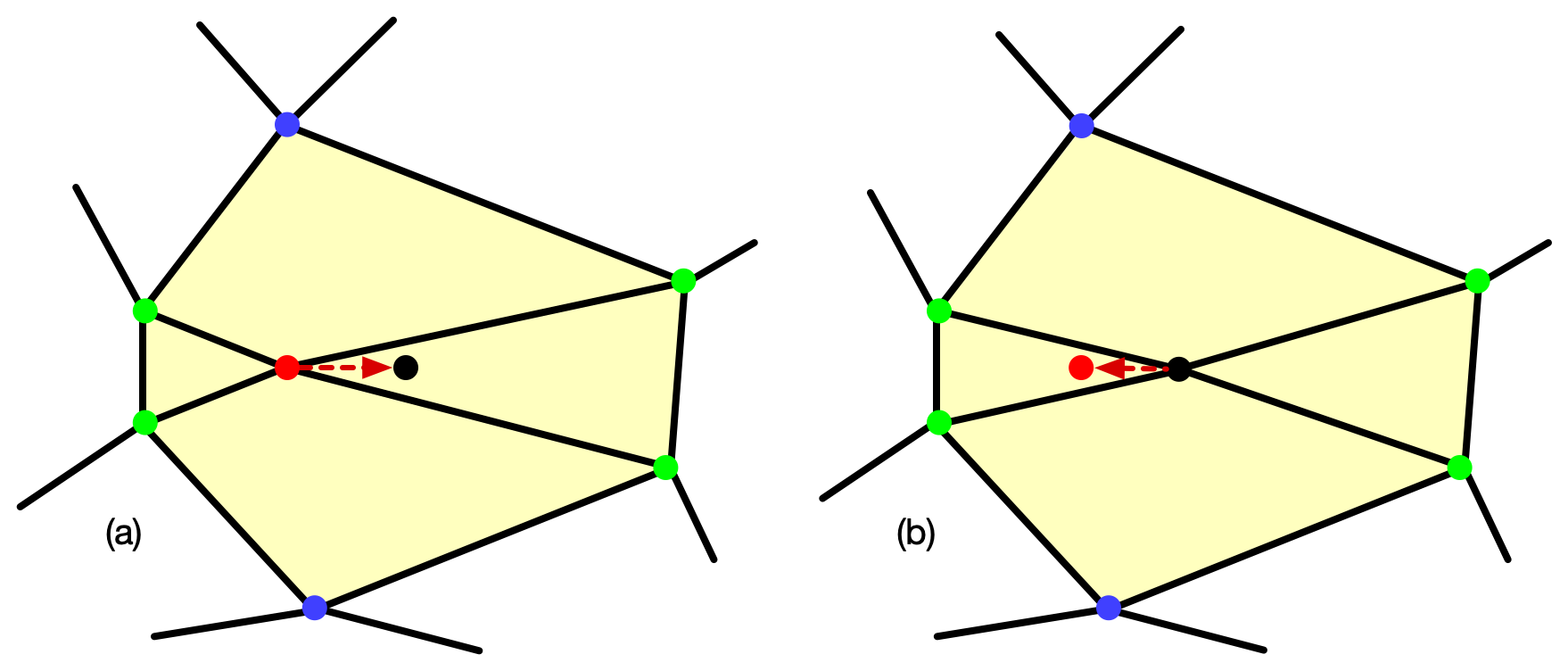
(a) A node (red dot) moves to the average position (black dot) of its four neighboring nodes (green dots). The move is affecting the four neighboring elements (yellow).
(b) The node has moved to the average position. If the move
doesn't satisfy the given criterion
(computed on the four affected elements), it will move back
to its original position.
Smoothing usually converges quickly and each iteration is not very
expensive, so it's reasonable to perform a fixed small number of
iterations, for example by setting iterations= FixedIteration(iterations=5).
It is also possible to use conditional
iteration, which can repeatedly smooth the Skeleton until the
energy drop or
acceptance
rate per iteration becomes too small.
Figure 6.111 shows a quadrilteral Skeleton that has
been refined twice by
bisection of the
inhomogeneous Elements, and the result of smoothing it. Figure 6.112 compares ways of preserving Element
homogeneity while smoothing.
Figure 6.111. Smoothing a Skeleton
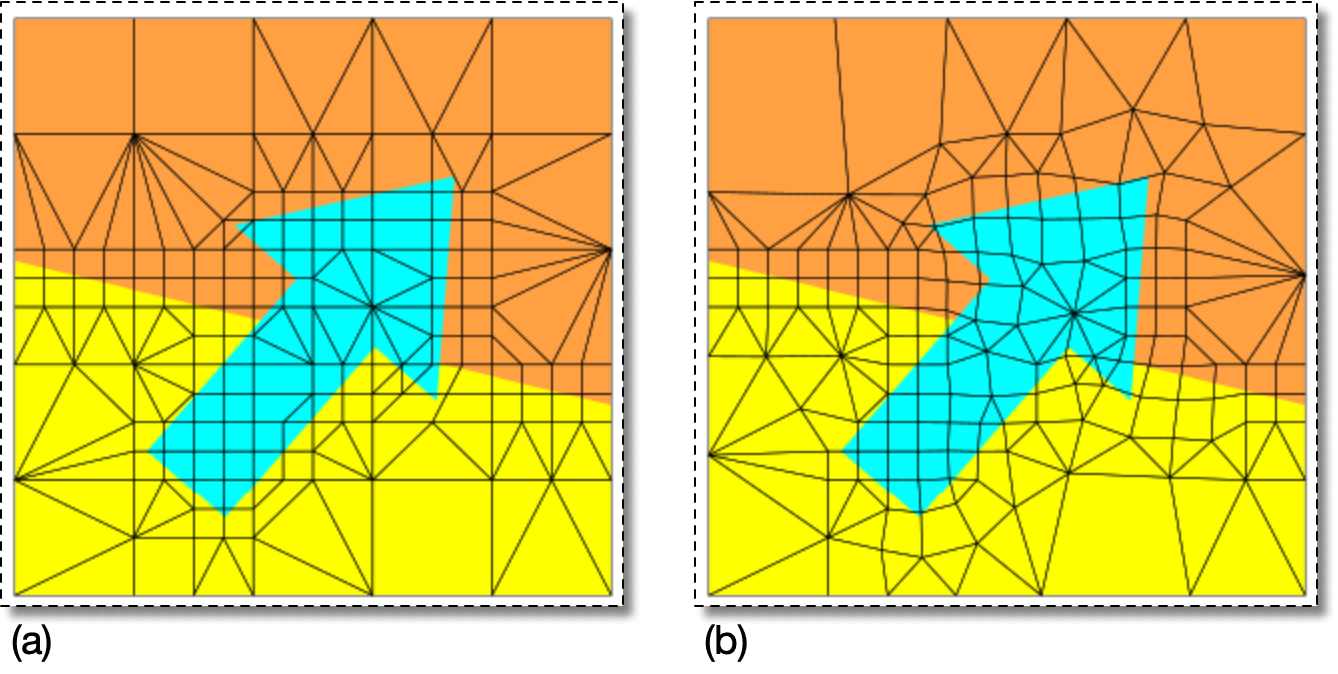
(a) A Microstructure and Skeleton. The Skeleton has been refined twice by
bisection.
(b) The result of smoothing the Skeleton with
Smooth(targets=AllNodes(),criterion=AverageEnergy(alpha=0.3),T=0,iteration=FixedIteration(iterations=5)).
Because alpha is small,
Smooth produced well shaped but
inhomogeneous Elements.
Figure 6.112. Smoothing without Losing Homogeneity
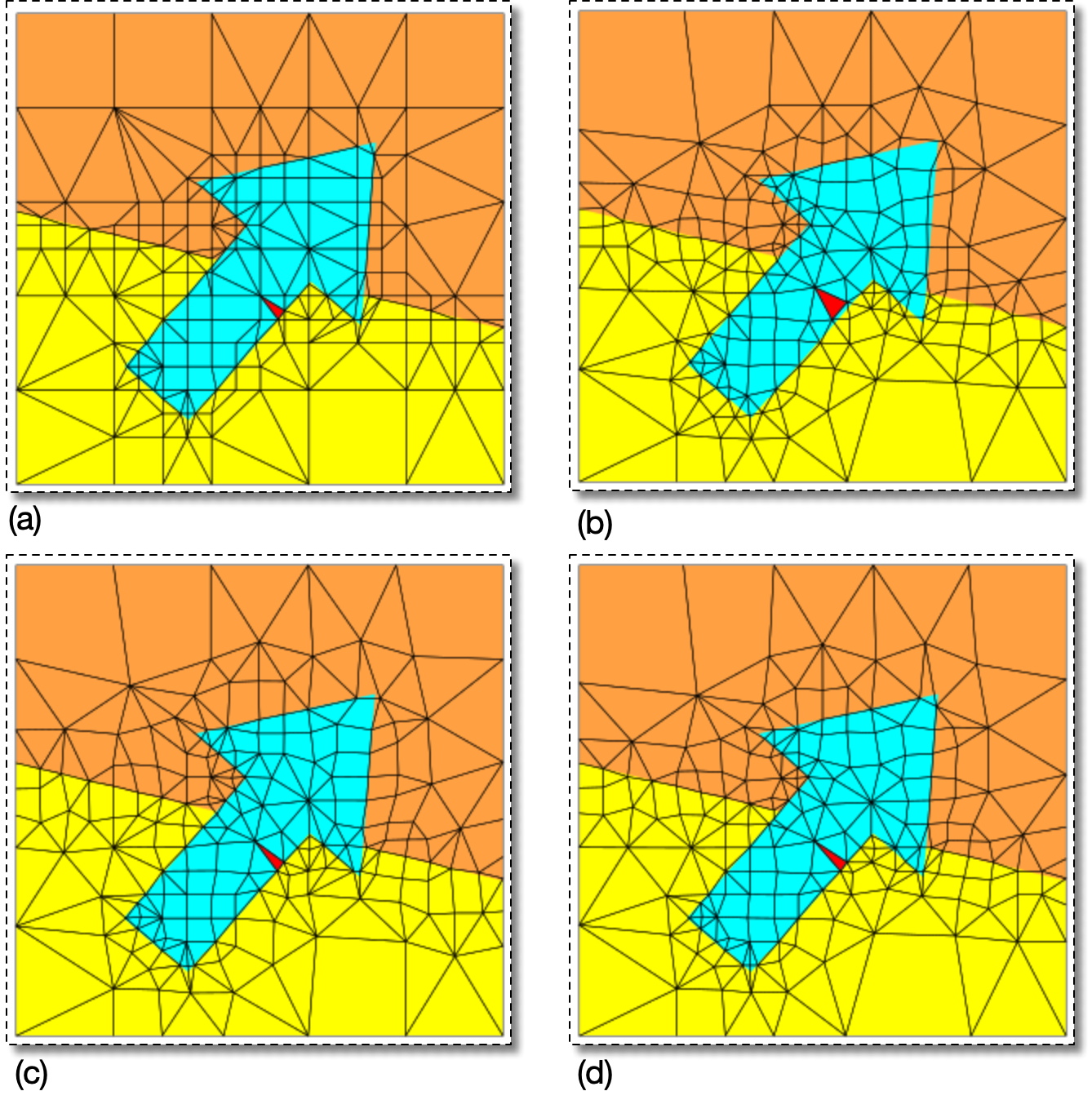
(a) A Skeleton created by refining the Skeleton in
Figure 6.111(a) at TransitionPoints and rationalizing it
three times. Its homogeneity
index is 0.9946, meaning that only 0.54% of the Microstructure
is misrepresented by the Skeleton. The shape
energy of the Element highlighted in red is 0.40.
(b) For comparison, this shows the Skeleton in (a) after
smoothing with alpha=0.3 for 5 iterations, the
same operation used in Figure 6.111. Many
Elements have become less homogeneous
— 1.08% of the Microstructure is misrepresented, twice what it
was in (a) — but shapes have improved. The shape
energy of the red element has decreased to 0.13.
(c) The Skeleton in (a) after smoothing with
alpha=1.0 for 5 iterations. Smoothing has
improved element shapes away from the boundaries, but not very
much near them (the shape energy of the red Element has
increased slightly to 0.54). Smoothing did not reduce
homogeneity. Nodes that were on pixel boundaries are still
on pixel boundaries, and only 0.45% of the Microstructure is
misrepresented.
(d) The Skeleton in (a) after pinning the Nodes
that lie on its internal
boundaries and then smoothing it with
alpha=0.3 for 5 iterations. The red Element's
shape energy is not very good, 0.53, but in general the shapes
of the Elements in the less constrained yellow and orange
regions have improved over (a). The misrepresented fraction
is 0.54%, the same as it was in (a), which is not surprising
because none of the Nodes on the boundaries have moved.
Statistics for each step of the smoothing process are printed in the OOF2 Message window. For example, here is the output from creating Figure 6.112(b):
    Iteration 1: E = 4.7648e+01, deltaE=-3.4691e+00 ( 7.281%), Acceptance Rate = 67.2%
    Iteration 2: E = 3.1804e+01, deltaE=-7.5127e-01 ( 2.362%), Acceptance Rate = 45.5%
    Iteration 3: E = 2.8475e+01, deltaE=-2.5280e-01 ( 0.888%), Acceptance Rate = 24.9%
    Iteration 4: E = 2.7365e+01, deltaE=-4.0957e-02 ( 0.150%), Acceptance Rate = 11.1%
    Iteration 5: E = 2.7201e+01, deltaE=-7.4279e-03 ( 0.027%), Acceptance Rate =  7.9%
    Smoothing done:  deltaE = -2.0476e+01 (42.975%)
The listing shows the iteration number, the total energy
(E) of the Skeleton, the absolute
change in energy (deltaE) during
the iteration, the percentage change in energy, and the move acceptance rate. If
the change in energy or the acceptance rate gets too small, the
smoothing process is not being effective at improving the Skeleton.
Notice that the energy change per step is decreasing exponentially,
indicating rapid convergence.
|
|
 |
|
Selected Segments (SkeletonSegmentSelectionDisplay)
|
 |
All Nodes (SnapAll) |