
OOF2: The Manual
Refine (Refine) |
||
|---|---|---|

|
6.5.2. Subclasses |  |
Name
Refine (Refine) — Subdivide elements.
Synopsis
Refine(targets, divider, rules, alpha)
Details
-
Base class:
SkeletonModifier -
Parameters:
targets- Target elements to be refined. Type: An object of the
RefinementTargetclass. divider- How to divide the edges of the refined elements. Type: An object of the
SegmentDividerclass. rules- The set of rules used to divide elements after their segments are divided. Type: An object from the
RuleSetenumerated class. alpha- alpha controls the relative importance of element shape and homogeneity. alpha=0 emphasizes shape and ignores homogeneity. alpha=1 emphasizes homogeneity and ignores shape. Type: A real number in the range [0, 1].
Description
Refine is a SkeletonModifier that chops its target
elements and their neighbors into smaller pieces. This adds more
degrees of freedom to the Skeleton, which allows it to adapt better
to the Microstructure. Refinement by itself is rarely sufficient to
create an acceptable Skeleton — it must be combined with other
modifiers that
move nodes, such as SnapNodes or
Anneal.
The steps involved in refining a Skeleton are:
-
Find the element edges (
Segments) that need to be refined. These are specified by thetargetsparameter, whose value is aRefinementTargetobject. Different kinds ofRefinementTargetobjects pick segments in different ways, for example, by choosing all edges of heterogeneous elements or the long edges of skinny elements. SeeRefinementTargetfor the details.Figure 6.102 (a) shows a
Skeletonthat needs to have its heterogeneous elements refined. SettingtargetstoCheckHomogeneity -
The
dividerparameter determines how and where the chosen segments will be divided. Segments are marked for division in in half (Bisection), in thirds (Trisection), or atTransitionPoints. -
After the segments are marked for division, each element is replaced by a suitable collection of smaller elements, such that each marked segment of the old
Skeletonturns into a set number of segments of the newSkeleton. Exactly how this is done depends on the setting of therulesparameter. (For details, see the description of RuleSet.) The rules sometimes allow more than one way of subdividing an element. In those cases, the total effective energy of the new elements is computed, and the configuration with the lowest energy is used. The parameteralphadetermines the relative contributions of shape and homogeneity to the effective energy, as discussed in Section 2.4.2.2.Figure 6.102 shows the result of refining a mesh using
divider=Bisectionwithalpha=0.3.
Figure 6.102. Refining a Skeleton
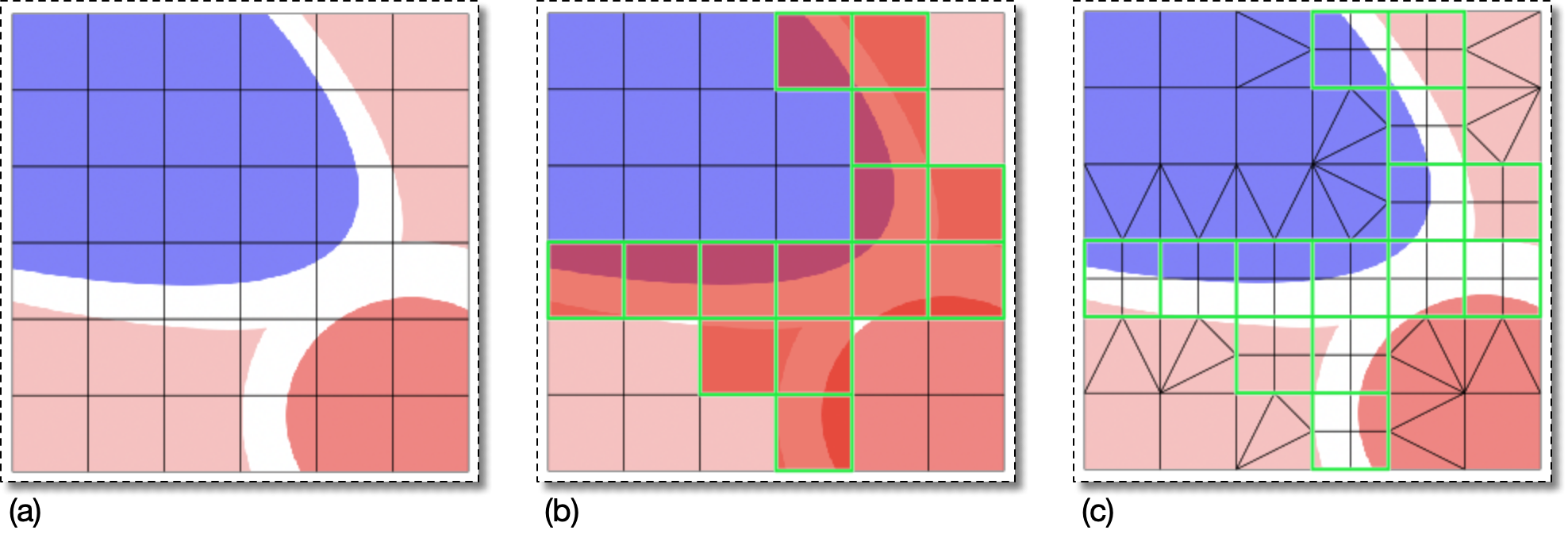
(a) A Skeleton ripe for refinement.
(b) The CheckHomogeneity(threshold=0.9)
RefinementTarget
operator marks the Segments of the heterogeneous Elements.
The marked Segments are drawn in green and the inhomogeneous
Elements are red.[42]
(c) The result of refining the marked edges with
divider set to Bisection
and rules set to Quick.
![[Caution]](IMAGES/caution.png) |
Caution |
|---|---|
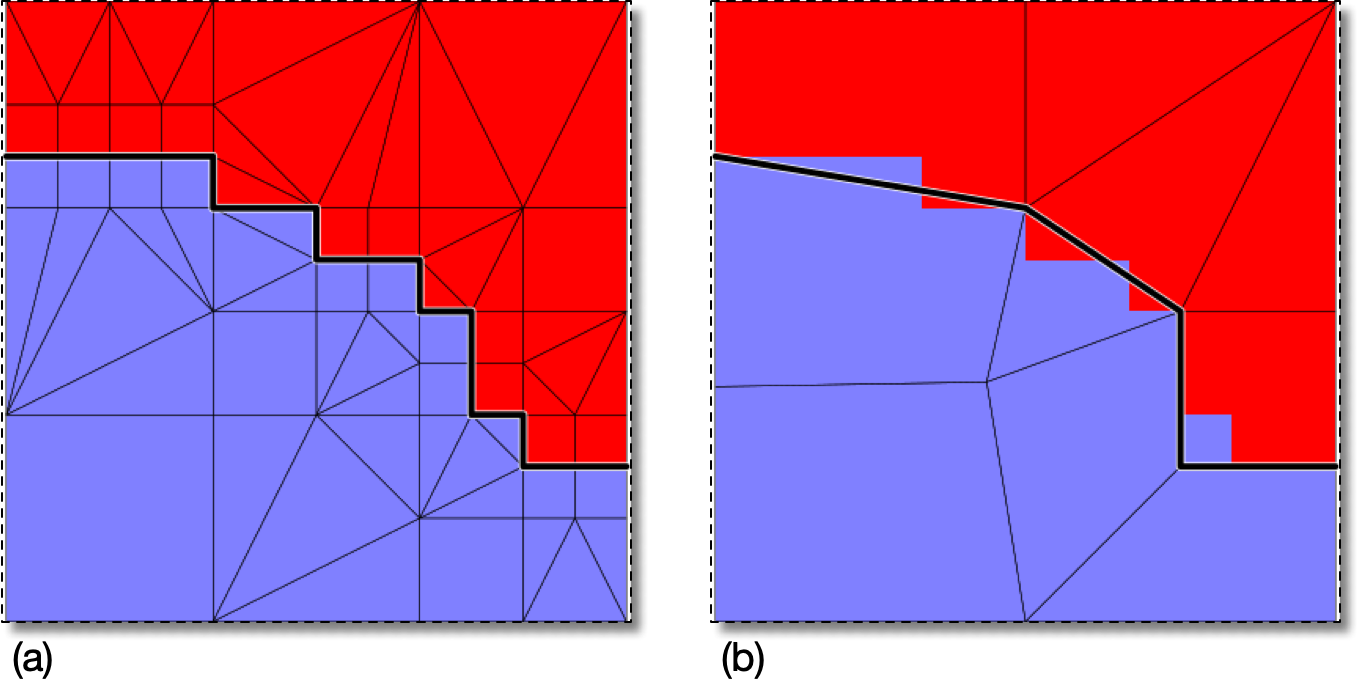
One should not abuse Refinement to the point where
Instead of abusing refinement, it is better to employ other
modification strategies. The right half of Figure 6.103 shows the same portion of the
|
|
|
 |
|
Energy Reduction Rate (ReductionRate)
|
 |
Relative (RelativeErrorScaling) |