
OOF2: The Manual
Rationalize (Rationalize) |
||
|---|---|---|

|
6.5.2. Subclasses |  |
Name
Rationalize (Rationalize) — Fix badly shaped elements in a Skeleton.
Synopsis
Rationalize(targets, criterion, method, iterations)
Details
-
Base class:
SkeletonModifier -
Parameters:
targets- Which elements to modify. Type: An object of the
SkelModTargetsclass. criterion- Acceptance criterion. Type: An object of the
SkelModCriterionclass. method- Methods for rationalization. Type: An object of the
RationalizeMethodclass. iterations- Repeat this many times. Type: Integer.
Description
Rationalize fixes badly-shaped Elements in a
Skeleton by either removing them or modifying them and their immediate
neighbors. Besides being ugly, badly shaped elements can impair the
convergence and accuracy of the finite element method.
OOF2 contains three Rationalizer
tools that modify different kinds of poorly shaped Elements. The
types are all illustrated in Figure 6.101:
-
short: Quadrilaterals with one or two very short sides are removed or converted into triangles by
RemoveShortSide. -
wide: Quadrilaterals with a large obtuse interior angle are split into triangles by by
QuadSplit. -
flat: Triangles with a large obtuse interior angle are eliminated by
RemoveBadTriangle. -
sharp: Triangles with a small acute interior angle are also eliminated by
RemoveBadTriangle. (There is overlap between the definitions of flat and sharp, but the two categories are both handled byRemoveBadTriangleso the ambiguity is unimportant.)
The method parameter determines whether the
various tools will be applied automatically
or whether only a specific
set of tools
should be used. Automatic rationalizing works better with a small
set of target Elements because it tries every method on every
Element. Specific rationalizing only applies the tools to Elements
that meet given criteria on angles and lengths, so it does less work
can can be used with any number of Elements.
Figure 6.101. Rationalizing a Skeleton
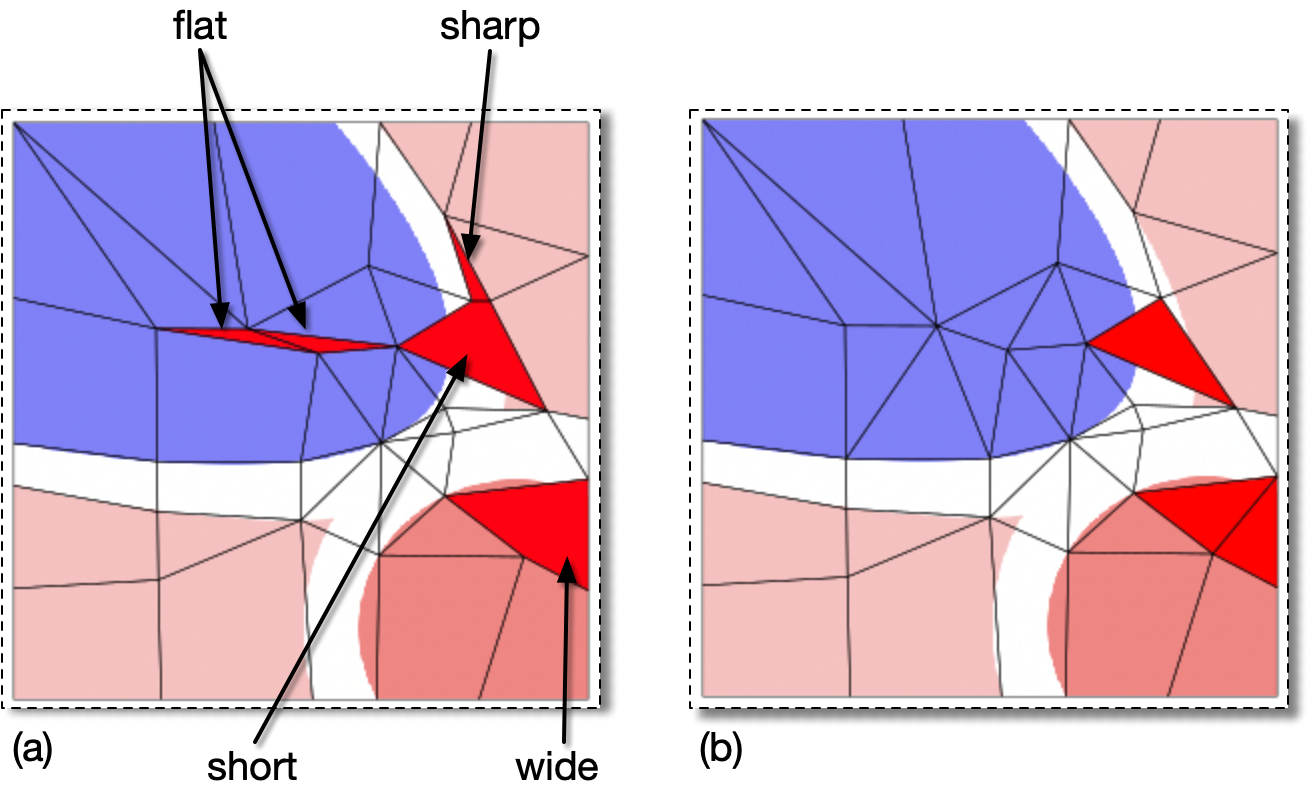
(a) The selected red Elements have the indicated flaws.
(b) The result of rationalizing the selected elements, using
          OOF.Skeleton.Modify(
             skeleton='swoops.png:skeleton',
             modifier=Rationalize(
                targets=SelectedElements(),
                criterion=AverageEnergy(alpha=0.3),
                method=SpecificRationalization(
                   rationalizers=[RemoveShortSide(ratio=5),
                                  QuadSplit(angle=150),
                                  RemoveBadTriangle(acute_angle=15,obtuse_angle=150)]),
                iterations=1))
The “flat” and “sharp” Elements have
been eliminated (causing neighboring Elements to be
subdivided), the “short” quadrilateral has been
converted into a triangle, and the “wide”
quadrilateral has been subdivided.
The Rationalizer tools are applied
sequentially. The general procedure for applying each tool is as
follows:
-
Scan the current
Skeletonfortargetelements according to the giventargetsparameter. The list of targetElementsis shuffled to prevent artifacts from the original internalElementordering. -
Apply the
Rationalizerto eachElementin the target set. When usingSpecificRationalization, only theElementsmeeting the criteria specified in theRationalizer'sparameters are examined. When usingAutomaticRationalization, allElementsare examined. TheRationalizerreturns a list of possible newElementconfigurations. -
Apply the given acceptance
criterionto the new configurations, and choose the best one, if any. -
Any new
Elementscreated in step 3 are added to the target list, but only if thecriterionis notUnconditional.[41] -
Return to step 2 until all
Elementsin the target list have been visited.
It is often necessary to apply the tools more than once, since
fixing one bad Element can create others. If the
iterations parameter is greater than 1, the
entire sequence will be repeated.
![[Tip]](IMAGES/tip.png) |
Tip |
|---|---|
|
Remove Short
Sides and Split
Wide Quads inevitably create triangles and these triangles
are not guaranteed to have good shapes. Thus, it's a good idea
always to include Remove Bad
Triangles in the set of tools to apply. It will be applied
after the other
|
|
|
 |
|
Range (RangeOutput)
|
 |
Rebuild (RebuildMesh) |