OOF2: The Manual
| Parameter | ||
|---|---|---|

|
Miscellaneous Classes and Functions |  |
Name
Parameter — Parameter classes for OOF2 menu commands, Properties, Outputs, and RegisteredClasses
Python Synopsis
Basic Parameters
from ooflib.common.IO.parameter import *

BooleanParameter(name, value, default=0, tip=None)
StringParameter(name, value=None, default="", tip=None)
FloatParameter(name, value=None, default=0.0, tip=None)
IntParameter(name, value=None, default=0, tip=None)

from ooflib.common.enum import EnumParameter

EnumParameter(name, enumclass, value=None, default=None, tip=None)
Range Parameters
from ooflib.common.IO.parameter import *

IntRangeParameter(name, range, value=None, default=None, tip=None)
FloatRangeParameter(name, range, value=None, default=None, tip=None)
RegisteredClass Parameters
from ooflib.common.IO.parameter import *

RegisteredParameter(name, reg, value=None, default=None, tip=None)
ConvertibleRegisteredParameter(name, reg, value=None, default=None, tip=None)
RegisteredListParameter(name, reg, value=None, default=[], tip=None)
Automatic Parameters
from ooflib.common.IO.parameter import *

AutoNumericParameter(name, value=None, default=None, tip=None)
AutoIntParameter(name, value=None, default=None, tip=None)
AutomaticNameParameter(name, resolver, value=None, default=None, tip=None)
Who Parameters
from ooflib.common.IO.whoville import *

WhoParameter(name, whoclass, value=None, default=None, tip=None)
AnyWhoParameter(name, value=None, default=None, tip=None)
NewWhoParameter(name, whoclass, value=None, default=None, tip=None)
WhoClassParameter(name, value=None, default=None, condition=noSecretClasses, tip=None)
Mesh Object Parameters
from ooflib.engine.IO.meshparameters import *

FieldParameter(name, value=None, default=None, tip=None, outofplane=0)
FluxParameter(name, value=None, default=None, tip=None)
EquationParameter(name, value=None, default=None, tip=None)
FieldIndexParameter(name, value=None, default=None, tip=None)
Rank 4 Tensor Parameters
from ooflib.engine.IO.isocijkl import IsotropicCijklParameter

IsotropicCijklParameter(name, value=None, default=None, tip=None)

from ooflib.engine.IO.anisocijkl import *

CubicCijklParameter(name, value=None, default=None, tip=None)
HexagonalCijklParameter(name, value=None, default=None, tip=None)
TetragonalCijklParameter(name, value=None, default=None, tip=None)
TrigonalACijklParameter(name, value=None, default=None, tip=None)
TrigonalBCijklParameter(name, value=None, default=None, tip=None)
OrthorhombicCijklParameter(name, value=None, default=None, tip=None)
MonoclinicCijklParameter(name, value=None, default=None, tip=None)
TriclinicCijklParameter(name, value=None, default=None, tip=None)
Rank 3 Tensor Parameters
from ooflib.SWIG.engine.rank3tensor import *

C1Rank3TensorParameter(name, value=None, default=None, tip=None)
C2Rank3TensorParameter(name, value=None, default=None, tip=None)
CsRank3TensorParameter(name, value=None, default=None, tip=None)
D2Rank3TensorParameter(name, value=None, default=None, tip=None)
C2vRank3TensorParameter(name, value=None, default=None, tip=None)
C4Rank3TensorParameter(name, value=None, default=None, tip=None)
C4iRank3TensorParameter(name, value=None, default=None, tip=None)
D4Rank3TensorParameter(name, value=None, default=None, tip=None)
C4vRank3TensorParameter(name, value=None, default=None, tip=None)
D2dRank3TensorParameter(name, value=None, default=None, tip=None)
C3Rank3TensorParameter(name, value=None, default=None, tip=None)
D3Rank3TensorParameter(name, value=None, default=None, tip=None)
C3vRank3TensorParameter(name, value=None, default=None, tip=None)
C6Rank3TensorParameter(name, value=None, default=None, tip=None)
D6iRank3TensorParameter(name, value=None, default=None, tip=None)
D6Rank3TensorParameter(name, value=None, default=None, tip=None)
C6vRank3TensorParameter(name, value=None, default=None, tip=None)
D3hRank3TensorParameter(name, value=None, default=None, tip=None)
TdRank3TensorParameter(name, value=None, default=None, tip=None)
Rank 2 Tensor Parameters
from ooflib.SWIG.engine.symmmatrix import *

SymmMatrix3Parameter(name, value=None, default=None, tip=None)
MonoclinicRank2TensorParameter(name, value=None, default=None, tip=None)
OrthorhombicRank2TensorParameter(name, value=None, default=None, tip=None)
TetragonalRank2TensorParameter(name, value=None, default=None, tip=None)
TrigonalRank2TensorParameter(name, value=None, default=None, tip=None)
HexagonalRank2TensorParameter(name, value=None, default=None, tip=None)
CubicRank2TensorParameter(name, value=None, default=None, tip=None)
Miscellaneous Parameters
from ooflib.SWIG.engine.outputval import *

OutputValParameter(name, value=None, default=None, top=None)

from ooflib.SWIG.common.coord import *

CoordParameter(name, value=None, default=None, top=None)
Description
OOF2 menu items and Outputs are
both objects that describe a process in which the user enters
some values and an action is performed. A RegisteredClass's
Registration and a Property's
PropertyRegistration
are similar: they take user-specified data and create an object
of some sort. In all these cases, the programmer has to specify
in advance the form of the input expected from the user. This
is the job of the Parameter class and its
multitudinous subclasses.
The different Parameter subclasses
represent input data of different types: integer, float,
boolean, cubic rank 4 tensor,
etc. Each subclass's constructor
arguments specify the Parameter's name
(by which it'll be labelled in the GUI and in scripts), optional
initial value, optional default value, and an optional (but
strongly recommended) help string. (Some types of
Parameter require additional arguments,
as described below.)
For example, a menu item that requires the user to enter two values, a file name and a floating point number, would be defined with a parameter list like this:
params=[StringParameter(name='filename', tip='Write to this file'),
        FloatParameter(name='threshold', value=3.0, tip='...')]
The menu item's callback function would then have two arguments
called filename and
threshold, whose value would be extracted
from the Parameter objects after being
set by the user. PropertyRegistrations
and RegisteredClass
Registrations work just the same way:
they have a list of Parameters that
specifies the type and name of the arguments to the
Property or
RegisteredClass constructor. The
registration mechanism extracts the values from the
Parameters and passes them to the
constructor when building an object.
Each Parameter subclass has its own
routines for creating GUI components, so that the GUI for
invoking a menu item or parametrizing a
Property is always appropriate for the
type of data required. For example, a FloatParameter will create
a box for entering a number, a BooleanParameter
will create on/off buttons, and an EnumParameter
will create a pull-down menu of choices.
All Parameter subclasses have at least
four arguments:
name-
The name of the
Parameter. This is the name by which it is referred to in the code, in the command line interface, and in the graphical interface. This argument is always required. value-
The initial value of the
Parameter. This argument is optional in the base class, and defaults toNone. default-
It is sometimes convenient to allow a
Parameterto have thevalueNone, indicating that it hasn't been set yet. However, the GUI widgets for manyParameterclasses don't have the ability to display or selectNone. In those cases, the widget will be initialized with the valuedefault. This argument is optional in the base class, and defaults toNone. It mustg be provided in any derived class whose widget can't displayNone. tip-
This string will be displayed as a tooltip in the GUI when the mouse is hovered over a widget. It also appears in the manual whenever a list of
Parametersis displayed, as in the reference pages for menu items. It is optional, but highly recommended.[89]
Additional arguments may be required in specific subclasses.
Parameter Subclasses
Not all of the Parameter subclasses used
in OOF2 are listed here. Some OOF2 modules create very
specialized Parameters that aren't useful
elsewhere. The classes listed here hopefully suffice for OOF2
extensions.
Basic Parameters
BooleanParameter(name, value, default=0, tip=None)
A BooleanParameter's value is either
True (1) or False (0).
In the GUI it's displayed as a checkbox.

StringParameter(name, value=None, default=None, tip=None)
A StringParameter's value is a
character string. Its GUI widget is an unadorned text entry
box.
FloatParameter(name, value=None, default=0.0, tip=None)
A FloatParameter's value is a
floating point number or an integer. Its widget is an
unadorned text entry box. Any floating point number or
integer can be entered, or anything that Python can evaluate
to form a floating point number.
IntParameter(name, value=None, default=0.0, tip=None)
An IntParameter's value is an integer
number. Its widget is an unadorned text entry box. Any
integer can be entered, or anything that Python can evaluate
to form an integer.
EnumParameter(name, enumclass, value=None,
                  	    default=None, tip=None)
An EnumParameter is used to choose
one of the members of a given Enum
class, specified by the enumclass
argument. The value is an instance of the given class.
In the GUI, an EnumParameter appears
as a pull-down menu listing all of the values of the given
Enum class. In scripts, the assigned
value can be either an instance of the
Enum class, or the
name of an instance of the class.
For example, the Arrangement class
enumerates the ways that an initial uniform triangular
Skeleton can be created, and is used as a parameter in the
TriSkeleton class. The
Registration for that class sets its
parameters like this:
params=[enum.EnumParameter('arrangement', enumclass=Arrangement)]
A TriSkeleton can be created in a
script like this:
TriSkeleton(arrangement=Arrangement('moderate'))
using an actual Arrangement object as
the parameter value, but it can also be created more
compactly, like this:
TriSkeleton(arrangement='moderate')
using a string instead.
Figure 231. EnumParameter Widget
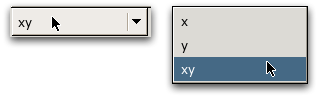
An EnumParameter widget,
displaying its current value (left) and choosing a new
value (right).
Range Parameters
IntRangeParameter(name, range, value=None,
                  	    default=None, tip=None)
An IntRangeParameter's value is an
integer constrained to lie within a given range. Attempting
to give it a value outside of the range is an error. The
range argument is a Python tuple,
(min, max), specifying the minimum and maximum
allowed values.
The GUI widget for a
IntRangeParameter is a slider with a
label. The label shows the numeric value, and can also be
edited directly to change the slider position.
Figure 232. IntRangeParameter Widget
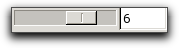
The widget for an
IntRangeParameter, with the
slider on the left and a text entry box on the right.
FloatRangeParameter(name, range, value=None,
                  	    default=None, tip=None)
A FloatRangeParameter's value is an
floating point number constrained to lie within a given
range. Attempting to give it a value outside of the range
is an error. The range argument is a
Python tuple, (min, max, step), specifying the
minimum and maximum allowed values and the step size to use
in the GUI.
The GUI widget for a
FloatRangeParameter is a slider with
a label. The label shows the numeric value, and can also be
edited directly to change the slider position.
Figure 233. FloatRangeParameter Widget
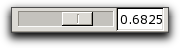
The widget for an
FloatRangeParameter, with the
slider on the left and a text entry box on the right.
RegisteredClass Parameters
RegisteredParameter(name, reg, value=None,
                  	    default=None, tip=None)
RegisteredClasses
are OOF2 objects that can be constructed from
Registrations.
Registrations are closely related to
PropertyRegistrations,
but are more general. They contain information describing
how to create an instance of the
RegisteredClass.
RegisteredClasses always come in
groups, arranged in a class hierarchy. The base class of
each hierarchy holds a list of
Registrations (a
registry) for all of the subclasses in
the group. For example, the SkeletonModifier base class
contains the subclasses Refine, Anneal, Smooth,
etc.
A RegisteredParameter is a parameter
whose value can be set to an instance of a subclass of a
given RegisteredClass base class.
The reg argument to the
RegisteredParameter constructor
specifies the RegisteredClass base
class. For example, a Parameter
whose value is an instance of the
SkeletonModifier class would be
created like this:
RegisteredParameter('modifier', SkeletonModifier, tip='use this
modifier')
The GUI widget for a
RegisteredParameter is a pull-down
menu containing the names of each of the subclasses. Below
the menu is a region containing widgets for each of the
chosen subclass's Parameters (which
may themselves be
RegisteredParameters!).
Figure 234. RegisteredParameter Widget
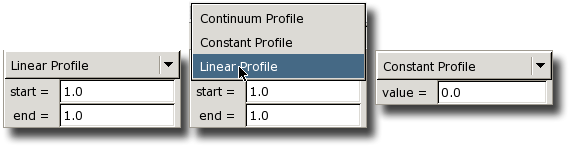
Three views of a
RegisteredParameter widget. In
the center, the pull-down menu is being used to switch
from one RegisteredClass to
another. The two classes have different parameters, as
shown on the left and right.
ConvertibleRegisteredParameter(name, reg,
                  	    value=None, default=None, tip=None)
A ConvertibleRegisteredClass is like
a RegisteredClass,
except that the different subclasses refer to different
representations of the same thing,
rather than different things that happen to be in the same
category. For example, OpaqueColor is a
ConvertibleRegisteredClass, since the
different representations (RGBColor, HSVColor,
etc.) all create color
objects that can be converted into one another. The
different SkeletonModifier
subclasses discussed above, however,
cannot be converted into one another.
A ConvertibleRegisteredParameter is a
RegisteredParameter
whose reg argument is a
ConvertibleRegisteredClass.
The GUI widget for a
ConvertibleRegisteredParameter looks
just like the widget for a
RegisteredParameter, but when the
user switches from one subclass to another, the old
displayed value is converted to the new form.
Figure 235. ConvertibleRegisteredParameter Widget
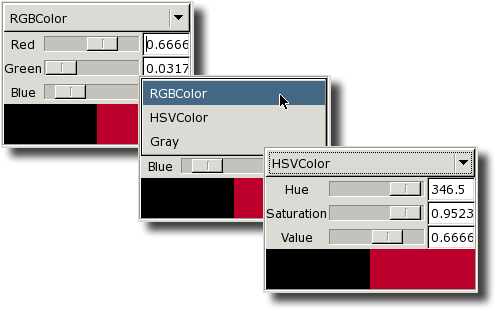
An example of a
ConvertibleRegisteredParameter
widget. A color is displayed in RGB format (top) and
HSV format (bottom). The pull-down menu is used to
switch between them (middle). This widget is not quite
a generic
ConvertibleRegisteredParameter
widget. It's been enhanced with the color swatches at
the bottom.
RegisteredListParameter(name, reg, value=None,
                  	    default=[], tip=None)
A RegisteredListParameter is like a
RegisteredParameter,
except that instead of returning a single instance of a
RegisteredClass subclass, it returns
a list containing at most one of each subclass in the given
RegisteredClass's registry.
Figure 236. RegisteredListParameter widget
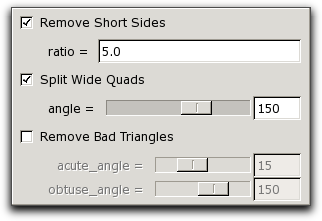
A RegisteredListParameter
widget for a RegisteredClass
with three subclasses. With these settings, the
Parameter's value contains
instances of the first two classes only.
Automatic Parameters
Automatic parameters are Parameters
that can take the value automatic as well
as other values which depend on the
Parameter type.[90]
When a parameter is set to automatic, the
program is supposed to choose some sensible default value
for it.
For example, when creating a Microstructure from an Image with
OOF.Microstructure.Create_From_ImageFile,
the height and width
parameters are both AutoIntParameters.
The callback function for that menu item makes assumptions
about the size and/or aspect ratio of the pixels if either
height or width are set
to automatic.
In the GUI, automatic parameters have a checkbox that sets
them to automatic and a text entry box in
which other values can be entered.
AutoNumericParameter(name, value=None, default=None,
                  	    tip=None
The AutoNumericParameter can bet set
to any numeric value (integer or floating point), or to the
special variable automatic.
Figure 237. AutoNumericParameter widget
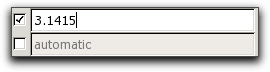
Two AutoNumericParameter
widgets. The lower one is set to
automatic.
AutoIntParameter(name, value=None,
                  	    default=None, tip=None)
The AutoIntParameter can be set to an
integer or to the special variable
automatic.
Figure 238. AutoIntParameter widget

An AutoIntParameter widget,
set to automatic on the left and
to 2 on the right.
AutomaticNameParameter(name, resolver,
                  	    value=None, default=None, tip=None)
The AutomaticNameParameter can be set
to either a string or the object
automatic. When asked for its value,
however, it always returns a string, which is generated from
the raw input by calling the provided
resolver function. The arguments to the
resolver are the parameter and the raw input. The resolver
can use the boolean function
AutomaticNameParameter.automatic()
to see if the raw input was automatic.
Who Parameters
Within OOF2, the classes of objects that can be displayed in
the graphics window are called
WhoClasses. (In early versions of the
program, graphics layers were determined by specifying
who (the object being displayed),
what (which feature of it to display),
where, and how.
Things that used be called “Whos” are now called
“Contexts” in some places, but the name
WhoClass has survived.) The primary
WhoClasses are
MicrostructureContext,
ImageContext,
SkeletonContext, and
Mesh, but
PixelSelectionContext and
ActiveAreaContext are
WhoClasses as well.
WhoParameter(name, whoclass, value=None,
                  	    default=None, tip=None)
A WhoParameter can be set to the path
name of an existing object in the given
whoclass (see Section 2.1.3). In the GUI, a
WhoParameter appears as a set of
pull-down menus, one for each path component, allowing the
user to choose from the existing objects in the class. See
Figure 2.2.
AnyWhoParameter(name, value=None, default=None,
                  	    tip=None)
An AnyWhoParameter can be set to the
path name of any existing object in any
WhoClass.
NewWhoParameter(name, whoclass, value=None,
                  	    default=None, tip=None)
A NewWhoParameter is just like a
WhoParameter,
but it's not restricted to existing objects in the given
whoclass. OOF.Image.Copy uses a
NewWhoParameter to pick the Microstructure
to which an Image is to be copied, creating a new Microstructure
if the given one does not exist.
WhoClassParameter(name, value=None,
                  	    default=None, condition=noSecretClasses, tip=None)
A WhoClassParameter can be set to the
name of any
WhoClass that meets the specified
condition. The default behavior is to
allow anyWhoClasses that don't have
their secret flag set.
The category menu in the
New Graphics
Layer dialog is a widget for a
WhoClassParameter.
Mesh Object Parameters
FieldParameter(name, value=None, default=None,
                  	    tip=None, outofplane=0)
A FieldParameter's value is a Field
instance. If outofplane is 0, then the
field must be a CompoundField,
but if outofplane is 1, all types of
Field are allowed.
The GUI widget for a FieldParameter
is a pull-down menu listing all of the
Fields defined on the
Mesh.[91]
FluxParameter(name, value=None, default=None, tip=None)
A FluxParameter's value is a Flux
instance. It's GUI widget is a pull-down menu listing all of
the Fluxes that are currently active on the
Mesh.[91]
Tensor Parameters
Rank 4 Tensor Parameters
The various rank 4 tensor Parameter
classes, all called
SomethingCijklParameter, have values
that are restricted to rank 4 tensors of a particular
symmetry. The
IsotropicCijklParameter and
CubicCijklParameter are ConvertibleRegisteredParameters,
since there are many different representations for isotropic
and cubic rank
4 tensors.
The GUI widgets for all of the rank 4 tensor
Parameters display a 6×6 upper
diagonal matrix, using Voigt notation to reduce four indices
to two. Entries in the matrix that are constrained to be
zero by symmetry are uneditable, and entries that depend on
other entries update themselves when their dependent entries
change. In addition, the widgets for
IsotropicCijklParameter and
CubicCijklParameter have pull-down
menus for selecting a representation.
Figure 239. Rank 4 Tensor Parameter Widget
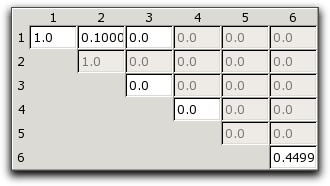
A widget for a rank 4 tensor (hexagonal, in this case). The grayed out boxes are set by symmetry and cannot be edited. The row and column labels are Voigt indices.
Rank 3 Tensor Parameters
The rank 3 tensor Parameter classes,
all called
SomethingRank4TensorParameter, have
values that are restricted to rank 3 tensors of a particular
symmetry, indicated by the Parameter
name. See Section 6.7.2.
The GUI widget for rank 3 tensors is an 3×6 array of entry boxes. The three rows correspond to the first tensor index, and the three columns correspond to the Voigt representation of the other two indices.
Figure 240. Rank 3 Tensor Parameter Widget
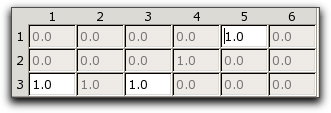
A widget for a rank 3 tensor
Parameter with C6v symmetry.
The grayed out entries are constrained by symmetry and
by the other entries.
Rank 2 Tensor Parameters
The rank 2 tensor Parameter classes
have values that are restricted to symmetric rank 2 tensors
of a particular rotational symmetry. The rotational
symmetry is indicated by the name of the
Parameter class. The
SymmMatrix3Parameter represents a
general symmetric rank 2 tensor. Not all of the other
subclasses are unique — for example, tetragonal and
trigonal rank 2 tensors are identical. See Section 6.7.1.
The GUI widgets for rank 2 tensor
Parameters display an upper diagonal
3×3 matrix. Matrix elements that are forced to be
zero by symmetry cannot be edited. The other entries can be
changed. Some entries update themselves when others are
changed, to satisfy symmetry requirements.
Figure 241. Rank 2 Tensor Parameter Widget
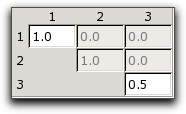
A rank 2 tensor Parameter's
widget. The values in the grayed-out boxes are
determined by symmetry.
[89] If no tip string is
really desired, setting tip to
emptyTipString will prevent a warning from
appearing the manual. emptyTipString is
defined in the ooflib.common.IO.parameter
module.
[90]
automatic is an object defined in the
module ooflib.common.IO.automatic and imported
into the OOF2 environment in which all scripts are run.
|
|
 |
|
| loadFile |  |
acquirePyLock |