
OOF2: The Manual
| PropertyRegistration | ||
|---|---|---|

|
Property and Material Classes |  |
Name
PropertyRegistration — Register new Properties
Synopsis
from ooflib.engine.propertyregistration import PropertyRegistration
class PropertyRegistration:def __init__(self, name, subclass, ordering, propertyType, params= [], outputs= [], secret= False, tip= None, discussion= None)def fluxInfo(self, fluxes, fields= [None], time_derivs= [], nonlinear= False, time_dependent= False)def eqnInfo(self, equations, fields= [None], time_derivs= [], nonlinear= False, time_dependent= False)def getParameter(self, name)
Description
Every new Property class must have a single
PropertyRegistration object. The
PropertyRegistration contains metadata
about the Property and inserts it in
the global list of all Property
classes, which allows it to appear in the user interface.
PropertyRegistrations are defined only
in Python, even for Properties that are
defined in C++. This means that all C++
Property subclasses must be swigged, in
order to be accessible to their
PropertyRegistration objects. It's
sufficient to swig the Property subclass and the constructor.
Other Property methods do not have to be made available in
Python.
Once a PropertyRegistration has been
created, it is unnecessary to store a reference to it
explicitly. All PropertyRegistrations
are stored a static list in the Property class.
There are three subclasses of Property from which all other
Properties are derived. All of them use the same
PropertyRegistration class, but
differ[73] in how additional metadata
must be added to the registration:
-
Registrations for
FluxPropertiesmust callPropertyRegistration.fluxInfo(). -
Registrations for
EqnPropertiesmust callPropertyRegistration.eqnInfo(). -
Registrations for
AuxiliaryPropertiesshould not call either function.
These functions should be called immediately after the
PropertyRegistrations are created.
Methods
PropertyRegistration.__init__(name, subclass,
                             ordering, params, propertyType, ...)
The only required constructor parameters are
name, subclass,
ordering, and
propertyType. The others can all be
omitted if they're not needed for a particular
Property.
When creating a PropertyRegistration,
it's advisable to use Python keyword arguments so that it's
clear which parameters have been omitted.
-
Parameters
name-
nameis a string containing the name of theProperty, as it will appear in scripts and in the GUI. In the GUI,Propertiesare arranged hierarchically in a tree. Thenameis a colon separated string, in which each segment is a branch of thePropertytree. For example, the cubic elasticity property'snameisMechanical:Elasticity:Anisotropic:Cubic, and it appears in the GUI like this: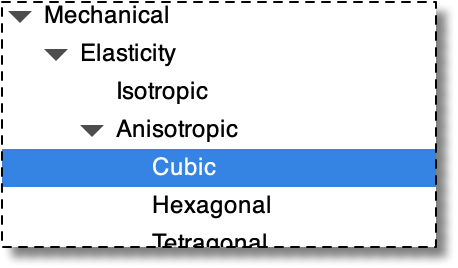
subclass-
This is the
Propertysubclass that is being registered. It must either be a swigged C++Propertysubclass, a Python class derived from a swigged C++Propertysubclass, or a Python class derived fromPyFluxPropertyor fromPyEqnProperty. Note that the argument is the actual class, not an instance of the class. ordering-
orderingdetermines thisProperty's position when listed in the GUI. It has no other significance. It can be either an integer or a floating point number. Nodes of thePropertytree in the GUI are listed in order of increasingordering. Theorderingof an intermediate node in the tree is taken to be the smallestorderingof any of its children. propertyType-
The
propertyTypeis a string that categorizes theProperty. No twoPropertiesin aMaterialcan have the samepropertyType. The functionMaterial::fetchPropertylocatesPropertiesby theirpropertyType.When registering a new
Property, it's important to use the samepropertyTypethat was used for otherPropertiesof that type. The existing OOF2propertyTypesare given in Table 8. If a newPropertydoesn't belong in any of the existing types and doesn't conflict with them, it is possible to create a new type. It is just a character string. params-
The arguments for every
Property's constructor are a name, a registration, and a variable number of additional values that quantify theProperty's behavior. These additional arguments are determined by thePropertyRegistration'sparamsargument.paramsis a Python list ofParametersubclass instances. Each entry in the list specifies a type (which is implied by theParametersubclass), a constructor argument name, a default value, and a help string. The parameters must appear in the same order in theparamslist as they do in thePropertyconstructor's argument list.For example, a mass density
Propertycould have aFloatParametercalleddensity,params = [FloatParameter('density', value=1.0, tip='mass density')]while a triclinic thermal expansion
Propertywould have aTriclinicRank2TensorParameter(for the modulus) and aFloatParameterfor the zero-stress temperature:params = [TriclinicRank2TensorParameter( name='alpha', value=TriclinicRank2Tensor(xx=1, yy=1, zz=1), tip='Thermal expansion tensor'), FloatParameter('T0', 0.0, tip='Stress free temperature') ]
See Parameter for a list of all of OOF2's built-in
Parametertypes and their constructor arguments. outputs-
outputsis a list of strings, each one the name of anPropertyOutputto which theProperty'soutputfunction contributes. secret-
secretshould be set to True if thePropertyshould not appear in the GUI. It will still be available in scripts, for those who are in the know. tip-
tipis a short string describing theProperty. It should be something suitable for displaying as a pop-up tooltip in the GUI. discussion-
discussionis a longer string describing theProperty, meant to be included in the OOF2 Manual. The string should be written in DocBook XML version 4.5. The manual will embed it inside a<refsect1>element.[74]Since it's often inconvenient to include large blocks of text inside a
PropertyRegistration, the text can be put into a separate file, anddiscussioncan be set toxmlmenudump.loadFile(filename).loadFile()doesn't actually read the file unless the OOF2 Manual is being generated, so there's no cpu or memory cost to doing it this way. In any case, thediscussionargument is optional. Omitting it has no consequences except when generating the manual.
fluxInfo(self, fluxes, fields=[None],
                               time_derivs=[0], nonlinear=False, time_dependent=False)
fluxInfo() adds additional metadata to
Properties that are derived from FluxProperty.
It must be called after the
PropertyRegistration for the FluxProperty
is created.
For example, this is how isotropic
elasticity is registered in
SRC/engine/properties/elasticity/iso/iso.spy:
from ooflib.engine import problem
from ooflib.engine import propertyregistration

reg = propertyregistration.PropertyRegistration(
    name="Mechanical:Elasticity:Isotropic",
    subclass=IsoElasticityProp,
    ...     other PropertyRegistration parameters go here
)

reg.fluxInfo(fluxes=[problem.Stress],
             fields=[problem.Displacement],
             time_derivs=[0])
This indicates that the registered Property contributes
to the Stress flux, uses the Displacement field, and no time
derivatives of the Field.
-
Parameters
fluxes-
A list of all of the
Fluxesthat thePropertycontributes to. TheFluxescan be obtained by importing the module defining them (problem.pyin the example above) or by calling getFlux(). fields-
A list of all of the
Fieldsthat contribute to theFluxvia thisProperty. When solving equations, thePropertywill not be used unless all of the listedFieldsare defined.The default value of
fieldsis[None], meaning the thePropertycan be used even if noFieldsare defined. Settingfieldsto[](an empty list) will disable theProperty. time_derivs-
A list of integers, indicating which time derivatives of
fieldsare used in thisProperty. 0 is theFielditself, 1 is its first time derivative, and 2 is its second time derivative. In the example above,time_derivs=[0]because only the 0th order time derivative is required to compute the Stress. If isotropic viscosity had been used,time_derivs=[1]would have been used.If the
fieldslist contains more than oneField,time_derivsshould include the derivative orders for all of theFields. That is, if any oneField's nth derivative is used, n should be in the list.The default value of
time_derivsis[0]. nonlinear-
Set
nonlineartoTrueif thePropertyis a nonlinear function of theFieldsor their time derivatives. The default value isFalse. time_dependent-
Set
time_dependenttoTrueif any part of thePropertyitself (not theFields) changes in a time dependent way. For example, if the elastic modulus were an explicit function of time, you'd settime_dependence=Truein its registration. The default value isFalse.
eqnInfo(self, equations, fields=[None],
                               time_derivs=[], nonlinear=False, time_dependent=False)
eqnInfo() adds additional metadata to
Properties that are derived from EqnProperty.
It must be called after the
PropertyRegistration for the EqnProperty
is created.
For example, this is how heat
capacity is registered in SRC/engine/properties/heatcapacity/heatcapacity.spy:
from ooflib.SWIG.engine import equation
from ooflib.SWIG.engine import field
from ooflib.engine import propertyregistration

reg = propertyregistration.PropertyRegistration(
    name='Thermal:HeatCapacity:ConstantHeatCapacity',
    subclass=HeatCapacityProp,
    ...     other PropertyRegistration parameters go here
    )
reg.eqnInfo(equations=[equation.getEquation("Heat_Eqn")],
            fields=[field.getField("Temperature")],
            time_derivs=[1])
This indicates that the registered Property makes direct
contributions to the Heat_Eqn
equation,[75] using
the first time derivative of the Temperature.
-
Parameters
equations-
A list of all the
Equationsthat thePropertycontributes to directly. If thePropertycontributes to aFluxthat appears in theEquation, usefluxInfo()instead. TheEquationsmay be obtained by callinggetEquation()as in the example above, or by importing the module defining them (ooflib.engine.property, for the built-inEquations). fields-
A list of all of the
Fieldsthat contribute to theEquationvia thisProperty. When solving equations, thePropertywill not be used unless all of the listedFieldsare defined.The default value of
fieldsis[None], meaning the thePropertycan be used even if noFieldsare defined. Settingfieldsto[](an empty list) will disable theProperty. time_derivs-
A list of integers, indicating which time derivatives of
fieldsare used in thisProperty. 0 is theFielditself, 1 is its first time derivative, and 2 is its second time derivative. In the example above,time_derivs=[1]because the heat capacity multiplies the first time derivative of Temperature in the heat equation.If the
fieldslist contains more than oneField,time_derivsshould include the derivative orders for all of theFields. That is, if any oneField's nth derivative is used, n should be in the list.The default value of
time_derivsis[0]. nonlinear-
Set
nonlineartoTrueif thePropertyis a nonlinear function of theFieldsor their time derivatives. The default value isFalse. time_dependent-
Set
time_dependenttoTrueif any part of thePropertyitself (not theFields) changes in a time dependent way. For example, if the heat capacity were an explicit function of time, you'd settime_dependence=Truein its registration. The default value isFalse.
Property Types
The following table lists the propertyTypes
used in OOF2 PropertyRegistrations.
Not all of the types listed here are fully available yet
— some are still in development or reserved for future
use. Some are defined in the internal
extensions that are distributed with OOF2.
Table 8. Property Types
|
|
Base Class |
Equation or Flux |
Role |
|---|---|---|---|
|
|
Source term |
||
|
|
Display color |
||
|
|
|||
|
|
Coefficient of first time derivative of Displacement |
||
|
|
Dielectric permittivity (coefficient of the Voltage gradient |
||
|
|
Chemical diffusivity (coefficient of the gradient of Concentration)[a] |
||
|
|
Elastic modulus (coefficient of the gradient of Displacement) |
||
|
|
Source term |
||
|
|
Heat capacity (coefficient of the first time derivative of Temperature) |
||
|
|
Source term |
||
|
|
Coupling between Voltage and Concentration.[a] |
||
|
|
Mass density (coefficient of the second time derivative of Displacement) |
||
|
|
Mobility (coefficient of the first time derivative of Concentration)[a] |
||
|
|
Crystalline orientation |
||
|
|
Piezoelectric modulus (coupling between Displacement and Voltage) |
||
|
|
Reserved for future use. |
||
|
|
Temperature-dependent polarization |
||
|
|
Constant Displacement-independent Stress offset. |
||
|
|
Thermal conductivity (coefficient the gradient of Temperature) |
||
|
|
Thermal expansion (Temperature dependent Stress) |
||
|
|
Viscoelasticity (coefficient of the gradient of the time derivative of Displacement) |
||
|
|
Contribution to Stress that gives a fixed non-zero strain. | ||
|
[a] Defined in |
|||
[73] Yes, this is ugly from an OO perspective.
[74] The simplest legal
discussion string has the form
<para>blah blah blah</para>
[75] Note that in this example the
Equation and Field are retrieved from the
ooflib.SWIG.engine.field and
ooflib.SWIG.engine.equation modules by
getField()
and getEquation()
instead of via variables declared in the
ooflib.engine.problem module, as in the
earlier example. Both methods work.
|
|
 |
|
| Property and Material Classes |  |
Property |