
OOF2: The Manual
Split Quads (SplitQuads) |
||
|---|---|---|

|
6.5.2. Subclasses |  |
Name
Split Quads (SplitQuads) — Split quadrilateral elements into two triangles.
Synopsis
SplitQuads(targets, criterion, split_how)
Details
-
Base class:
SkeletonModifier -
Parameters:
targets- Which elements to modify. Type: An object of the
SkelModTargetsclass. criterion- Acceptance criterion. Type: An object of the
SkelModCriterionclass. split_how- How to choose the split direction. Type: An object of the
SplitQuadMethodclass.
Description
The SplitQuads Skeleton modifier improves
the Homegeneity Energy of a
quadrilateral Element by splitting it along a diagonal into two
triangles.
The targets parameter specifies which Elements to
examine as possible candidates for splitting.
The criterion parameter determines the conditions
under which splits will be accepted or rejected.
The split_how parameter determines how the
diagonal is chosen for each split. When set to GeographicQ2T, the diagonal is chosen
according to the dominant categories of the neighboring Elements.
When set to TrialAndErrorQ2T, both
diagonals are tried and the better one is chosen according to the
given criterion.
The left-hand image in Figure 6.118 is a
portion of a Skeleton with two Elements that can be split. Such
Elements are often created by SnapNodes, if it has moved opposing
Nodes to the same pixel boundary. The heterogeneous elements
(highlighted with thick lines) are surrounded by
two types of elements (two
blue elements and two
white elements for each case) and the material
boundary is closely following their diagonals. The right-hand image
is the result of applying SplitQuads with
split_how=GeographicQ2T().
Figure 6.118. Using SplitQuads
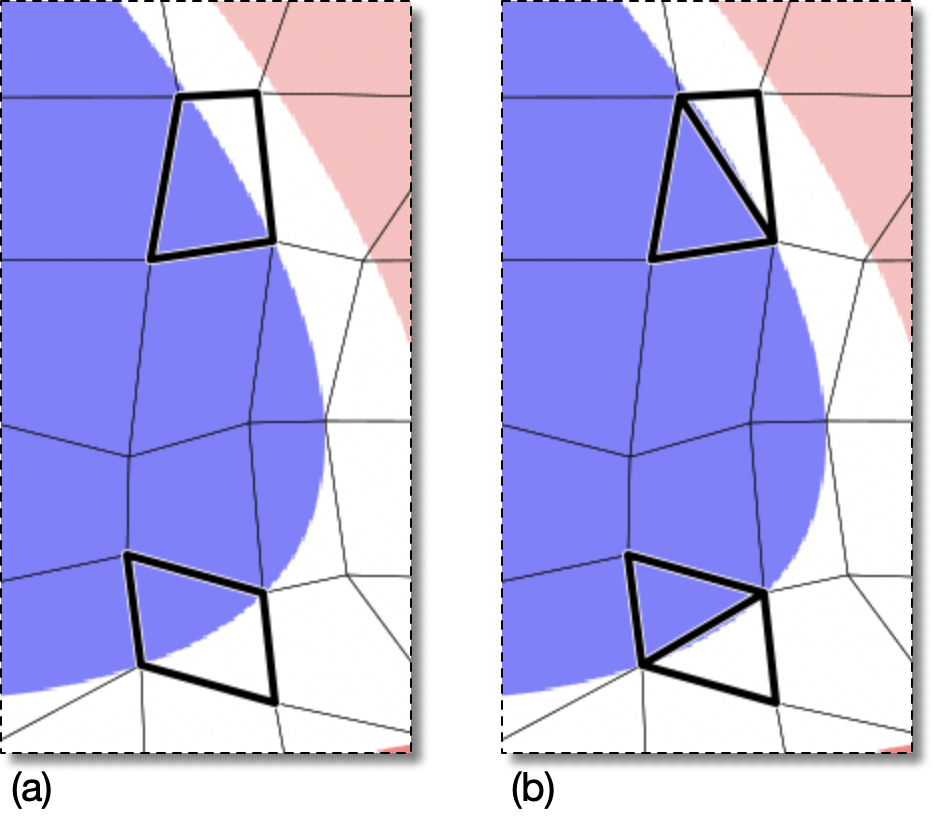
(a) The material boundary is crossing two heterogenous elements along their diagonals.
(b) The heterogeneous quadrilaterals have been replaced with homogeneous triangles.
|
|
 |
|
Spectral (SpectralMap)
|
 |
BiCGStab (StabilizedBiConjugateGradient) |