
OOF2: The Manual
| OOF.Graphics_n.Settings.List_All_Layers | ||
|---|---|---|

|
6.2. Menus |  |
Name
OOF.Graphics_n.Settings.List_All_Layers — List all graphics layers, even predefined ones.
Synopsis
OOF.Graphics_n.Settings.List_All_Layers(boolean)
Details
- Parent Menu: OOF.Graphics_n.Settings
-
Callback: function
GfxWindow.toggleListAllin moduleooflib.common.IO.ghostgfxwindow -
Parameters:
boolean-
A boolean value,
0(false) or1(true). This is not a keyword parameter. In scripts, just enter '0' or '1', not 'boolean=1'.
Description
The Layer list in
the Graphics window usually
only shows the primary Layers: those that show Images, Skeletons,
and Meshes. It does not show the predefined Layers for pixel selections,
Skeleton
selections, Active
Areas, etc.
In order to modify (or delete) the
predefined layers in the GUI, it's necessary first to select them.
In order to select them, it's necessary to turn on
List_All_Layers.
List_All_Layers has no effect in scripts or in text mode. In GUI mode, unlisted layers are indicated by thin horizontal lines in the layer list, as shown in Figure 6.13.
Figure 6.13. Unlisted Layers
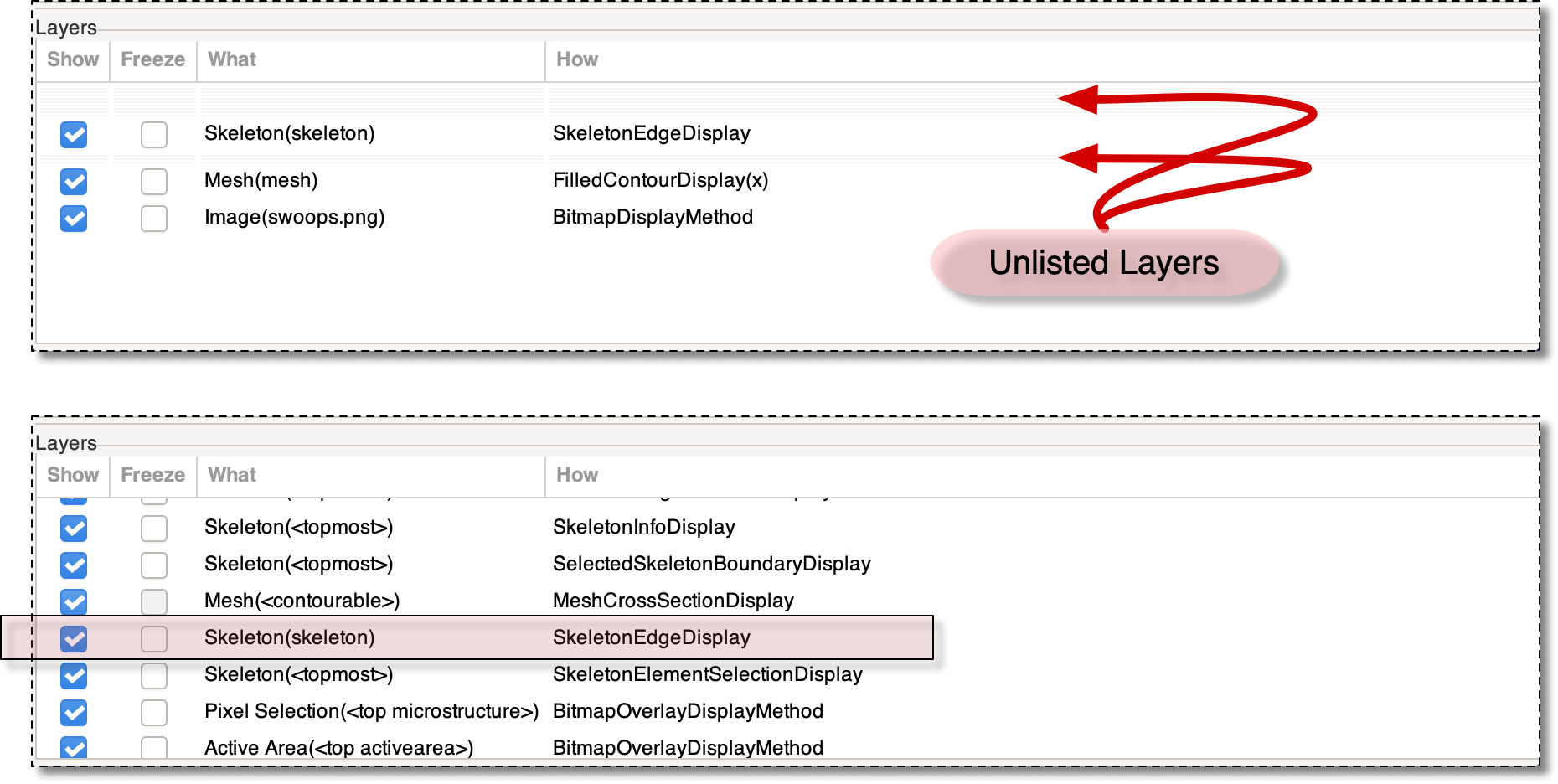
The top image shows the Graphics Window's Layer List when
List_All_Layers is off. The arrows mark
the faint lines denoting the unlisted Layers. The bottom
image shows a portion of the list when
List_All_Layers is on. It is necessary to
scroll to see the whole list. Most of the Layers
are predefined auxiliary Layers not normally displayed. At
this position in the list, only one of the normally listed
layers (indicated by the pink box) is visible.
|
|
 |
|
| OOF.Graphics_n.Settings.Hide_Empty_Mesh_Elements |  |
OOF.Graphics_n.Settings.Long_Layer_Names |