
OOF2: The Manual
| 3.4. The Pixel Selection Page | ||
|---|---|---|

|
Chapter 3. Task Pages |  |
The Pixel Selection Page contains tools for creating and modifying
the set of selected
pixels in a Microstructure. None of these tools require mouse
input. The pixel selection tools that do
require mouse input are all in the Pixel Selection
toolbox in the Graphics
window.
Figure 3.5 shows the anatomy of the Pixel
Selection Page. It consists of a Microstructure Chooser for
selecting the Microstructure (called the current
Microstructure) whose pixel selection will be modified, a Status Pane,
and a Pixel Selection
Modification Pane. The Status Pane simply shows how many
pixels are selected in the current Microstructure.
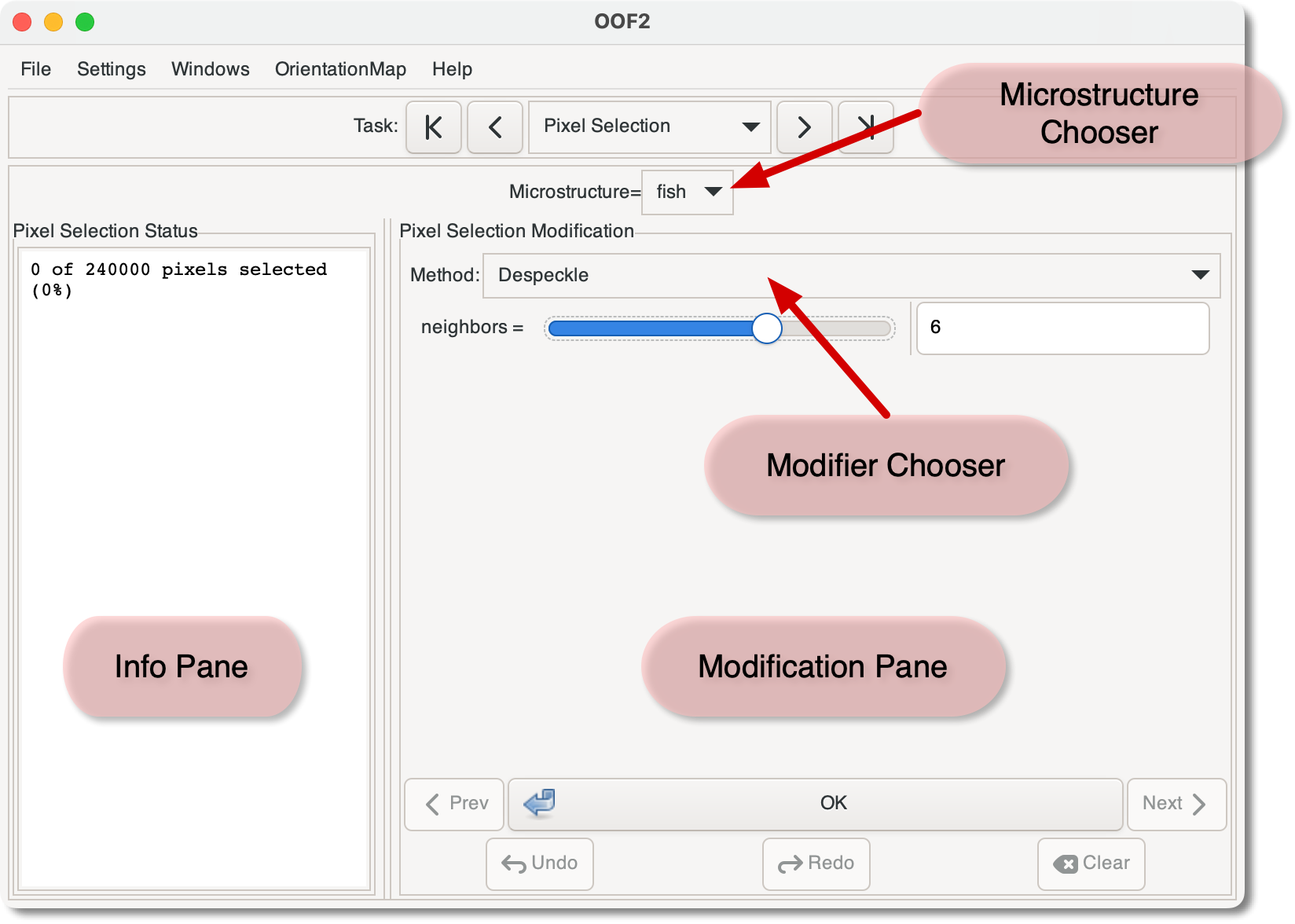
The Pixel Selection Modification Pane follows the same layout as the Image Modification Pane in the Image Page.
At the top of the pane is a Modifier Chooser, which selects a
method for modifying the pixel selection of the current Microstructure.
The Chooser is a pull-down menu, corresponding to the OOF.PixelSelection command menu. The
arguments for commands that require them (as in the Despeckle
command shown in Figure 3.5) are set in
the region below the Chooser. The at
the bottom of the pane performs the operation specified in the
Chooser.
The
and
buttons at the bottom of the pane undo and redo the latest
changes to the pixel selection in the current Microstructure, whether
or not the changes were made through the Pixel Selection page or
through other means. The and
buttons cycle the Chooser through
the recently used modifiers, without actually affecting the
Microstructure at all.
The
button clears the pixel selection in the current Microstructure.
|
|
 |
|
| 3.3. The Image Page |  |
3.5. The Active Area Page |