
OOF2: The Manual
| OOF.PixelSelection.Despeckle | ||
|---|---|---|

|
6.2. Menus |  |
Name
OOF.PixelSelection.Despeckle — Recursively select all pixels with a minimum number of selected neighbors.
Synopsis
OOF.PixelSelection.Despeckle(microstructure, neighbors)
Details
- Parent Menu: OOF.PixelSelection
-
Callback: function
doSelectionModin moduleooflib.common.pixelselectionmod -
Parameters:
microstructure- Type: The path to an existing
Microstructureobject. neighbors- Select pixels with at least this many selected neighbors. Type: An integer in the range [4, 8].
Description
Some pixel selection tools such as OOF.Graphics_n.Toolbox.Pixel_Select.Burn or OOF.Graphics_n.Toolbox.Pixel_Select.Color tend to leave small holes in the selection due to imperfections of the micrograph or other reasons. With only a few holes, it's possible to fill them manually with other tools in the Pixel Selection toolbox, but this quickly gets tedious. The Despeckle command fills these holes efficiently.
![[Note]](IMAGES/note.png) |
Note |
|---|---|
|
Note that it's the pixel selection that is
being despeckled, not the |
The end result of a despeckling is a solidification of the selecting region. Compare to Elkcepsed, which achieves a similar effect by deselecting pixels.
The microstructure parameter specifies the Microstructure
where the selection resides.
The parameter neighbors controls the
despeckling operation. Smaller values mean stronger filling power.
The algorithm examines each unselected pixel, counts its selected
neighbors (examining the 8 immediately adjacent pixels), and
selects the target pixels if at least neighbors
neighboring pixels were selected. The process repeats recursively
until no more pixels are selected. The value of
neighbors must be between 4 and 8 inclusive:
values higher than 8 are meaningless, and values lower than 4 will
cause all pixels to be selected. 4 itself is of dubious utility.
Figure 6.50. Despeckling the Pixel Selection
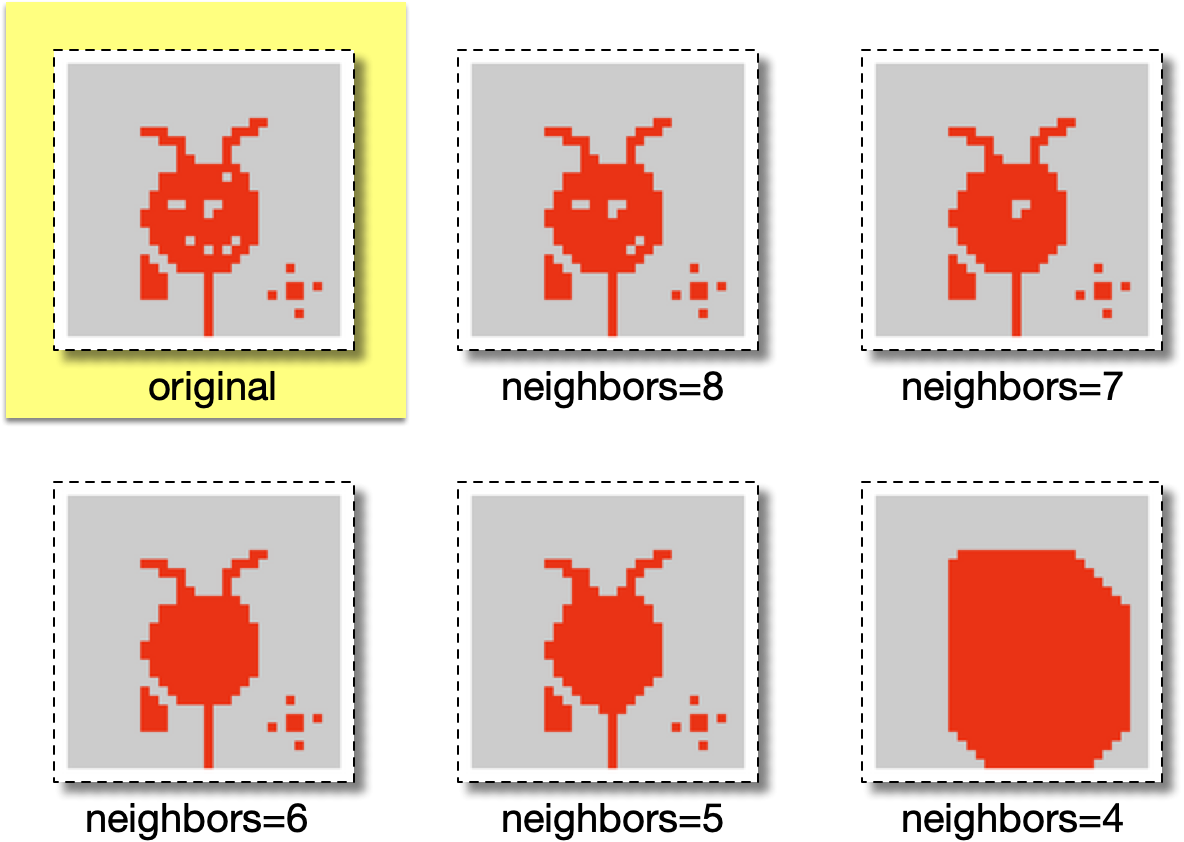
The upper left image shows a set of selected pixels, in red.
The other images show the result of running
Despeckle with various values of
neighbors. With neighbors=8,
only single pixel holes have been filled. With
neighbors=7, one and two pixels holes have been
filled. With neighbors=6, larger holes have been
filled. With neighbors=5, holes have been filled
and the the boundary has been smoothed. With
neighbors=4, the despeckeled selection is very
dissimilar to the original.
|
|
 |
|
| OOF.PixelSelection.Copy |  |
OOF.PixelSelection.Elkcepsed |