
OOF2: The Manual
| OOF.Graphics_n.Toolbox.Pixel_Select.Color | ||
|---|---|---|

|
6.2. Menus |  |
Name
OOF.Graphics_n.Toolbox.Pixel_Select.Color — Select pixels whose color is close to that of a reference pixel.
Synopsis
OOF.Graphics_n.Toolbox.Pixel_Select.Color(source, range, points, shift, ctrl)
Details
- Parent Menu: OOF.Graphics_n.Toolbox.Pixel_Select
-
Callback: function
PixelSelectToolbox.selectCBin moduleooflib.common.IO.genericselecttoolbox -
Parameters:
source- Microstructure or Image. Type: The path to an OOF2 object.
range- Acceptable deviation from the reference color. Type: An object of the
ColorDifferenceclass. points- Type: A list of
Pointobjects. shift- True for addition. Type: Boolean: True or False.
ctrl- True for toggle. Type: Boolean: True or False.
Description
Select pixels that are similar in color to the pixel at a given
location (the reference pixel). When using the Pixel Selection
Toolbox, this location is given by a mouse click. In text
mode the location is the first entry in the
points list. Pixels selected in this way are not
necessarily contiguous.
The source parameter must be the path to an Image. The
selection is made in the Microstructure in which the Image resides.
Pixels will be selected if their color lies within the given
range of the reference color. The different
types of ColorDifference define
the range in different ways.
The shift and ctrl parameters
govern how the current selection
(i.e, the set of objects defined by
this operation) is merged with the previous selection (the objects
already selected) to form a new selection, as shown in Table 6.1. They indicate whether
(True) or not (False)
the shift and control keys were depressed during the mouse click
that initiated this command.
Figure 6.18. Selecting Pixels by Color
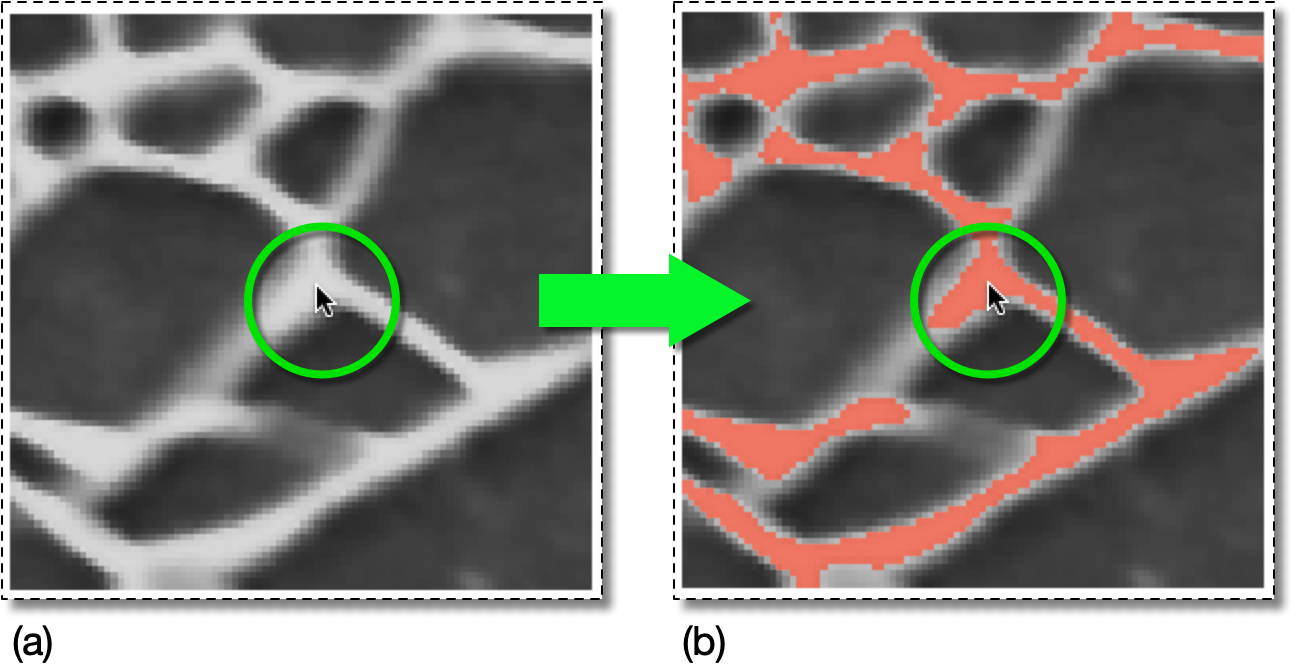
(a) Click the mouse on a representative pixel.
(b) The pixels selected by the mouse click in (a), with
range=DeltaGray(delta_gray=0.1).
|
|
 |
|
| OOF.Graphics_n.Toolbox.Pixel_Select.Clear |  |
OOF.Graphics_n.Toolbox.Pixel_Select.Ellipse |