
OOF2: The Manual
| OOF.Graphics_n.Settings.Hide_Empty_Mesh_Elements | ||
|---|---|---|

|
6.2. Menus |  |
Name
OOF.Graphics_n.Settings.Hide_Empty_Mesh_Elements — Toggle the display of elements with no Material.
Synopsis
OOF.Graphics_n.Settings.Hide_Empty_Mesh_Elements(boolean)
Details
- Parent Menu: OOF.Graphics_n.Settings
-
Callback: function
toggleEmptyDrawingin moduleooflib.engine.IO.displaymethods -
Parameters:
boolean-
A boolean value,
0(false) or1(true). This is not a keyword parameter. In scripts, just enter '0' or '1', not 'boolean=1'.
Description
When Hide_Empty_Mesh_Elements is on, Elements of a
Mesh which have no assigned Material are not drawn by any DisplayMethod. Some display methods,
such as FilledContourDisplay,
never draw these elements in any case, even if
Hide_Empty_Mesh_Elements is off.
![[Note]](IMAGES/note.png) |
Note |
|---|---|
|
The default value of Hide_Empty_Mesh_Elements
is |
Figure 6.12. Hiding Empty Mesh Elements
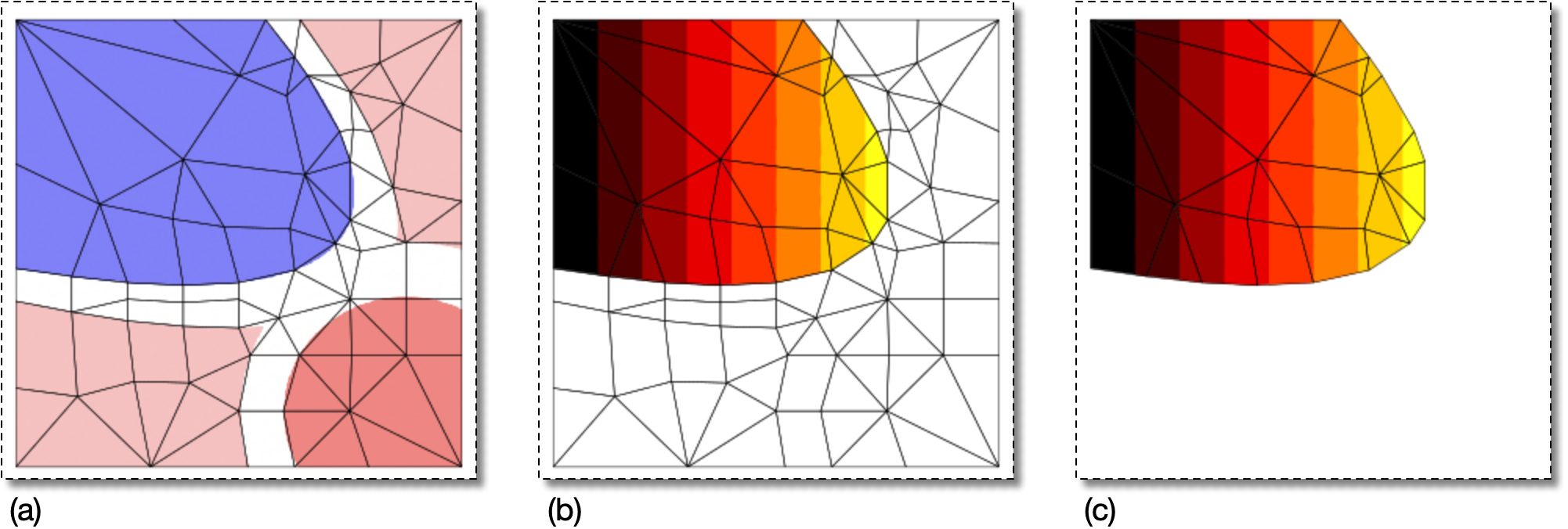
(a) A Microstructure with a Material assigned only to the blue
pixels, and a Skeleton created from it.
(b) A Mesh created from the Skeleton in (a), with a contour
plot displayed on it.
Hide_Empty_Mesh_Elements is
False.
(c) The same Mesh and contour plot as in (b), but
Hide_Empty_Mesh_Elements is
True.
|
|
 |
|
| OOF.Graphics_n.Settings.Contourmap_Marker_Size |  |
OOF.Graphics_n.Settings.List_All_Layers |