 FiPy
FiPyFrequently Asked Questions
How do I represent an equation in FiPy?
As explained in Theoretical and Numerical Background, the canonical
governing equation that can be solved by FiPy for the dependent
CellVariable  is
is
![\underbrace{
\frac{\partial (\rho \phi)}{\partial t}
}_{\text{transient}}
+
\underbrace{
\vphantom{\frac{\partial (\rho \phi)}{\partial t}}
\nabla \cdot \left( \vec{u} \phi \right)
}_{\text{convection}}
=
\underbrace{
\vphantom{\frac{\partial (\rho \phi)}{\partial t}}
\left[ \nabla \cdot \left( \Gamma_i \nabla \right) \right]^n \phi
}_{\text{diffusion}}
+
\underbrace{
\vphantom{\frac{\partial (\rho \phi)}{\partial t}}
S_{\phi}
}_{\text{source}}](../_images/math/738ba0ab871e8919b73e62d0c4360cb85c700976.svg)
and the individual terms are discussed in Discretization.
A physical problem can involve many different coupled governing equations, one for each variable. Numerous specific examples are presented in Part Examples.
Is there a way to model an anisotropic diffusion process or more generally to represent the diffusion coefficient as a tensor so that the diffusion term takes the form  ?
?
Terms of the form can be
posed in FiPy by using a list, tuple rank 1
or rank 2 FaceVariable to represent a
vector or tensor diffusion coefficient. For example, if we wished to
represent a diffusion term with an anisotropy ratio of 5 aligned along the
x-coordinate axis, we could write the term as,
>>> DiffusionTerm([[[5, 0], [0, 1]]])
which represents  . Notice that
the tensor, written in the form of a list, is contained within
a list. This is because the first index of the list refers to
the order of the term not the first index of the tensor (see
Higher Order Diffusion). This notation, although succinct can
sometimes be confusing so a number of cases are interpreted below.
. Notice that
the tensor, written in the form of a list, is contained within
a list. This is because the first index of the list refers to
the order of the term not the first index of the tensor (see
Higher Order Diffusion). This notation, although succinct can
sometimes be confusing so a number of cases are interpreted below.
>>> DiffusionTerm([[5, 1]])
This represents the same term as the case examined above. The vector notation is just a short-hand representation for the diagonal of the tensor. Off-diagonals are assumed to be zero.
>>> DiffusionTerm([5, 1])
This simply represents a fourth order isotropic diffusion
term of the form  .
.
>>> DiffusionTerm([[1, 0], [0, 1]])
Nominally, this should represent a fourth order diffusion
term of the form  , but FiPy
does not currently support anisotropy for higher order
diffusion terms so this may well throw an error or give
anomalous results.
, but FiPy
does not currently support anisotropy for higher order
diffusion terms so this may well throw an error or give
anomalous results.
>>> x, y = mesh.cellCenters
>>> DiffusionTerm(CellVariable(mesh=mesh,
...                            value=[[x**2, x * y], [-x * y, -y**2]])
This represents an anisotropic diffusion coefficient that
varies spatially so that the term has the form
 .
.
Generally, anisotropy is not conveniently aligned along the coordinate
axes; in these cases, it is necessary to apply a rotation matrix in
order to calculate the correct tensor values, see
examples.diffusion.anisotropy for details.
How do I represent a … term that doesn’t involve the dependent variable?
It is important to realize that, even though an expression may superficially resemble one of those shown in Discretization, if the dependent variable for that PDE does not appear in the appropriate place, then that term should be treated as a source.
How do I represent a diffusive source?
If the governing equation for is

then the first term is a TransientTerm and the second term is a
DiffusionTerm, but the third term is simply an explicit source,
which is written in Python as
>>> (D2 * xi.faceGrad).divergence
Higher order diffusive sources can be obtained by simply nesting the
references to faceGrad and
divergence.
Note
We use faceGrad, rather than
grad, in order to obtain a second-order spatial
discretization of the diffusion term in  , consistent with the
matrix that is formed by
, consistent with the
matrix that is formed by
DiffusionTerm for .
How do I represent a convective source?
The convection of an independent field as in

can be rendered as
>>> (u * xi.arithmeticFaceValue).divergence
when  is a rank-1
 FaceVariable (preferred) or as
>>> (u * xi).divergence
if is a rank-1 CellVariable.
How do I represent a transient source?
The time-rate-of change of an independent variable , such as in
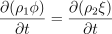
does not have an abstract form in FiPy and should be discretized directly, in the manner of Equation (1), as
>>> TransientTerm(coeff=rho1) == rho2 * (xi - xi.old) / timeStep
This technique is used in examples.phase.anisotropy.
What if my term involves the dependent variable, but not where FiPy puts it?
Frequently, viewing the term from a different perspective will allow it to be cast in one of the canonical forms. For example, the third term in

might be considered as the diffusion of the independent variable with
a mobility  that is a function of the dependent variable .
For FiPy’s purposes, however, this term represents the convection of
, with a velocity
that is a function of the dependent variable .
For FiPy’s purposes, however, this term represents the convection of
, with a velocity  , due to the counter-diffusion of
, so
, due to the counter-diffusion of
, so
>>> eq = TransientTerm() == (DiffusionTerm(coeff=D1)
...                          + <Specific>ConvectionTerm(coeff=D2 * xi.faceGrad))
Note
With the advent of Coupled and Vector Equations in FiPy 3.x, it is now
possible to represent both terms with
DiffusionTerm.
What if the coefficient of a term depends on the variable that I’m solving for?
A non-linear coefficient, such as the diffusion coefficient in
![\nabla\cdot[\Gamma_1(\phi) \nabla \phi] = \nabla\cdot[\Gamma_0 \phi (1 -
\phi) \nabla\phi]](../_images/math/52517729343ea1598a74da44c28683adb99037f9.svg) is not a problem for FiPy. Simply write it as it
appears:
is not a problem for FiPy. Simply write it as it
appears:
>>> diffTerm = DiffusionTerm(coeff=Gamma0 * phi * (1 - phi))
Note
Due to the nonlinearity of the coefficient, it will probably be necessary to “sweep” the solution to convergence as discussed in Iterations, timesteps, and sweeps? Oh, my!.
How can I see what I’m doing?
How do I export data?
The way to save your calculations depends on how you plan to make use of
the data. If you want to save it for “restart” (so that you can continue
or redirect a calculation from some intermediate stage), then you’ll want
to “pickle” the Python data with the dump module. This is
illustrated in examples.phase.anisotropy,
examples.phase.impingement.mesh40x1,
examples.phase.impingement.mesh20x20, and
examples.levelSet.electroChem.howToWriteAScript.
On the other hand, pickled FiPy data is of little use to anything
besides Python and FiPy. If you want to import your calculations into
another piece of software, whether to make publication-quality graphs or
movies, or to perform some analysis, or as input to another stage of a
multiscale model, then you can save your data as an ASCII text
file of tab-separated-values with a TSVViewer. This is illustrated
in examples.diffusion.circle.
How do I save a plot image?
Some of the viewers have a button or other mechanism in the user interface
for saving an image file. Also, you can supply an optional keyword
filename when you tell the viewer to
plot(), e.g.
>>> viewer.plot(filename="myimage.ext")
which will save a file named myimage.ext in your current working
directory. The type of image is determined by the file extension
“.ext”. Different viewers have different capabilities:
- Matplotlib
accepts “
.eps,” “.jpg” (Joint Photographic Experts Group), and “.png” (Portable Network Graphics).Attention
Actually, Matplotlib supports different extensions, depending on the chosen backend, but our
MatplotlibViewerclasses don’t properly support this yet.

What if I only want the saved file, with no display on screen?
To our knowledge, this is only supported by Matplotlib, as is explained
in the
Matplotlib FAQ on image backends.
Basically, you need to tell Matplotlib to use an “image
backend,” such as “Agg” or “Cairo.” Backends are discussed at
http://matplotlib.sourceforge.net/backends.html.
How do I make a movie?
FiPy has no facilities for making movies. You will need to save
individual frames (see the previous question) and then stitch them together
into a movie, using one of a variety of different free, shareware, or
commercial software packages. The guidance in the
Matplotlib FAQ on movies
should be adaptable to other Viewers.
Why doesn’t the Viewer look the way I want?
FiPy’s viewers are utilitarian. They’re designed to let you see
something with a minimum of effort. Because different plotting
packages have different capabilities and some are easier to install on some
platforms than on others, we have tried to support a range of Python
plotters with a minimal common set of features. Many of these packages are
capable of much more, however. Often, you can invoke the
Viewer you
want, and then issue supplemental commands for the underlying plotting
package. The better option is to make a “subclass” of the FiPy
Viewer that comes closest to producing the image you want. You can
then override just the behavior you wan to change, while letting FiPy do
most of the heavy lifting. See examples.phase.anisotropy and
examples.phase.polyxtal for examples of creating a custom
Matplotlib Viewer class; see
examples.cahnHilliard.sphere for an example of creating a custom
Mayavi Viewer class.
Iterations, timesteps, and sweeps? Oh, my!
Any non-linear solution of partial differential equations is an approximation. These approximations benefit from repetitive solution to achieve the best possible answer. In FiPy (and in many similar PDE solvers), there are three layers of repetition.
- iterations
This is the lowest layer of repetition, which you’ll generally need to spend the least time thinking about. FiPy solves PDEs by discretizing them into a set of linear equations in matrix form, as explained in Discretization and Linear Equations. It is not always practical, or even possible, to exactly solve these matrix equations on a computer. FiPy thus employs “iterative solvers”, which make successive approximations until the linear equations have been satisfactorily solved. FiPy chooses a default number of iterations and solution tolerance, which you will not generally need to change. If you do wish to change these defaults, you’ll need to create a new
Solverobject with the desired number of iterations and solution tolerance, e.g.>>> mySolver = LinearPCGSolver(iterations=1234, tolerance=5e-6) : : >>> eq.solve(..., solver=mySolver, ...)
Note
The older
Solversteps=keyword is now deprecated in favor ofiterations=to make the role clearer.Solver iterations are changed from their defaults in
examples.flow.stokesCavityandexamples.updating.update0_1to1_0.- sweeps
This middle layer of repetition is important when a PDE is non-linear (e.g., a diffusivity that depends on concentration) or when multiple PDEs are coupled (e.g., if solute diffusivity depends on temperature and thermal conductivity depends on concentration). Even if the
Solversolves the linear approximation of the PDE to absolute perfection by performing an infinite number of iterations, the solution may still not be a very good representation of the actual non-linear PDE. If we resolve the same equation at the same point in elapsed time, but use the result of the previous solution instead of the previous timestep, then we can get a refined solution to the non-linear PDE in a process known as “sweeping.”Note
Despite references to the “previous timestep,” sweeping is not limited to time-evolving problems. Nonlinear sets of quasi-static or steady-state PDEs can require sweeping, too.
We need to distinguish between the value of the variable at the last timestep and the value of the variable at the last sweep (the last cycle where we tried to solve the current timestep). This is done by first modifying the way the variable is created:
>>> myVar = CellVariable(..., hasOld=True)
and then by explicitly moving the current value of the variable into the “old” value only when we want to:
>>> myVar.updateOld()
Finally, we will need to repeatedly solve the equation until it gives a stable result. To clearly distinguish that a single cycle will not truly “solve” the equation, we invoke a different method “
sweep():>>> for sweep in range(sweeps): ... eq.sweep(var=myVar, ...)
Even better than sweeping a fixed number of cycles is to do it until the non-linear PDE has been solved satisfactorily:
>>> while residual > desiredResidual:
...     residual = eq.sweep(var=myVar, ...)
Sweeps are used to achieve better solutions in
examples.diffusion.mesh1D,examples.phase.simple,examples.phase.binaryCoupled, andexamples.flow.stokesCavity.- timesteps
This outermost layer of repetition is of most practical interest to the user. Understanding the time evolution of a problem is frequently the goal of studying a particular set of PDEs. Moreover, even when only an equilibrium or steady-state solution is desired, it may not be possible to simply solve that directly, due to non-linear coupling between equations or to boundary conditions or initial conditions. Some types of PDEs have fundamental limits to how large a timestep they can take before they become either unstable or inaccurate.
Note
Stability and accuracy are distinctly different. An unstable solution is often said to “blow up”, with radically different values from point to point, often diverging to infinity. An inaccurate solution may look perfectly reasonable, but will disagree significantly from an analytical solution or from a numerical solution obtained by taking either smaller or larger timesteps.
For all of these reasons, you will frequently need to advance a problem in time and to choose an appropriate interval between solutions. This can be simple:
>>> timeStep = 1.234e-5
>>> for step in range(steps):
...     eq.solve(var=myVar, dt=timeStep, ...)
or more elaborate:
>>> timeStep = 1.234e-5
>>> elapsedTime = 0
>>> while elapsedTime < totalElapsedTime:
...     eq.solve(var=myVar, dt=timeStep, ...)
...     elapsedTime += timeStep
...     timeStep = SomeFunctionOfVariablesAndTime(myVar1, myVar2, elapsedTime)
A majority of the examples in this manual illustrate time evolving behavior. Notably, boundary conditions are made a function of elapsed time in
examples.diffusion.mesh1D. The timestep is chosen based on the expected interfacial velocity inexamples.phase.simple. The timestep is gradually increased as the kinetics slow down inexamples.cahnHilliard.mesh2DCoupled.
Finally, we can (and often do) combine all three layers of repetition:
>>> myVar = CellVariable(..., hasOld=1)
:
:
>>> mySolver = LinearPCGSolver(iterations=1234, tolerance=5e-6)
:
:
>>> while elapsedTime < totalElapsedTime:
...     myVar.updateOld()
...     while residual > desiredResidual:
...         residual = eq.sweep(var=myVar, dt=timeStep, ...)
...     elapsedTime += timeStep
Why the distinction between CellVariable and FaceVariable coefficients?
FiPy solves field variables on the cell centers. Transient and
source terms describe the change in the value of a field at the cell
center, and so they take a
CellVariable coefficient. Diffusion
and convection terms involve fluxes between cell centers, and are
calculated on the face between two cells, and so they take a
FaceVariable coefficient.
Note
If you supply a CellVariable
var when a FaceVariable
is expected, FiPy will automatically substitute
var.arithmeticFaceValue.
This can have undesirable consequences, however. For one thing, the
arithmetic face average of a non-linear function is not the same as the
same non-linear function of the average argument, e.g., for
 ,
,

This distinction is not generally important for smoothly varying functions, but can dramatically affect the solution when sharp changes are present. Also, for many problems, such as a conserved concentration field that cannot be allowed to drop below zero, a harmonic average is more appropriate than an arithmetic average.
If you experience problems (unstable or wrong results, or
excessively small timesteps), you may need to explicitly supply the
desired FaceVariable rather than letting FiPy
assume one.
How do I represent boundary conditions?
See the Boundary Conditions section for more details.
What does this error message mean?
ValueError: frames are not alignedThis error most likely means that you have provided a
CellVariablewhen FiPy was expecting aFaceVariable(or vice versa).MA.MA.MAError: Cannot automatically convert masked array to Numeric because data is masked in one or more locations.This not-so-helpful error message could mean a number of things, but the most likely explanation is that the solution has become unstable and is diverging to
 . This can be caused by taking
too large a timestep or by using explicit terms instead of implicit
ones.
. This can be caused by taking
too large a timestep or by using explicit terms instead of implicit
ones.repairing catalog by removing keyThis message (not really an error, but may cause test failures) can result when using the
weavepackage via the--inlineflag. It is due to a bug in SciPy that has been patched in their source repository: http://www.scipy.org/mailinglists/mailman?fn=scipy-dev/2005-June/003010.html.numerix Numeric 23.6This is neither an error nor a warning. It’s just a sloppy message left in SciPy: http://thread.gmane.org/gmane.comp.python.scientific.user/4349.
How do I change FiPy’s default behavior?
FiPy tries to make reasonable choices, based on what packages it finds installed, but there may be times that you wish to override these behaviors. See the Command-line Flags and Environment Variables section for more details.
How can I tell if I’m running in parallel?
See Solving in Parallel.
Why don’t my scripts work anymore?
FiPy has experienced three major API changes. The steps necessary to upgrade older scripts are discussed in Updating FiPy.
What if my question isn’t answered here?
Please post your question to the mailing list <http://www.ctcms.nist.gov/fipy/mail.html> or file an issue at <https://github.com/usnistgov/fipy/issues/new>.