FiPy
FiPyexamples.cahnHilliard.sphere
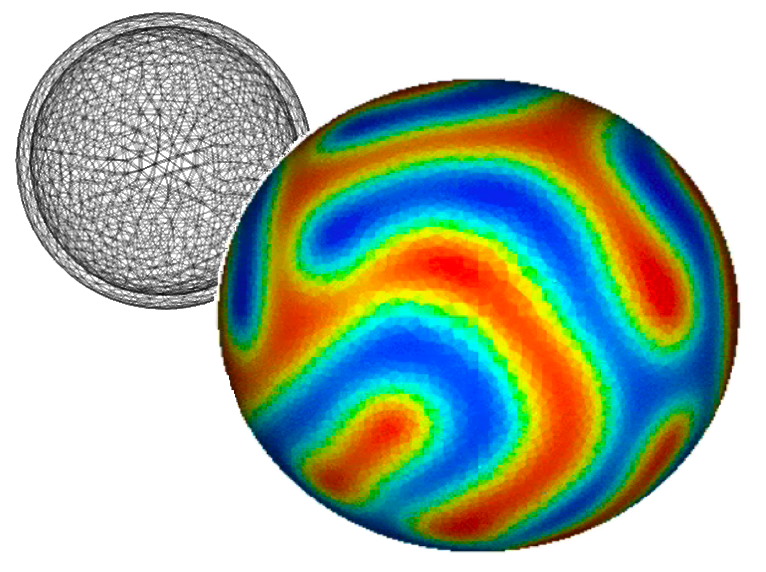
Solves the Cahn-Hilliard problem on the surface of a sphere.
This phenomenon can occur on vesicles (http://www.youtube.com/watch?v=kDsFP67_ZSE).
>>> from fipy import CellVariable, Gmsh2DIn3DSpace, GaussianNoiseVariable, Viewer, TransientTerm, DiffusionTerm, DefaultSolver
>>> from fipy.tools import numerix
The only difference from examples.cahnHilliard.mesh2D is the
declaration of mesh.
>>> mesh = Gmsh2DIn3DSpace('''
...     radius = 5.0;
...     cellSize = 0.3;
...
...     // create inner 1/8 shell
...     Point(1) = {0, 0, 0, cellSize};
...     Point(2) = {-radius, 0, 0, cellSize};
...     Point(3) = {0, radius, 0, cellSize};
...     Point(4) = {0, 0, radius, cellSize};
...     Circle(1) = {2, 1, 3};
...     Circle(2) = {4, 1, 2};
...     Circle(3) = {4, 1, 3};
...     Line Loop(1) = {1, -3, 2} ;
...     Ruled Surface(1) = {1};
...
...     // create remaining 7/8 inner shells
...     t1[] = Rotate {{0,0,1},{0,0,0},Pi/2} {Duplicata{Surface{1};}};
...     t2[] = Rotate {{0,0,1},{0,0,0},Pi} {Duplicata{Surface{1};}};
...     t3[] = Rotate {{0,0,1},{0,0,0},Pi*3/2} {Duplicata{Surface{1};}};
...     t4[] = Rotate {{0,1,0},{0,0,0},-Pi/2} {Duplicata{Surface{1};}};
...     t5[] = Rotate {{0,0,1},{0,0,0},Pi/2} {Duplicata{Surface{t4[0]};}};
...     t6[] = Rotate {{0,0,1},{0,0,0},Pi} {Duplicata{Surface{t4[0]};}};
...     t7[] = Rotate {{0,0,1},{0,0,0},Pi*3/2} {Duplicata{Surface{t4[0]};}};
...
...     // create entire inner and outer shell
...     Surface Loop(100)={1,t1[0],t2[0],t3[0],t7[0],t4[0],t5[0],t6[0]};
... ''', overlap=2).extrude(extrudeFunc=lambda r: 1.1 * r)
>>> phi = CellVariable(name=r"$\phi$", mesh=mesh)
We start the problem with random fluctuations about

>>> phi.setValue(GaussianNoiseVariable(mesh=mesh,
...                                    mean=0.5,
...                                    variance=0.01))
FiPy doesn’t plot or output anything unless you tell it to: If
MayaviClient is available, we
can customize the view with a subclass of
MayaviDaemon.
>>> if __name__ == "__main__":
...     try:
...         viewer = MayaviClient(vars=phi,
...                               datamin=0., datamax=1.,
...                               daemon_file="examples/cahnHilliard/sphereDaemon.py")
...     except:
...         viewer = Viewer(vars=phi,
...                         datamin=0., datamax=1.,
...                         xmin=-2.5, zmax=2.5)
For FiPy, we need to perform the partial derivative
 manually and then put the equation in the canonical
form by decomposing the spatial derivatives
so that each
manually and then put the equation in the canonical
form by decomposing the spatial derivatives
so that each Term is of a single, even order:
![\frac{\partial \phi}{\partial t}
= \nabla\cdot D a^2 \left[ 1 - 6 \phi \left(1 - \phi\right)\right] \nabla \phi- \nabla\cdot D \nabla \epsilon^2 \nabla^2 \phi.](../../../_images/math/6a69bfe95bd52305ffeea1f4a307257ee5702abf.svg)
FiPy would automatically interpolate
D * a**2 * (1 - 6 * phi * (1 - phi))
onto the faces, where the diffusive flux is calculated, but we obtain
somewhat more accurate results by performing a linear interpolation from
phi at cell centers to PHI at face centers.
Some problems benefit from non-linear interpolations, such as harmonic or
geometric means, and FiPy makes it easy to obtain these, too.
>>> PHI = phi.arithmeticFaceValue
>>> D = a = epsilon = 1.
>>> eq = (TransientTerm()
...       == DiffusionTerm(coeff=D * a**2 * (1 - 6 * PHI * (1 - PHI)))
...       - DiffusionTerm(coeff=(D, epsilon**2)))
Because the evolution of a spinodal microstructure slows with time, we use exponentially increasing time steps to keep the simulation “interesting”. The FiPy user always has direct control over the evolution of their problem.
>>> dexp = -5
>>> elapsed = 0.
>>> if __name__ == "__main__":
...     duration = 1000.
... else:
...     duration = 1e-2
>>> while elapsed < duration:
...     dt = min(100, numerix.exp(dexp))
...     elapsed += dt
...     dexp += 0.01
...     eq.solve(phi, dt=dt, solver=DefaultSolver(precon=None))
...     if __name__ == "__main__":
...         viewer.plot()