
OOF2: The Manual
Merge Triangles (MergeTriangles) |
||
|---|---|---|

|
6.5.2. Subclasses |  |
Name
Merge Triangles (MergeTriangles) — Merge neighboring homogeneous triangles to form quadrilaterals.
Synopsis
MergeTriangles(targets, criterion)
Details
-
Base class:
SkeletonModifier -
Parameters:
targets- Which elements to modify. Type: An object of the
SkelModTargetsclass. criterion- Acceptance criterion. Type: An object of the
SkelModCriterionclass.
Description
MergeTriangles merges two triangular Elements
into one quadrilateral Element. It is more or less the opposite of
SplitQuads, which splits a
quadrilateral into two triangles.
The targets parameter specifies which Elements in
the Skeleton to examine. Taking the Elements in random order, OOF2
tries to merge each Element with each of its
neighbor elements in turn (whether or not they're in the target
list), if the neighbor is a triangle and has the same dominant pixel type
as the target Element. The criterion parameter
specifies which, if any, of the possible merges to accept.
If a Mesh is going to be built from high-order elements,
merging the triangles in its Skeleton reduces the overall degrees of
freedom in the Mesh, thereby decreasing the solution time (and
possibly accuracy). For Meshes made of linear elements (4-noded
quads or 3-noded triangles) merging triangles does not reduce the
number of degrees of freedom.
Figure 6.91(a) shows a few highlighted
triangle pairs to be merged. The resulting Skeleton is shown in
Figure 6.91(b).
Figure 6.91. Merging Triangles
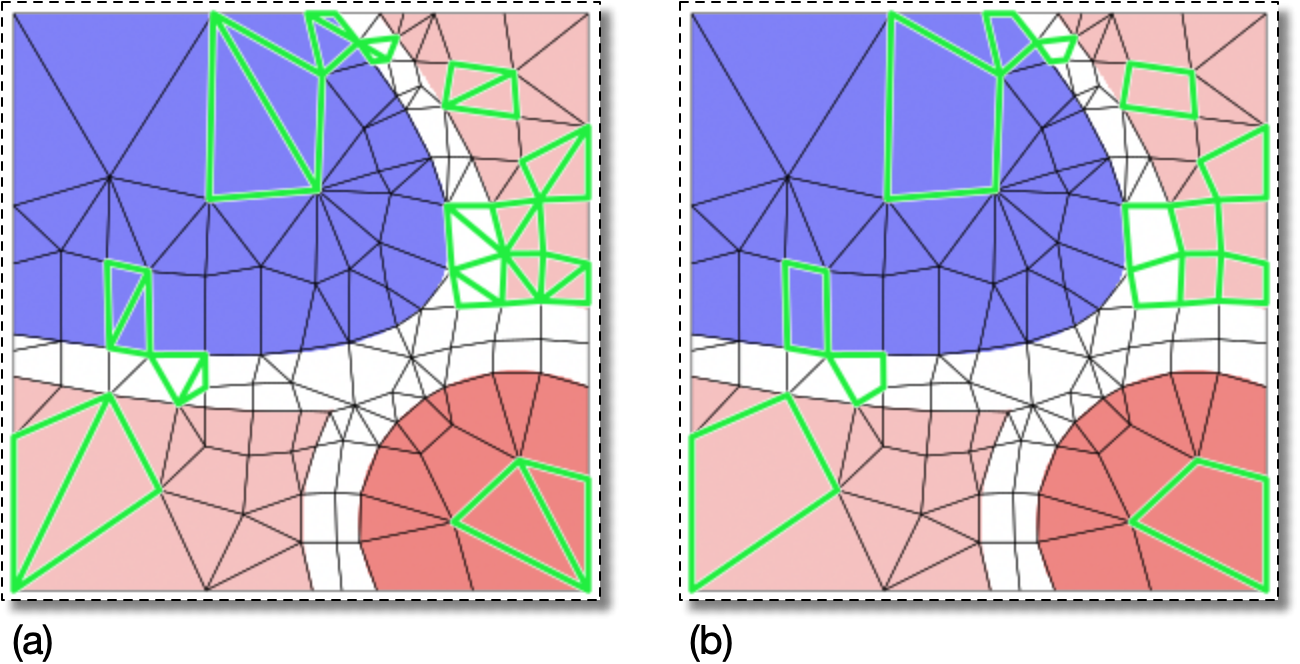
(a) The Elements with green edges are triangles that can be
merged.
(b) The result of running
          OOF.Skeleton.Modify(
             skeleton='swoops.png:skeleton',
             modifier=MergeTriangles(targets=AllElements(),criterion=AverageEnergy(alpha=0.5)))
on the Skeleton in (a). (The green edges indicate the affected
Elements for illustrative purposes only. Selected Segments were
not actually necessary to run this command.)
|
|
 |
|
Mean (MeanThreshold)
|
 |
Solid Fill (MeshCenterFillDisplay) |