
OOF2: The Manual
Aspect Ratio (CheckAspectRatio) |
||
|---|---|---|

|
6.5.2. Subclasses |  |
Name
Aspect Ratio (CheckAspectRatio) — Divide elements with extreme aspect ratios.
Synopsis
CheckAspectRatio(threshold, only_quads)
Details
-
Base class:
RefinementTarget -
Parameters:
threshold- Refine the long edges of elements whose aspect ratio is greater than this. Type: A real number.
only_quads- Restrict the refinement to quadrilaterals?. Type: Boolean: True or False.
Description
Skinny Elements (ones with a high aspect ratio) can cause poor
finite element performance. Refining a Skeleton with the
targets parameter of Refine set to Aspect
Ratio will subdivide the long sides of Elements with
high aspect ratios.
The aspect ratio of a rectangle is its length divided by its width,
or vice versa. That definition
doesn't work well for trianglar or non-rectangular quadrilateral
Elements. The definition used in OOF2 is the square root of the
ratio of the eigenvalues of the in-plane moment of inertia tensor of
the element's corners.
If corner is at position and the center of the element is , then the moment of inertia tensor is
This definition reduces to the intuitive one if the element is rectangular, doesn't require any special handling if it is not, and can be computed more easily than it seems.
The longest two edges of a quadrilateral
Element whose aspect ratio is greater than
threshold will be subdivided,
if the longest two edges are on opposite sides of the element.
The longest two edges of a triangular Element will be subdivided if
the aspect ratio is greater than threshold, but
only if the parameter only_quads is
False. If your goal is to eliminate high aspect
elements, refining high aspect triangles is not useful — it just
creates new smaller triangles with the same high aspect ratio. To
remove skinny triangles from a Skeleton, use the Rationalize Skeleton modifier.
Figure 6.69(a) shows a Skeleton containing one
skinny quadrilateral and one skinny triangle. Figure 6.69(b) shows the result of refining the
elements. Unlike CheckHomogeneity, which marks all the
Segments of its target Elements,
CheckAspectRatio marks only the long Segments,
so not all of the sides have been subdivided.
Figure 6.69. Refining Elements with High Aspect Ratios
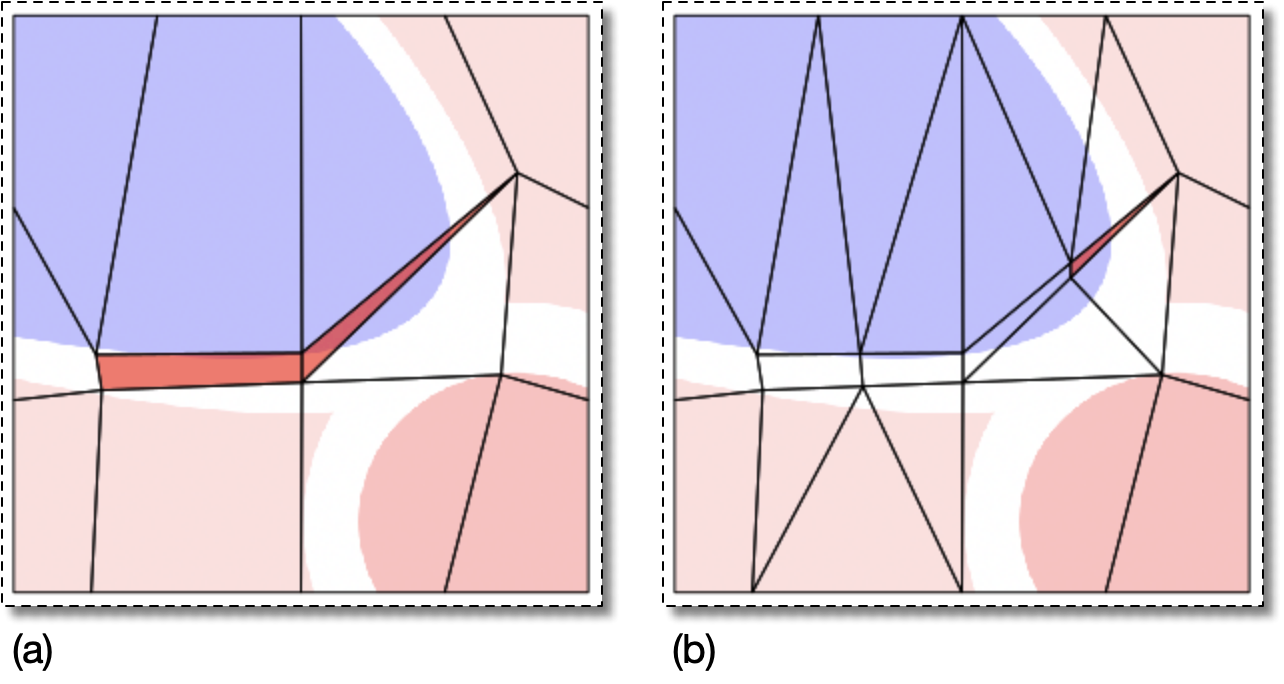
(a) A Skeleton containing two elements with a high aspect ratio.
The aspect ratio of the highlighted quadrilateral is about 6,
and the aspect ratio of the highlighted triangle is about 15.
(b) The Skeleton produced by refining with
modifier=Refine(targets=CheckAspectRatio(threshold=5.0, only_quads=False),
                divider=Bisection(minlength=2),
                rules='Quick', alpha=1)
The quad was divided into two elements with aspect ratios near 3, but the triangle was turned into a quad with aspect ratio 8 and a new triangle with aspect ratio 15, which is no better than the original triangle.
|
|
 |
|
All Elements (CheckAllElements)
|
 |
Elements In Group (CheckElementsInGroup) |