
OOF2: The Manual
| OOF.Skeleton.PinNodes.Pin_Selected_Elements | ||
|---|---|---|

|
6.2. Menus |  |
Name
OOF.Skeleton.PinNodes.Pin_Selected_Elements — Pin nodes of selected elements.
Synopsis
OOF.Skeleton.PinNodes.Pin_Selected_Elements(skeleton, internal, boundary)
Details
- Parent Menu: OOF.Skeleton.PinNodes
-
Callback: function
pinnodesmodin moduleooflib.engine.pinnodesmodifier -
Parameters:
skeleton- Type: The path to an existing
Skeletonobject. internal- Select internal nodes. Type: Boolean: True or False.
boundary- Select boundary nodes. Type: Boolean: True or False.
Description
Pin the
Nodes of the currently selected Elements in the given Skeleton.
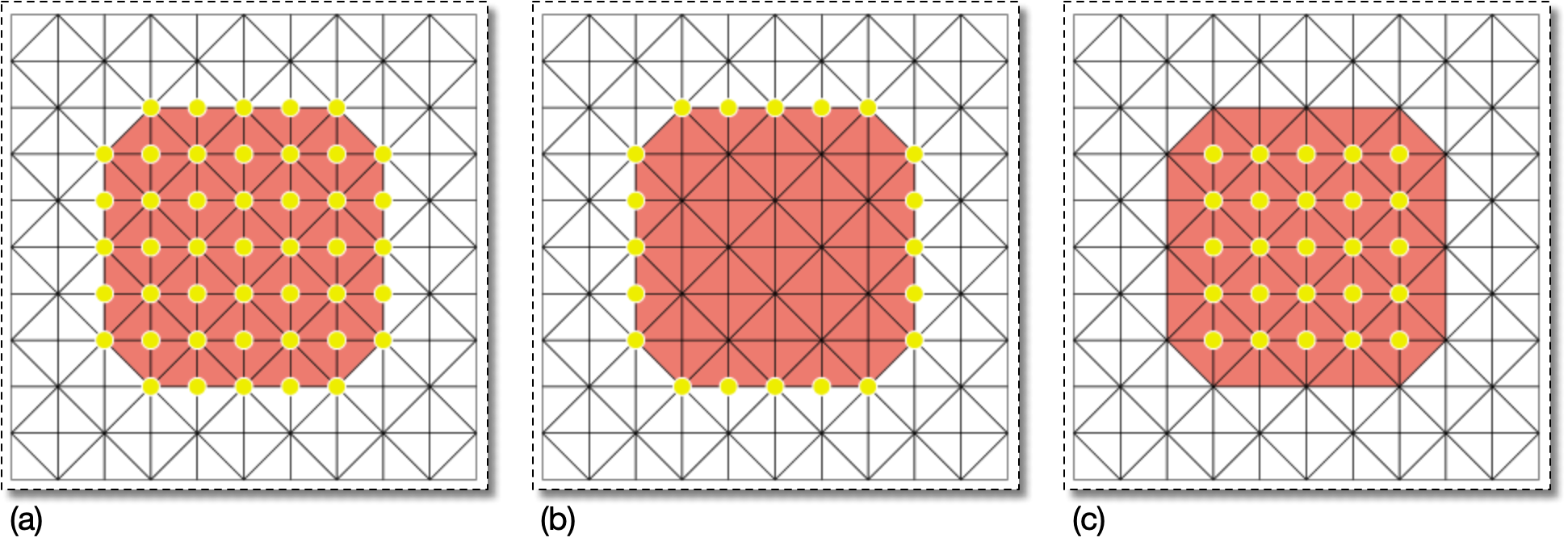
The two parameters, internal and
boundary determine exactly which Nodes will be
pinned. If internal is
true, then Nodes that are completely
surrounded by selected Elements will be pinned. If
boundary is true, then
Nodes that are only partially surrounded by selected Elements will
be pinned. If both are true, then all
Nodes of the selected Elements will be pinned. Figure 6.58 illustrates the different scenarios.
|
|
 |
|
| OOF.Skeleton.PinNodes.Pin_Node_Selection |  |
OOF.Skeleton.PinNodes.Pin_Selected_Segments |