
OOF2: The Manual
Swap Edges (SwapEdges) |
||
|---|---|---|

|
6.5.2. Subclasses |  |
Name
Swap Edges (SwapEdges) — Rearrange internal edges in pairs of neighboring elements.
Synopsis
SwapEdges(targets, criterion)
Details
-
Base class:
SkeletonModifier -
Parameters:
targets- Which elements to modify. Type: An object of the
SkelModTargetsclass. criterion- Acceptance criterion. Type: An object of the
SkelModCriterionclass.
Description
SwpaEdges rearranges the interior Segments
of neighboring Elements to improve their shape energy
or homogeneity.
The possible rearrangements are shown in Figure 6.119.
Figure 6.119. Swapping Element Edges
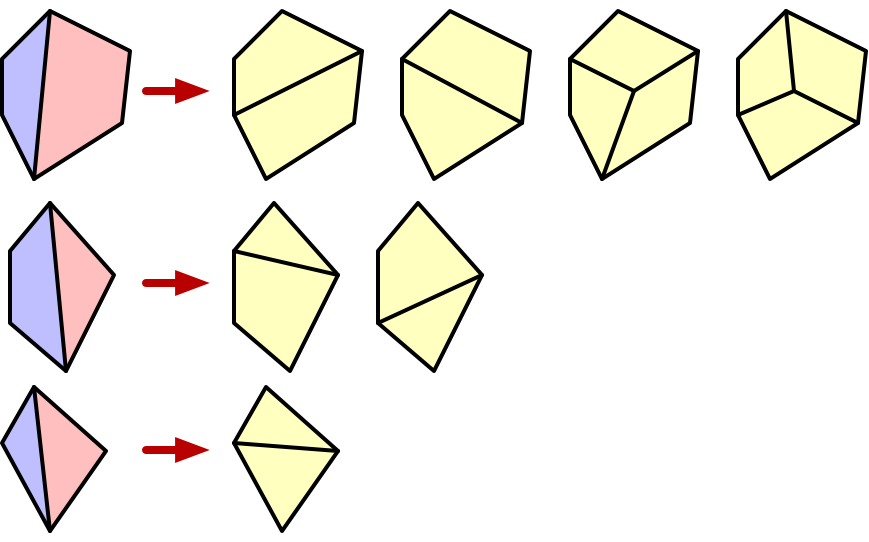
The blue and pink pairs of Elements on the left can replace
their shared edge with new edges and become the one of the
configurations on the right. When two quadrilaterals are
replaced by three, as in the right hand images in the top row,
a new Node is inserted at the average position of its
neighbors.
The general procedure for SwapEdges
is as follows:
-
Loop over the target
Elementsin random order to avoid any bias due to the order in which they were created.-
For the first
Elementin the list, try to swap edges with each of its neighbors in all the possible ways illustrated in Figure 6.119. -
Replace the
Elementand its neighbor in theSkeletonwith the swap that best satisfies thecriterion, if any. Remove theElementand its neighbor from the list. If no swap satisfies thecriterion, do nothing.
-
Figure 6.120 shows the application of
SwapEdges in a Skeleton. The Elements with
Segments marked in green in (a) have been replaced in (b). The two
pairs of Elements on the blue-white boundary have improved their
homogeneity,
and the pair inside the blue region has improved its shape
energy.
Figure 6.120. Swapping Edges
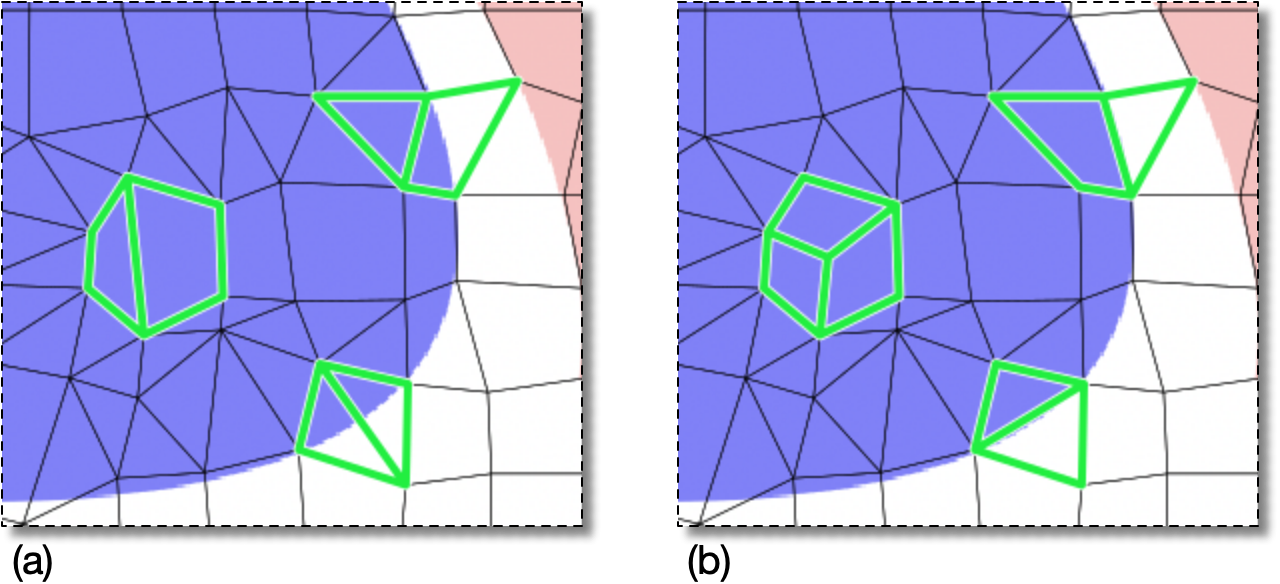
(a) Before and (b) after running
          OOF.Skeleton.Modify(
              skeleton='swoops.png:skeleton',
              modifier=SwapEdges(targets=AllElements(),criterion=AverageEnergy(alpha=0.5)))
The segments of the affected Elements are highlighted in green.
|
|
 |
|
Straight (StraightCrossSection)
|
 |
TSL (TSLreader) |