OOF2: The Manual
Local (LocalThreshold) |
||
|---|---|---|

|
6.5.2. Subclasses |  |
Name
Local (LocalThreshold) — Use a different threshold at each point, computed from the local neighborhood.
Synopsis
LocalThreshold(radius, average, offset)
Details
-
Base class:
ThresholdMethod -
Parameters:
radius- Half width of the local neighborhood. Type: Integer.
average- How to compute local average brightness. Type: An object of the
LocalAverageMethodclass. offset- Offset from the mean. Type: A real number in the range [-1, 1].
Description
Local thresholding computes the average brightness of an Image in
the neighborhood of a pixel, and then sets the pixel to black or
white depending on whether it is darker or lighter than the local
average, minus a given offset. This command is a wrapper around the
scikit-image method skimage.filters.threshold_local.
The Image is first converted from color to grayscale if
necessary.
The radius parameter is the radius of the local
averaging area, in pixel units. The area is actually a square with
edge length 2*radius+1. Making the
radius too small can lead to noisy results, as
shown in Figure 6.87.
The average parameter determines how the average
is computed within the local area. If it's set to
gaussian, a gaussian weighted average will be
used, and the standard deviation sigma can be
specified. If sigma=automatic, a deviation is
chosen automatically. Because the gaussian effectively converts the
square averaging area to a circle, it can sometimes produce smoother
results.
If a non-zero offset is provided, it is
subtracted from the local threshold value. That is, if
offset is 0.1, pixels whose
brightness is greater than the local mean minus
0.1 will be turned white. Note that if the
image is more or less smooth and the local radius is small, the
local means will tend to be similar to the pixel values, so a very
small offset can have a large effect, as shown in Figure 6.88.
Figure 6.87. Thresholding an Image with LocalThreshold
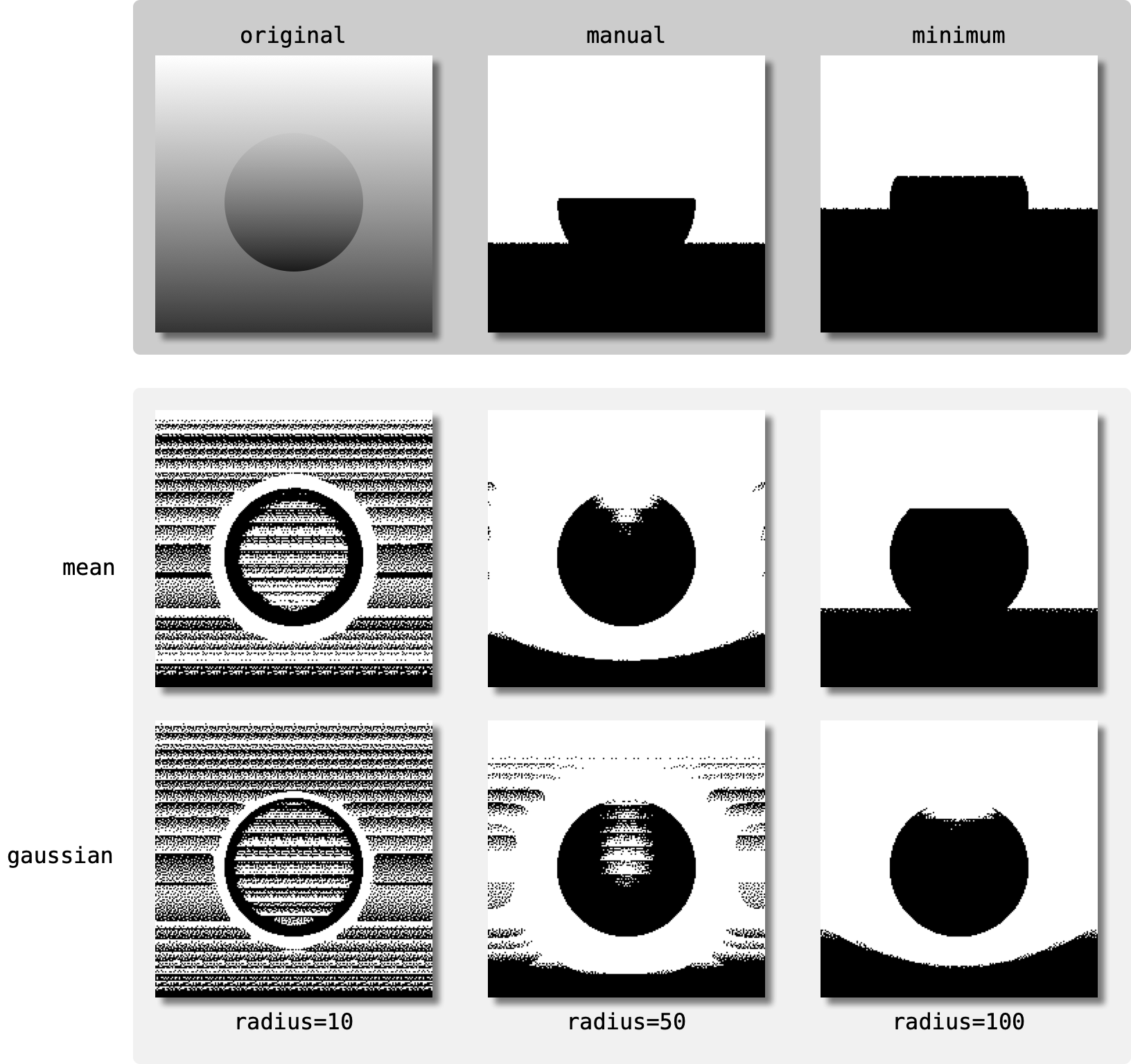
The 200×200 pixel image in the top left is a circle
inside a square. Both shapes are filled with a grayscale
gradient, so global thresholding is inadequate for identifying
the shapes, as shown in the other images in the top row. The
bottom two rows show the results of using
LocalThreshold with two different averaging
methods and three different radii. The gaussian averaging was
done with sigma=automatic.
The results in the left column were created with
radius=10. Because
this is much smaller than the size of the features in the
image, and because the color gradients are linear, for most of
the pixels the local average is close to the pixel value, and
the result is noise.
The results in the center and right columns, with larger
radius, are less noisy and do a better job
of isolating the boundary of the circle.
Figure 6.88. Using an offset with LocalThreshold
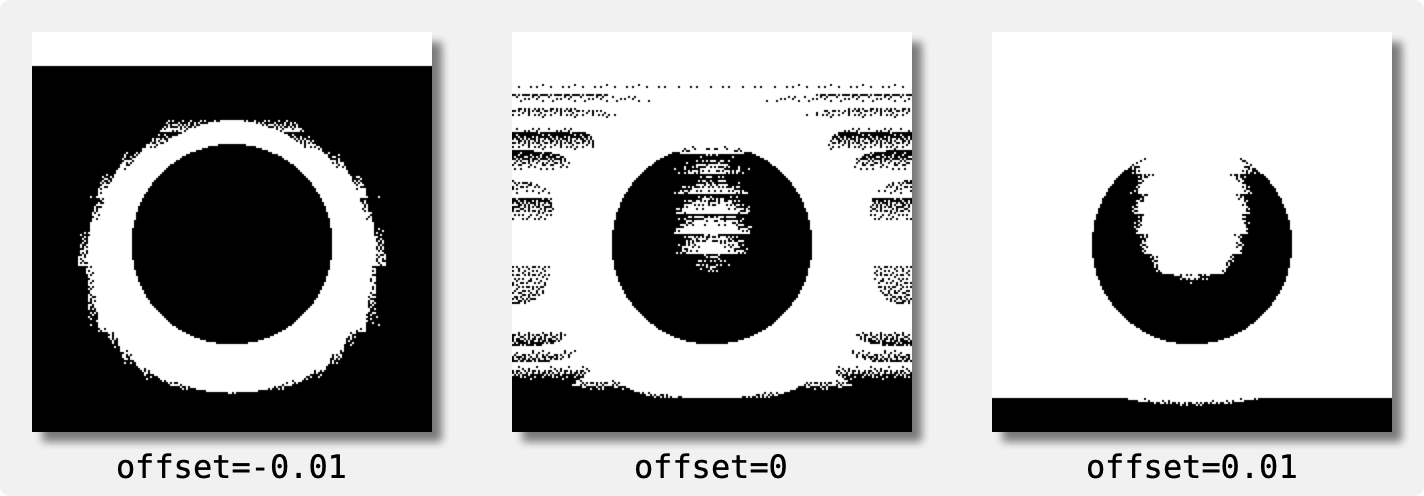
The results of using LocalThreshold with a
small nonzero offset A negative offset
increases the number of black pixels.
(average=gaussian and
radius=50 here.)
The example with the negative offset would
allow the circular region to be easily selected by OOF.Graphics_n.Toolbox.Pixel_Select.Burn,
something that would be quite difficult on the original image.
|
|
 |
|
median (LocalMedian)
|
 |
Loop (LoopAnimation) |