
OOF2: The Manual
Edge boundary from segments (EdgeFromSegments) |
||
|---|---|---|

|
6.5.2. Subclasses |  |
Name
Edge boundary from segments (EdgeFromSegments) — Construct an edge boundary from a set of segments.
Synopsis
EdgeFromSegments(group, direction)
Details
-
Base class:
BoundaryConstructor -
Parameters:
group- Construct the boundary from these segments. Type: The name of a segment
group,
or the placeholder
selection, referring to the currently selected segments. direction- Direction of the boundary. Type: An object from the
Directorenumerated class.
Description
EdgeFromSegments is a BoundaryConstructor, used as the
constructor argument of the OOF.Skeleton.Boundary.Construct command when
building Skeleton boundaries. It
creates Edge
Boundaries from the currently selected Skeleton
Segments or from a group of Segments.
The Segments are specified by the group parameter,
which must be either the name of a Segment group or the special placeholder object,
selection.
Edge boundaries must be constructed from a single contiguous
non-branching set of Segments, and they must be
directed. Boundary
conditions use the direction to determine the boundary normal
and the direction of applied Fields and Fluxes. The
direction parameter specifies the direction of
the boundary being created. The legal values for
direction depend on the topology of the boundary
being constructed. When the Segments form a closed loop, the legal
values are 'Clockwise' and
'CounterClockwise'. When the Segments form an
open line or curve, the values are 'Left to
right', 'Right to left',
'Top to bottom', and 'Bottom to
top'. OOF2 compares the positions of only the first
and last Nodes when determining the direction of an open boundary.
Figure 6.77. Constructing an Edge Boundary from Segments
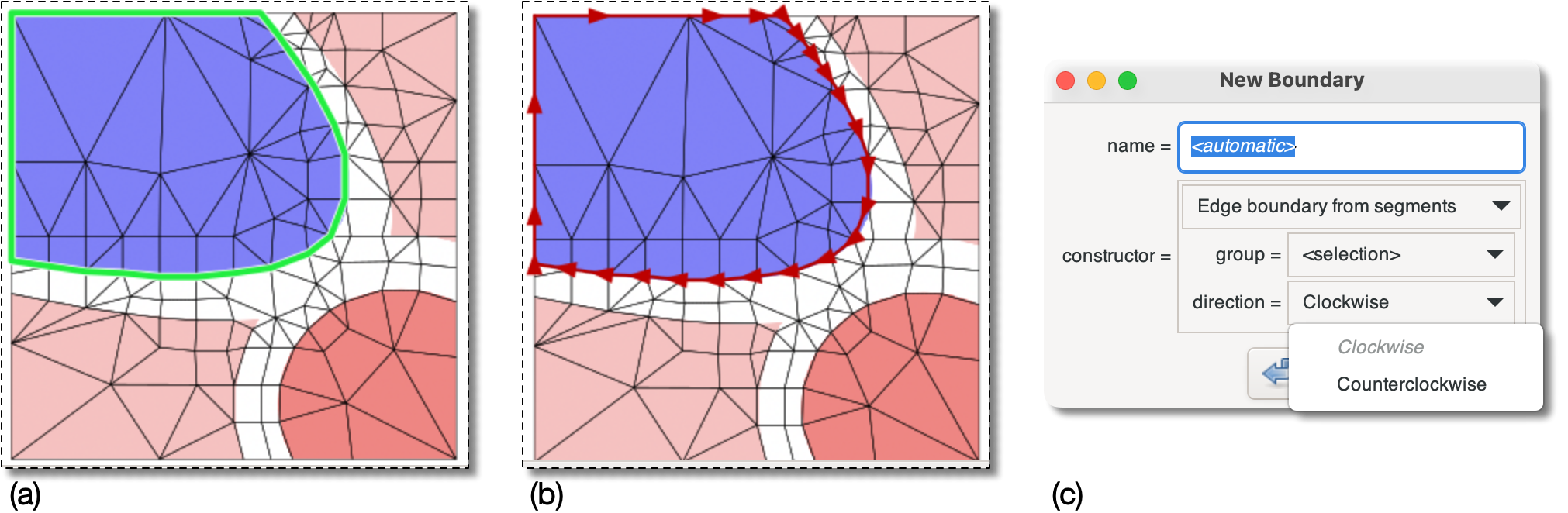
(a) A closed loop of Segments on the border of the
blue region has been selected.[33]
(b) the selected Segments have been turned into a
closed clockwise edge boundary by
          OOF.Skeleton.Boundary.Construct(
             skeleton='swoops.png:skeleton',
             name='boundary',
             constructor=EdgeFromSegments(group=selection, direction='Clockwise'))
(c) The dialog box offers clockwise and counterclockwise
directions because the Segments form a loop.
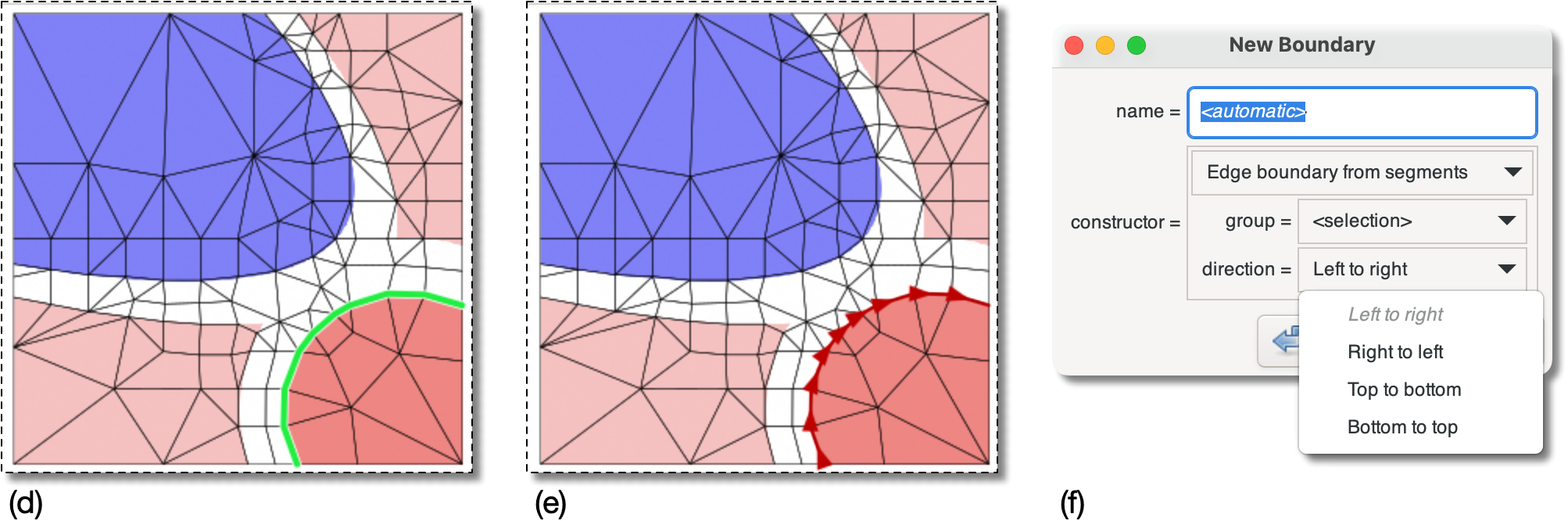
(d) Segments on the border between the red and white
Elements have been selected.[34]
They don't form a closed loop.
(e) The selected Segments have been turned into
an open linear edge boundary by
          OOF.Skeleton.Boundary.Construct(
             skeleton='swoops.png:skeleton',
             name='boundary<2>',
             constructor=EdgeFromSegments(group=selection, direction='Left to right'))
(f) The possible directions are left to right, right to left,
etc, because the Segments form
an open sequence.
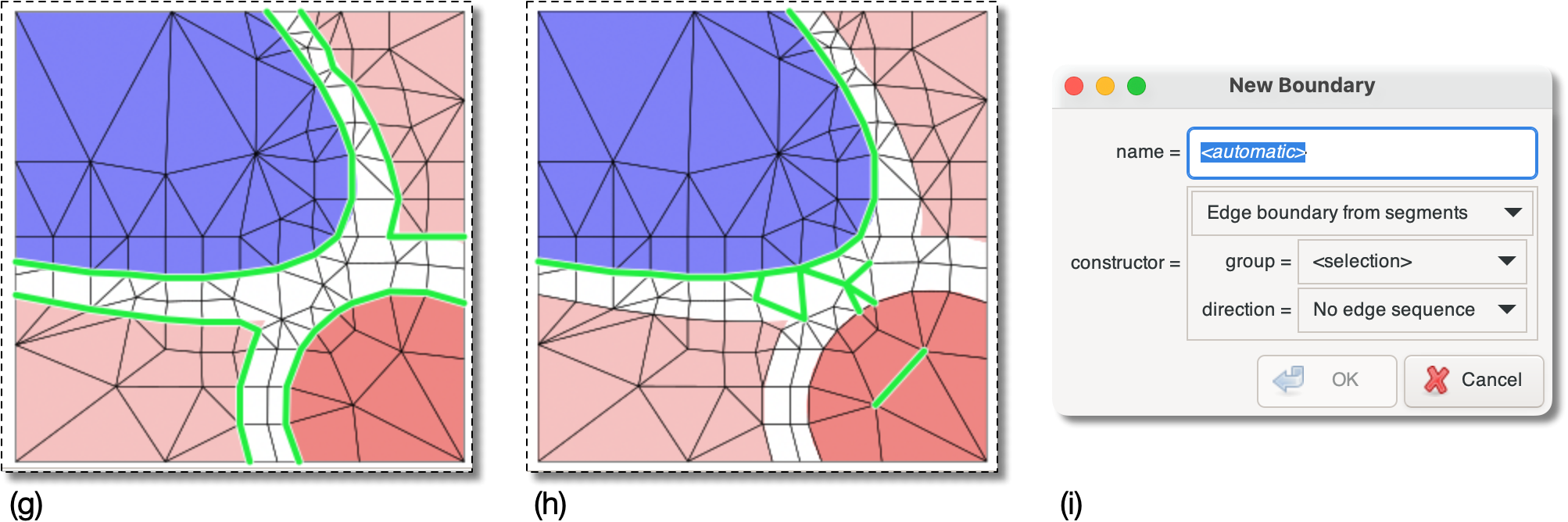
(g & h) The selected Segments in these two examples cannot
be assembled into a simple sequence.
(c) The dialog does not offer any direction and the button is disabled.
[33] They were
selected by creating an Element group for the blue Elements and
using OOF.SegmentSelection.Select_from_Selected_Elements.
[34] A circular Active Area
was created enclosing the red pixels, and
OOF.SegmentSelection.Select_Internal_Boundary_Segments
was used to select the Segments.
|
|
 |
|
Edge boundary from nodes (EdgeFromNodes)
|
 |
Eigenvalue (Eigenvalue) |