
OOF2: The Manual
Edge boundary from elements (EdgeFromElements) |
||
|---|---|---|

|
6.5.2. Subclasses |  |
Name
Edge boundary from elements (EdgeFromElements) — Construct an edge boundary around a set of elements.
Synopsis
EdgeFromElements(group, direction)
Details
-
Base class:
BoundaryConstructor -
Parameters:
group- Construct the boundary from these elements. Type: The name of a element
group,
or the placeholder
selection, referring to the currently selected elements. direction- Direction of Boundary. Type: An object from the
Directorenumerated class.
Description
EdgeFromElements is a BoundaryConstructor, used as the
constructor argument of the OOF.Skeleton.Boundary.Construct command when
building Skeleton boundaries. It
creates Edge
Boundaries from the currently selected Skeleton
Elements or from a group of Elements.
The Elements are specified by the group parameter,
which must be either the name of an Element group or the special
placeholder object,
selection.
The boundary is constructed from the Segments that are on the
perimeter of the given group of Elements. Segments
that are shared by two Elements in the group will not form part of
the boundary. It is not possible to construct an edge boundary from
a set of non-contiguous Elements.
Edge boundaries must be constructed from a single contiguous
non-branching set of Segments, and they must be
directed. Boundary
conditions use the direction to determine the boundary normal
and the direction of applied Fields and Fluxes. The
direction parameter specifies the direction of
the boundary being created. The legal values for
direction generally depend on the topology of the
boundary being constructed. The edges bounding a set of Elements
always form a closed loop, so the legal values of
direction are 'Clockwise'
and 'CounterClockwise'.
Figure 6.71 shows some
examples of edge boundaries created from Elements, and of sets of
Elements from which it's impossible to create boundaries.
Figure 6.71. Constructing an Edge Boundary from Elements
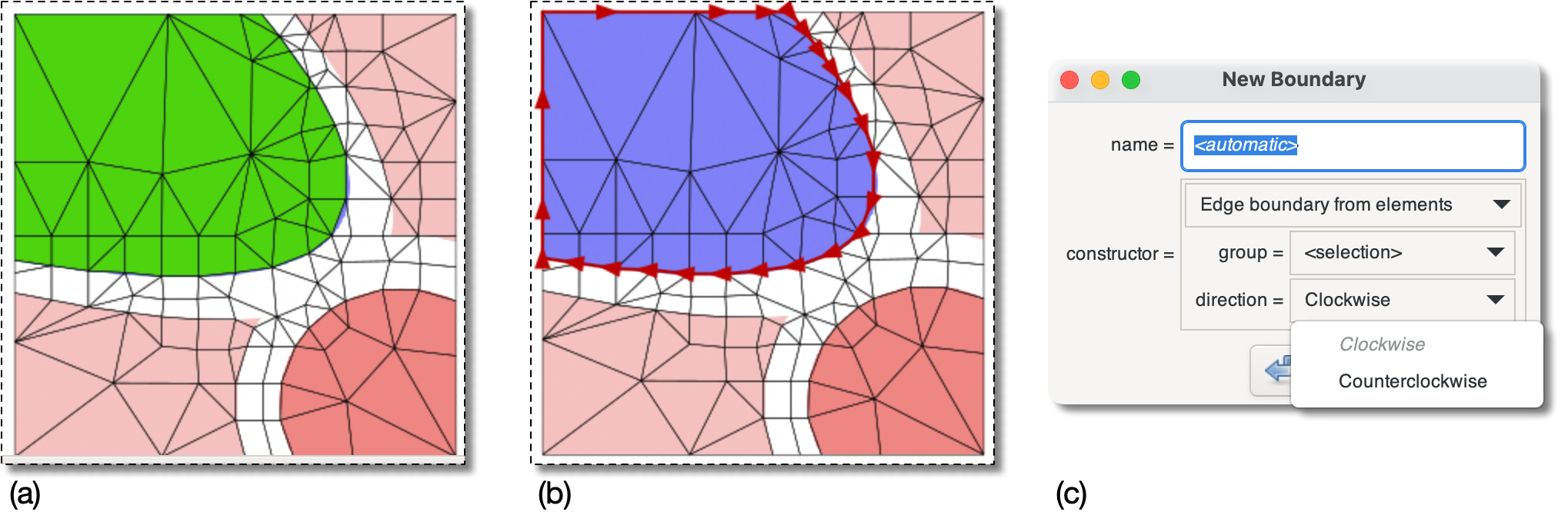
(a) A Skeleton with some selected Elements (in green).
(b) An edge boundary created with
          OOF.Skeleton.Boundary.Construct(
             skeleton='swoops.png:skeleton',
             name='boundary',
             constructor=EdgeFromElements(
                group=selection,
                direction='Clockwise'))
Note that only the outer boundary of the selected elements
has been used to construct the boundary.
(c) The boundary is necessarily closed, so the allowed
directions are Clockwise and
Counterclockwise.
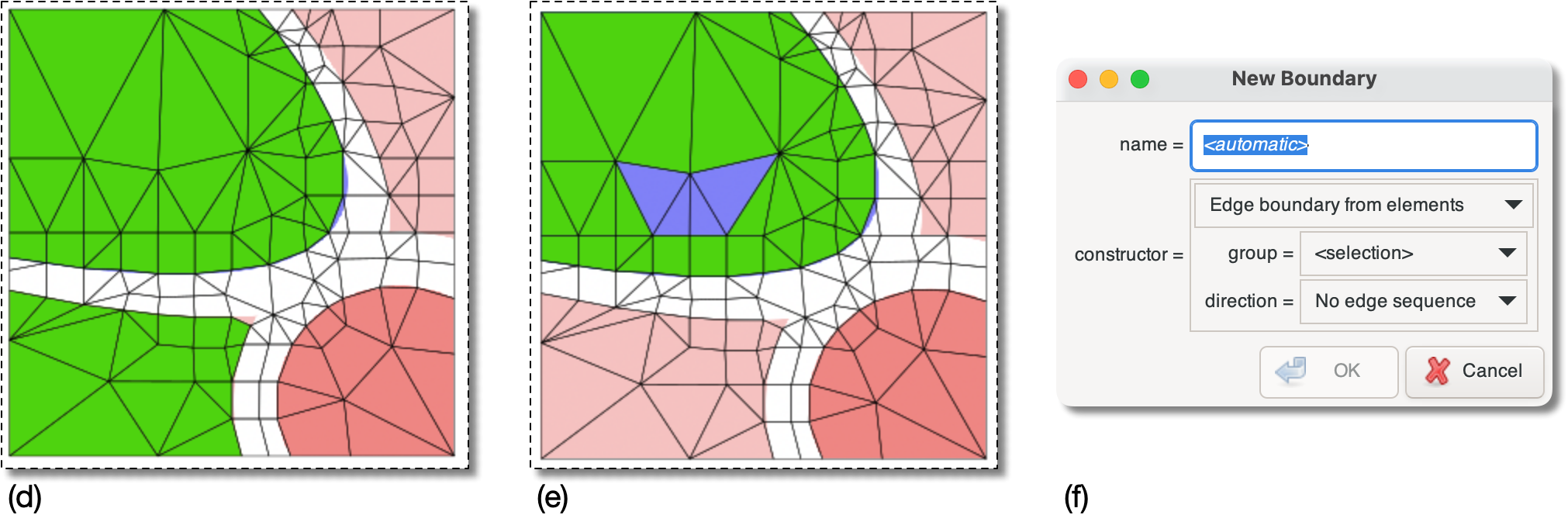
(d) and (e) illustrate Element selections (in green) that
cannot be used to create an edge boundary. The segments on
the exterior of the green regions do not form a single
sequence.
(f) The dialog box now offers no choices for
direction and the
button is disabled.
|
|
 |
|
Discrete Points (DiscretePointSampleSet)
|
 |
Edge boundary from nodes (EdgeFromNodes) |