
OOF2: The Manual
Heterogeneous Segments (CheckHeterogeneousSegments) |
||
|---|---|---|

|
6.5.2. Subclasses |  |
Name
Heterogeneous Segments (CheckHeterogeneousSegments) — Divide heterogeneous segments.
Synopsis
CheckHeterogeneousSegments(threshold, choose_from)
Details
-
Base class:
RefinementTarget -
Parameters:
threshold- Refine segments whose homogeneity is less than this. Type: A real number in the range [0, 1].
choose_from- Segments to consider. Type: An object of the
SegmentChooserclass.
Description
The Skeleton refinement process is
ultimately driven by Segments — the refinement rule for each element is determined
solely by number and configuration of marked Segments in the
element. CheckHeterogeneousEdges directly
marks heterogeneous Segments for refinement. Segment homogeneity
is defined in Section 2.4.4.
All Segments whose homogeneity is less than the given
threshold will be refined, as long as they're in
the set described by the choose_from parameter.
(choose_from is a SegmentChooser object that can restrict
the scope of the refinement. Leave it set to FromAllSegments for unrestricted
operation.)
Figure 6.70 shows Segments that have
been marked for refinement with threshold=0.9 and
choose_from=FromAllSegments(), and the result of
refining those segments (with divider=Bisection and
rules==Quick).
Figure 6.70. Refining Heterogeneous Segments
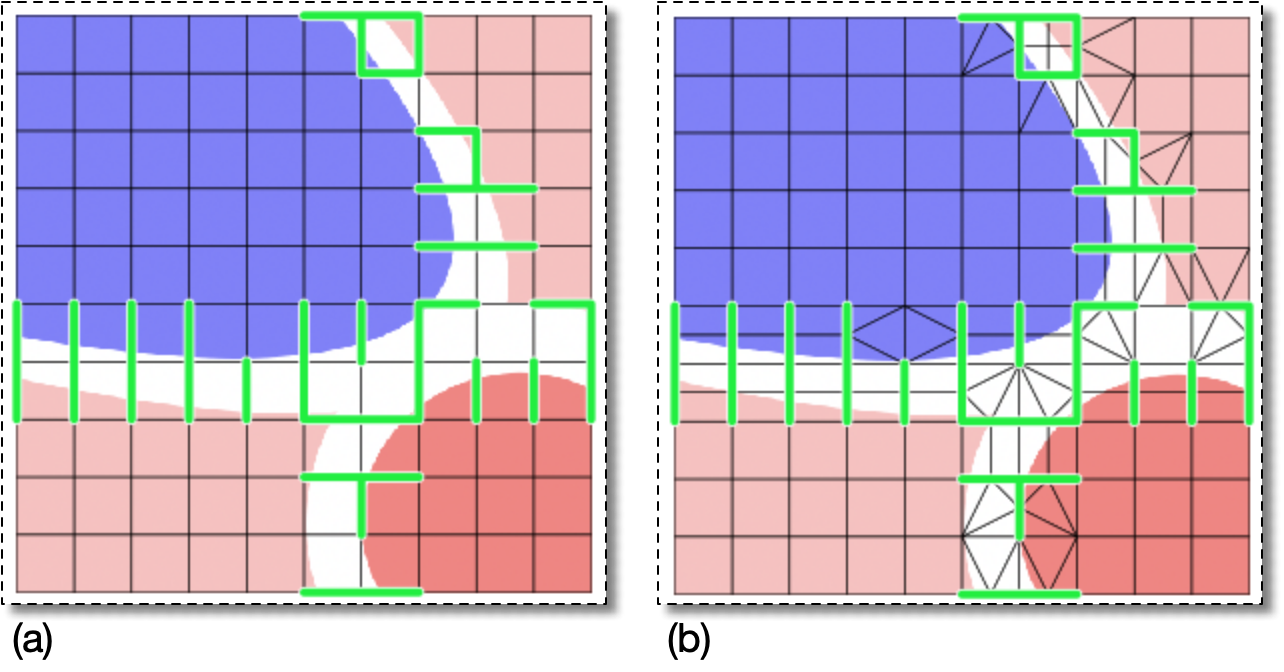
(a) A Skeleton with inhomogeneous Segments highlighted in green.
(b) The result of refining the inhomogeneous Segments with the
command
OOF.Skeleton.Modify(
             skeleton='swoops.png:skeleton',
             modifier=Refine(
                targets=CheckHeterogeneousSegments(threshold=0.9,choose_from=FromAllSegments()),
                divider=Bisection(minlength=2),
                rules='Quick',
                alpha=0.3))
|
|
 |
|
Elements In Group (CheckElementsInGroup)
|
 |
Heterogeneous Elements (CheckHomogeneity) |