
OOF2: The Manual
| OOF.Image.Modify.Edge | ||
|---|---|---|

|
6.2. Menus |  |
Name
OOF.Image.Modify.Edge — Use a Sobel filter to find edges in an image.
Synopsis
OOF.Image.Modify.Edge(image, mode)
Details
- Parent Menu: OOF.Image.Modify
-
Callback: function
doImageModin moduleooflib.image.imagemodifier -
Parameters:
image- Type: The path to an existing
Imageobject. mode- Operate on RGB channels separately, or only the V from HSV. Type: An object from the
ModifierModeenumerated class.
Description
Find edges in an Image using a Sobel filter, via the scikit-image
skimage.filters.sobel routine.
Figure 6.35. Detecting Edges in an Image
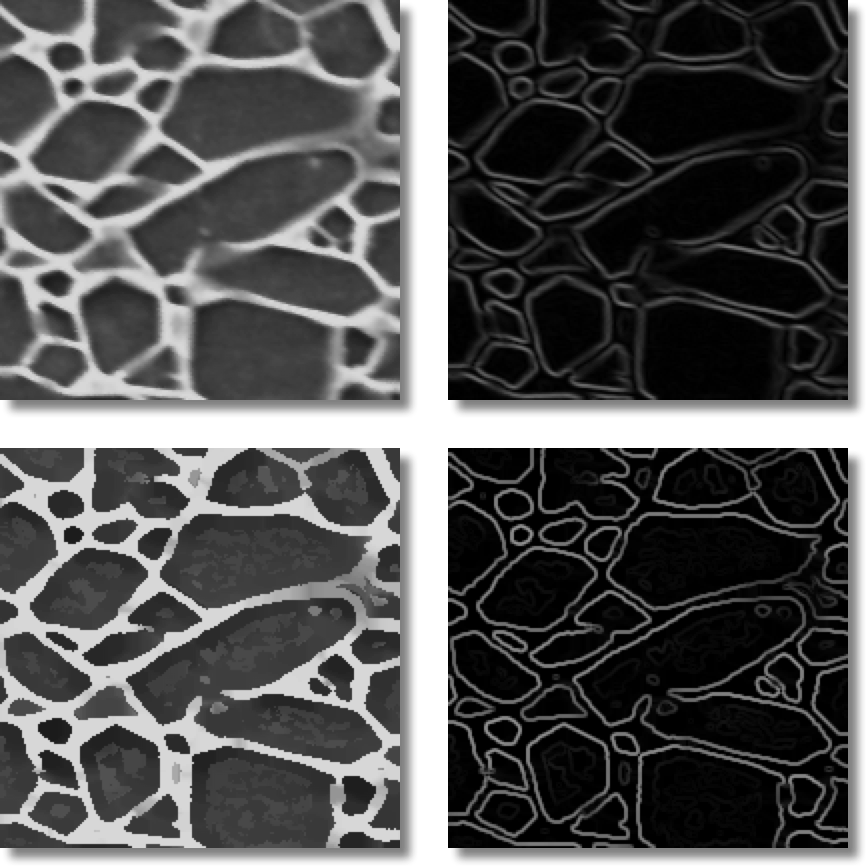
The image on the top left is a micrograph of Si3N4 (courtesy of C.-H. Hsueh). The image to its right is the result of applying Edge to it. In places the edges are not clearly distinguished from the background.
The image on the bottom left is the result of applying the Contrast modifier to the original micrograph, and the image to its right is the result of applying Edge to that. The edges are much clearer.
|
|
 |
|
| OOF.Image.Modify.Dim |  |
OOF.Image.Modify.Equalize |