
OOF2: The Manual
| OOF.Graphics_n.Toolbox.Select_Node.Circle | ||
|---|---|---|

|
6.2. Menus |  |
Name
OOF.Graphics_n.Toolbox.Select_Node.Circle — Drag to select nodes within a circle.
Synopsis
OOF.Graphics_n.Toolbox.Select_Node.Circle(skeleton, points, shift, ctrl)
Details
- Parent Menu: OOF.Graphics_n.Toolbox.Select_Node
-
Callback: function
SkelSelectToolbox.selectCBin moduleooflib.common.IO.genericselecttoolbox -
Parameters:
Description
CircleNodeSelect is a selection
method that selects Nodes in response to a mouse click in
the graphics window when the
Skeleton
Selection toolbox is active and is set to “Node”
mode. It selects all Nodes lying within a circle swept out by
dragging the mouse, as shown in Figure 6.25. Click the mouse in the center of
the circle and drag out along a radius.
skeleton is the Skeleton from which the Nodes are
to be selected.
points is a list of
Point objects. The first point in the
list is the center of the circle, and the second point is a point
on the circumference. Any other points in the list will be ignored.
The shift and ctrl parameters
govern how the current selection
(i.e, the set of Nodes defined by
this operation) is merged with the previous selection (the Nodes
already selected) to form a new selection, as shown in Table 6.1. They indicate whether
(True) or not (False)
the shift and control keys were depressed during the mouse click
that initiated this command.
Figure 6.25. Selecting a Circular Set of Nodes
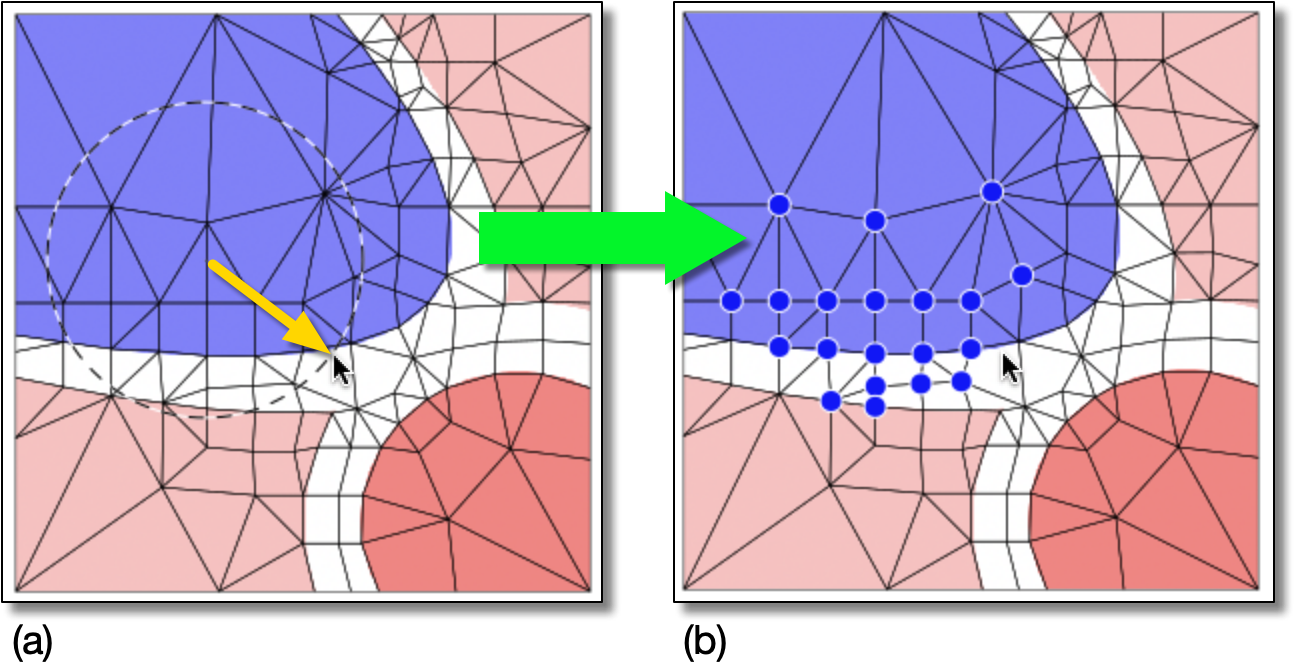
(a) Click on the center of the circle and drag to the desired radius, as shown by the yellow arrow.
(b) The Nodes within the circle are selected.
|
|
 |
|
| OOF.Graphics_n.Toolbox.Select_Element.Undo |  |
OOF.Graphics_n.Toolbox.Select_Node.Clear |