
OOF2: The Manual
| 5.2. Activity Viewer | ||
|---|---|---|

|
Chapter 5. Auxiliary Windows |  |
The Activity Viewer indicates the status of major OOF2 operations. Every task that might potentially take a long time to complete draws a progress bar in the Activity Viewer window. The window is shown in Figure 5.2.
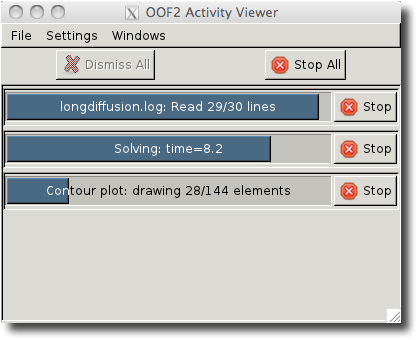
Each task puts two items in the Activity Viewer Window: a progress bar, a button, and a description. The progress bar indicates how far the task is from completion, if possible. Some tasks are open ended, and their progress bars just indicate that they're still going. Each progress bar includes some text that describes the task and, when relevant, how much work it's completed and how much work it has left to do. The button can be pressed to interrupt and abort the task.
After a task finishes, the button changes to a button. Clicking the button removes the task from the Activity Viewer. (But see AutoDismiss, below.)
The Settings menu in the Activity Viewer's menu bar contains two items:
-
AutoDismiss controls whether or not progress bars for completed tasks remain in the window, or if they disappear immediately without waiting for their buttons to be pressed. The default setting is for them to disappear immediately.
-
DelayProgressBarCreation brings up a dialog for setting the progress bar delay time. Progress bars are not created immediately when a task starts. OOF2 waits for a bit so that the Activity Viewer is not cluttered with progress bars for short tasks. The delay time determines how long it waits. The default value is 2 seconds.
The button at the top of the Activity Viewer window closes all completed progress bars. The stops all current tasks.
The Activity Viewer window appears automatically the first time an OOF2 task creates a progress bar. If the window is closed, it won't reappear automatically, but it can be resurrected with the Activity Viewer command in any OOF2 OOF.Windows menu. Only one Activity Viewer window may be open at a time.
If OOF2 is started with the --unthreaded
option, the Activity Viewer will be unavailable.
|
|
 |
|
| Chapter 5. Auxiliary Windows |  |
5.3. Console |