OOF2: The Manual
| placeholder | ||
|---|---|---|

|
6.7. Other Objects |  |
Name
placeholder — Placeholder arguments for groups, times, etc.
Description
Placeholders are used to signify certain abstract sets of objects or times. The program resolves the placeholder into an actual value before using it.
Group Placeholders
OOF2 often gives the user a choice between operating upon
objects stored in a named group
(e.g, pixel
groups or Node groups) or upon
the current selection (e.g, the
pixel
selection), or upon all of the existing objects
(e.g, every pixel in a
Microstructure or all the Nodes in a Skeleton). In such situations,
the GUI presents a pull down menu containing the names of the
relevant groups and two additional
placeholder entries,
<selection> and
<every>, as shown in Figure 6.120. Choosing
<selection> applies the operation to
the current selection. Choosing <every>
applies the operation to all objects.[41]
Figure 6.120. The selection placeholder
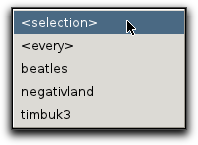
A menu listing a bunch of groups, plus the placeholders <selection> and <every>.
Time Placeholders
When computing outputs
or displaying a
Mesh whose time evolution has been computed, it's necessary
to specify the time at which the operation should be
performed. The time can be a floating point or integer
number, or the placeholders
<earliest> or
<latest>. The placeholders refer
to the earliest and latest times stored in the current Mesh.
In graphics window Layers,
<latest> doesn't always mean
“latest”. If the when
parameter for a Layer is set to
<latest>, the layer will be drawn
at the time set by the window's time controller, or at
the animation time, if the window is being animated.
Placeholders in scripts and the GUI
The placeholders are shown with angle brackets (< and >)
in the GUI to distinguish them from groups that a perverse user
might have named “selection” or
“every”. In scripts, group names always appear in
quotation marks, and the placeholders are simply predefined
Python variables, selection and
every. They should be entered without
quotation marks, such as in this command to assign a Material
to the currently selected pixels:
	    OOF.Material.Assign(material='material',
	    microstructure='microstructure',
	    pixels=selection)
The following command, on the other hand, assigns a Material
to all pixels in the group (perversely) named
“selection”:
	    OOF.Material.Assign(material='material',
	    microstructure='microstructure',
	    pixels='selection')
[41]
Before version 2.1, the every was
called all. In scripts, a value of
all is still accepted, but it is
discouraged.
|
|
 |
|
| Point |  |
automatic |