OOF2: The Manual
| automatic | ||
|---|---|---|

|
6.7. Other Objects |  |
Name
automatic — Set parameters automatically
Description
Many OOF2 parameters can be set automatically when you cannot
or will not do it yourself. For example, the default name of a
new Skeleton is skeleton. The default
value of the max parameter in a contour
plot is the largest data point. To use the default value
of a parameter, set it to automatic.
In text mode, automatic should always be
entered without quotation marks. In
graphics mode, GUI input widgets for parameters that can be set
to automatic contain a checkbox to turn
automatic behavior on and off, as shown in Figure 6.121.
Figure 6.121. An Automatic Widget
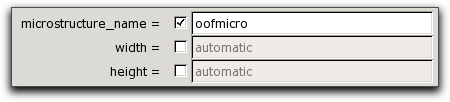
Three automatic widgets, from the OOF.Microstructure.Create_From_ImageFile
dialog box. The checkboxes between the equals signs and
the input fields determine whether the parameter is set to
automatic or not. Here,
microstructure_name is not automatic,
and a value has been entered for
it. width and height
are set to automatic, and their text
input fields are inactive.
If a name needs to be unique, automatically generated names may
have <x> appended to them, just
like other names do, as explained in Note.
|
|
 |
|
| placeholder |  |
ProfileFunctionX, ProfileFunctionXT |