OOF2: The Manual
| OOF.Image.Modify.Reilluminate | ||
|---|---|---|

|
6.2. Menus |  |
Name
OOF.Image.Modify.Reilluminate — Adjust brightness so that the whole image is evenly illuminated.
Synopsis
OOF.Image.Modify.Reilluminate(image, radius)
Details
- Parent Menu: OOF.Image.Modify
-
Callback: function
doImageModin moduleooflib.image.imagemodifier -
Parameters:
image- Type: The path to an existing
Imageobject. radius- Radius of the averaging region in pixels. Type: Integer.
Description
Compensate for uneven lighting in an Image. The average
brightness in a circular neighborhood of size
radius around each pixel is compared to the
average brightness of the whole Image, and the pixel value is
scaled by the resulting ratio. The radius is
specified in units of the pixel size, and should be large compared
to the size of the features in the image, but small compared to the
size of the image itself.
Figure 6.41. Reilluminating an Image
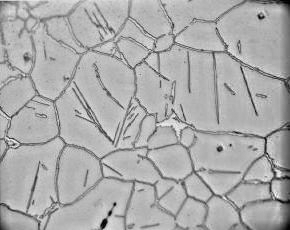
A micrograph of cementite and austenite phases in steel
(courtesy of M. Kral) on top, and the result of reilluminating
it with three different values of radius.
The image is 290 × 230 pixels.
|
|
 |
|
| OOF.Image.Modify.Normalize |  |
OOF.Image.Modify.Sharpen |