
OOF2: The Manual
| 3.17. Boundary Analysis | ||
|---|---|---|

|
Chapter 3. Task Pages |  |
The Boundary Analysis Page computes quantities on the boundaries of a (presumably solved) mesh. This information can be used to compute the effective properties of materials. The page is simply a GUI for the OOF.Mesh.Boundary_Analysis command. Although it is similar in spirit to the Analysis Page, it is substantially simpler because there are fewer operationa and fewer choices for domain and sampling.
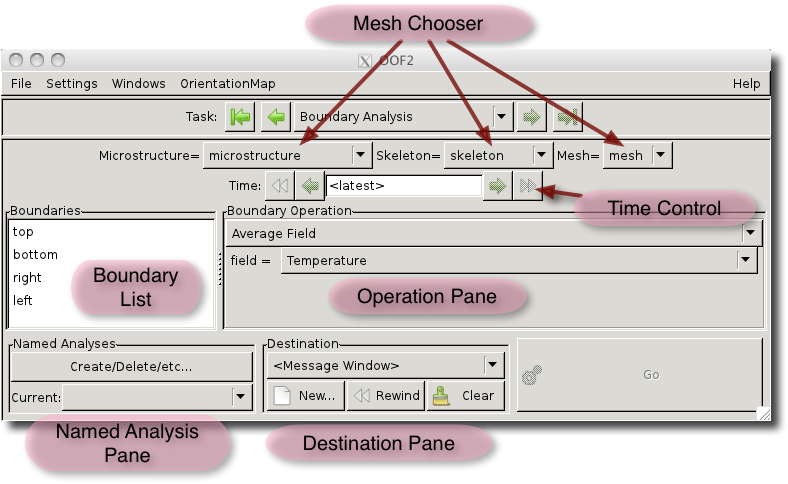
As shown in Figure 3.29, at the top
of the page is a Mesh Chooser, consisting of a set of pull-down
menus for choosing the Mesh (and its Skeleton and Microstructure) to
analyze. The Time Chooser below it works identically to the one
on the Analysis
Page.
Below the Time Chooser are two panes: the one on the left contains a list of boundaries, and the one on the right contains a pull-down menu listing the kinds of computations that can be done on the boundaries. The computations are different kinds of MeshBdyAnalyzer.
A computation is done by choosing a boundary on the left, an analysis method on the right, and pressing the button. The results will be sent to the destination (file or message window) set by the Destination Pane at the bottom of the window. The Destination Pane is identical to its counterpart in the Analysis Page.
Named Analyses can be created and retrieved here in the same way that they can be created on the Analysis Page, although the underlying menu commands are different. This page uses OOF.Mesh.Boundary_Analysis.Create to create a new Named Analysis, OOF.Mesh.Boundary_Analysis.Delete to delete one, and OOF.Mesh.Boundary_Analysis.SaveAnalysisDefs to save one or more.
|
|
 |
|
| 3.16. Analysis |  |
Chapter 4. The Graphics Window |