
OOF2: The Manual
| 3.12. The Fields & Equations Page | ||
|---|---|---|

|
Chapter 3. Task Pages |  |
The Fields & Equations Page specifies which Fields are
defined on the Mesh which Equations are active. It has three
parts, as shown in Figure 3.20. The
Subproblem Chooser at the top of the page specifies which
SubProblem is being operated upon. The Field Pane sets various
properties of the Fields. The Equation Pane activates
Equations.
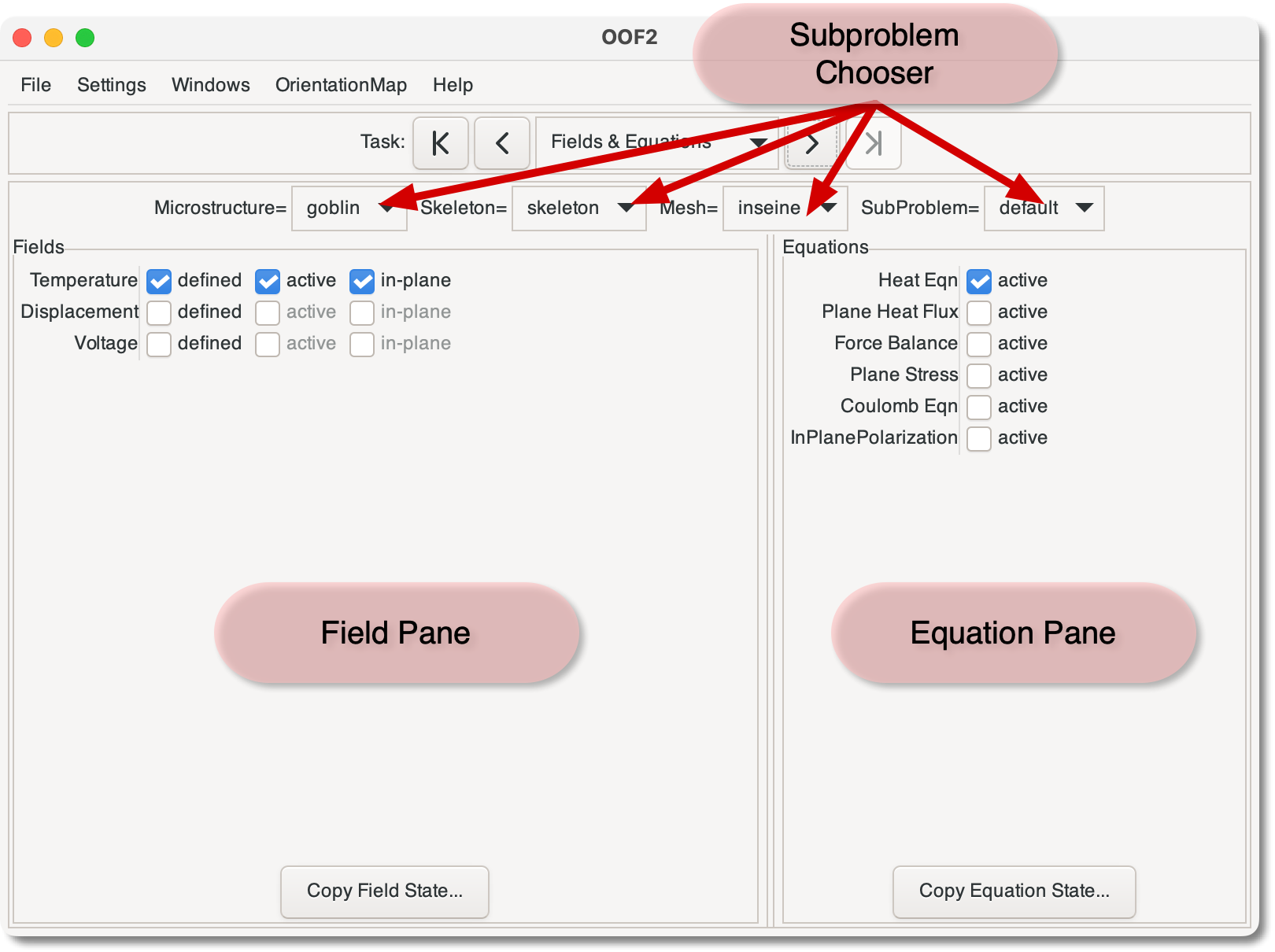
The Field Pane specifies which Fields are defined on the
SubProblem, and sets attributes of those Fields. The
checkboxes for each Field correspond to commands in the OOF.Mesh.Field menu.
-
Toggling the checkbox defines and undefines the
Field. TheMeshonly stores values for definedFields. -
Toggling the checkbox activates and deactivates the
Field. TheEquationsonly solve for activeFields. -
OOF2 generalizes the standard concept of plane-strain to apply to arbitrary coupled
Fields. Toggling the button determines whether or not theFieldhas out-of-plane derivatives, by invoking OOF.Mesh.Field.In_Plane or OOF.Mesh.Field.Out_of_Plane. The counterpart to generalized plane-strain, plane-flux, is invoked by activating the appropriate equation in the Equation Pane.A
Fieldthat is in-plane on oneSubProblemin aMeshmust be in-plane on allSubProblemsin thatMesh. Toggling the for a field in oneSubProblemwill change its state in allSubProblems.
The button at the bottom
of the pane allows the current set of checkbox settings to be
copied to another SubProblem, possibly in another Mesh.
The Equation Pane simply contains a list of the Equations that
OOF2 can solve, and checkboxes which activate
and deactivate
them for the current SubProblem. Equations will be solved
only if they are active, if the Fields they use are defined,
and if there are Material Properties in the SubProblem
that make contributions to them.
The button at the
bottom of the pane copies the current set of active Fields to
another SubProblem, possibly in a different Mesh.
|
|
 |
|
| 3.11. The FE Mesh Page |  |
3.13. The Boundary Conditions Page |