
OOF2: The Manual
| 7.2. External Extensions | ||
|---|---|---|

|
Chapter 7. Extending OOF2 |  |
This section describes how to create external OOF2 extensions. External extensions are defined outside of the OOF2 source directory hierarchy and are not built or installed when OOF2 is built and installed. Therefore they are a bit more difficult to work with, but they don't require write-access to the OOF2 source code.
This section describes three way of building extensions. There's no fundamental reason that external OOF2 extensions must be built using the procedures and naming conventions described here. Other techniques certainly exist, and users who are proficient with swig and CMake, or can do without them, should feel free to do it their own way. The methods described here should be easy for most users and should suffice in almost all cases, though.
If an extension consists only of Python files, you can load
them with OOF.File.Load.Script.
The extension mechanism described here is not needed. Or you
can arrange the files into a subdirectory with an
__init__.py file, put the subdirectory
into the Python path (see Section 7.4.1) and import the
extension with OOF.File.Load.Module.
Figure 7.2 shows the directory
layout for a simple extension, with the source files on the
left and the installed executable files on the right. The
extension developer must provide all of the source files.
This section describes how to construct
CMakeLists.txt. The other files are
described in Chapter 8.
The top level source directory,
extension_source can be located anywhere.
The installation directory, however, must be in the Python
path. Its name can be anything convenient and does
not have to be the name of the extension.
The installation directory can contain other code — it
does not have to be devoted only to OOF2.
Figure 7.2. Simple Extension Directory Layout
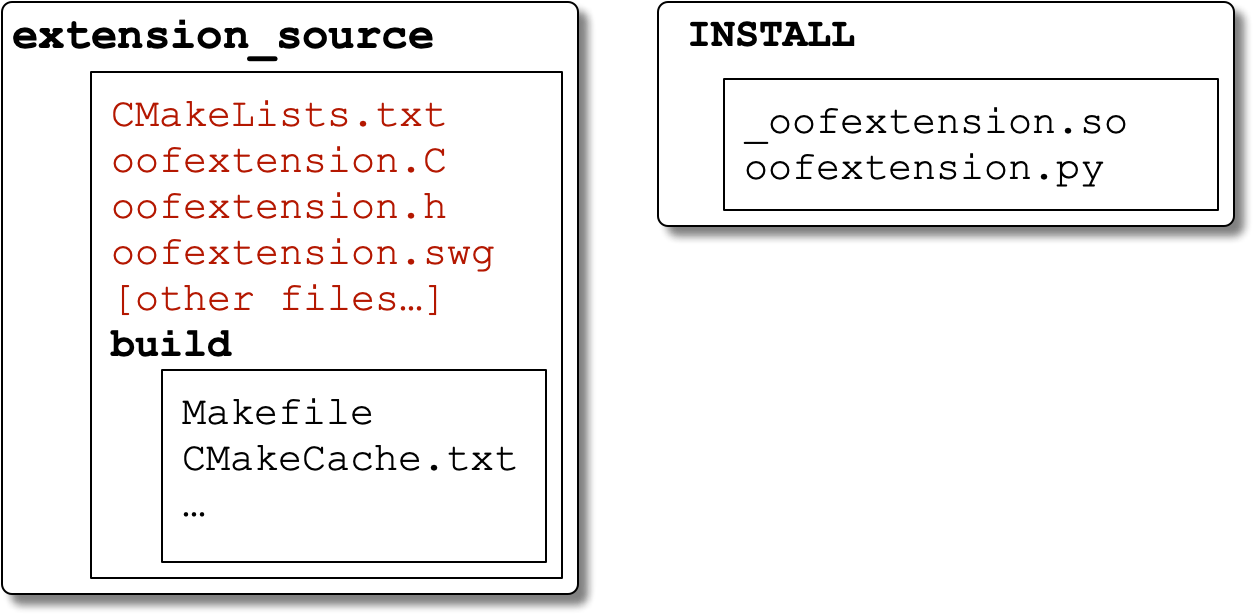
The directory structure for a simple OOF2 extension,
with the source directory on the left and the installation
directory on the right. Directory names are in bold type.
Files with names in red are created by the
developer. “Other files” could include Python
scripts that are imported into
oofextension.py or additional C++
files that contribute to
_oofextension.so. INSTALL is a
directory in the Python path.
The CMakeLists.txt file contains
instructions for CMake. Copy the text from Example 7.1 into a file named
CMakeLists.txt in the source
directory. Edit the file as needed. Please note the numbered
comments at the end of the Example 7.1. At the
very least
-
Change all instances of
PREFIXto the OOF2 installation location, i.e, the value ofCMAKE_INSTALL_PREFIXused to build OOF2. For example, if the top OOF2 executable script is/usr/local/bin/oof2, thenPREFIXis/usr/local. -
Change all instances of
oofextensionto the name of your extension files. If your files areabcde.h,abcde.C,abcde.swg, etc, then replaceoofextensionwithabcde.
Example 7.1. CMakeLists.txt for a simple extension
cmake_minimum_required(VERSION 3.18) #project(projectname VERSION 0.0.0) #
set(OOF2_PYTHON_VERSION 3.11 CACHE STRING "Use this version of Python") #
include("PREFIX/share/oof2/tools/oofbuildtools.cmake") #
find_library(OOF2COMMON oof2common PREFIX/lib) #
find_library(OOF2ENGINE oof2engine PREFIX/lib) mark_as_advanced(OOF2COMMON OOF2ENGINE) #
swig_sources( #
SWIGFILES oofextension LIBRARIES ${OOF2COMMON} ${OOF2ENGINE} INCLUDE_DIRECTORIES PREFIX/include/oof2 ${Python3_INCLUDE_DIRS} SOURCES oofextension.C SWIGDEST ${CMAKE_INSTALL_PREFIX} )
|
|
OOF2 uses some features from CMake 3.18. Older versions might be usable for extensions. |
|
|
|
|
|
These version numbers should match the versions that were used when OOF2 was built. |
|
|
This line loads settings and functions used when building OOF2. |
|
|
If you need to link to other OOF2 libraries, or
any other libraries at all, add new lines for them
here, and include the libraries in the
|
|
|
This line is optional. It prevents
|
|
|
|
To compile and install an extension built this way, see the instructions in Section 7.3. To use it within OOF2, see Section 7.4.
This section describes how to build a set of extensions that use multiple C++ and swig source files, which are distributed across multiple directories. The files are installed into a package named “oofextensions”, which resides in a directory that is part of the Python path. The file layout is illustrated in Figure 7.3. Each extension has its own subdirectory.
Figure 7.3. Less Simple Extension Directory Layout
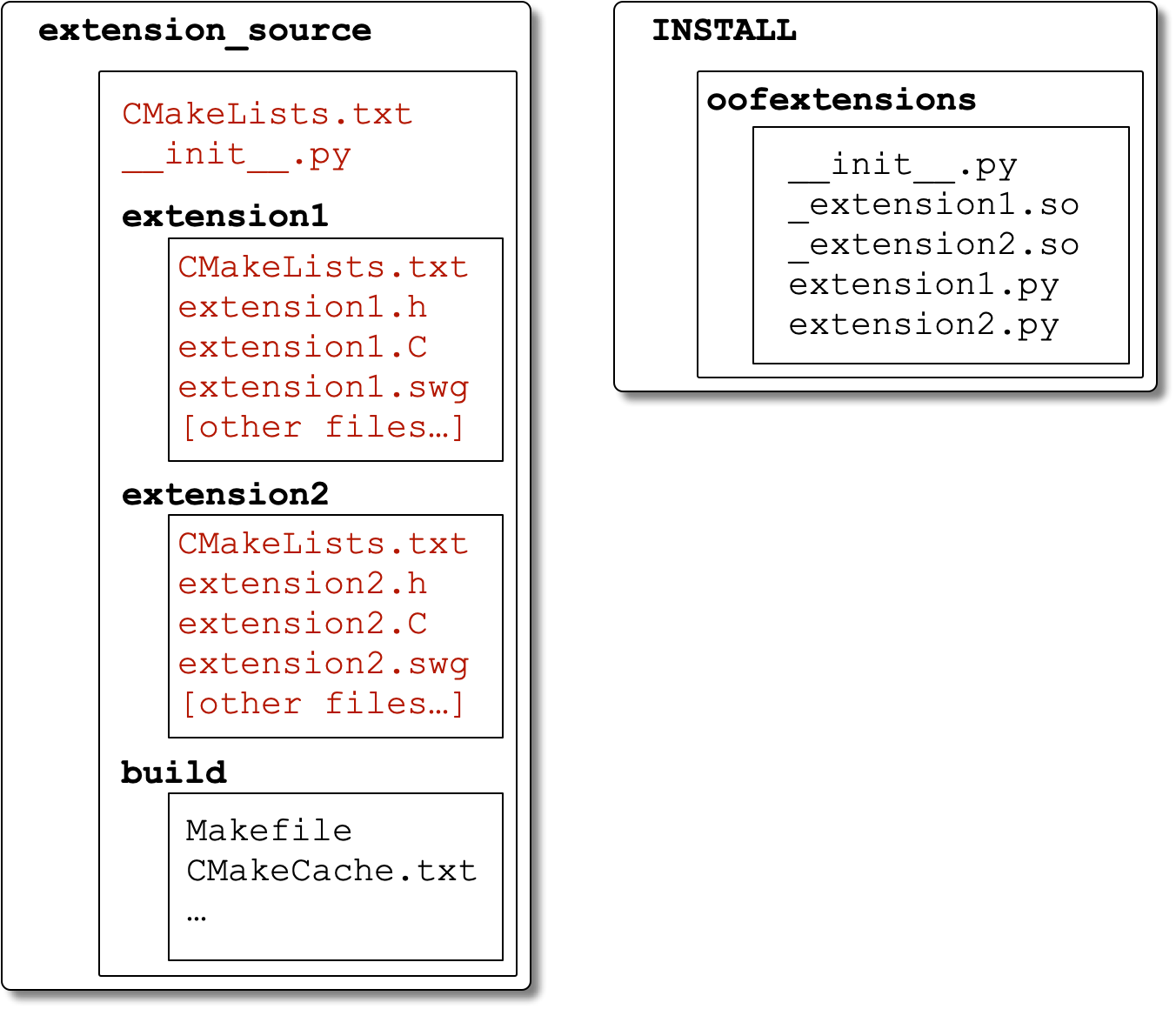
The directory structure for a compound OOF2
extension, with the source directory on the left and
the installation directory on the right. Directory
names are in bold type. Files in red are created by
the developer. INSTALL is
a directory in the Python path.
This isn't much more complicated than the previous example.
The differences are that every source directory and
subdirectory needs its own CMakeLists.txt
file, and there needs to be an
__init__.py file to tell Python that the
files contained in the installation directory are part of a
package.
The top directory in the extensions' hierarchy needs to
contain two files, CMakeLists.txt and
__init__.py, along with the
subdirectories for each extension.
CMakeLists.txt.
The top level CMakeLists.txt file (in
the extension_source directory in
Figure 7.3) is just like the
beginning of the file in Example 7.1. Copy
the lines from Example 7.2 to a file called
CMakeLists.txt in your source
directory and make the indicated changes. Everything in
bold type in the example should be changed.
Example 7.2. Top level CMakeLists.txt for a set of extensions
cmake_minimum_required(VERSION 3.18) project(oofextensions VERSION 0.0.0) #
|
|
In this example, the project name is used as the name of
the installed Python package. See |
|
|
These version numbers should match the versions that were used when OOF2 was built. |
|
|
Change |
|
|
This installs the top level
|
|
|
All subdirectories containing extensions should be listed here. |
__init__.py.
The __init__.py file in the
installation directory is copied directly from the source
directory. It tells Python to treat the directory as a
package and optionally tells it to import the modules for
the subdirectories. For example, using the file names
from Figure 7.3, if
__init__.py contains the single line
from . import extension1, extension2 then both extensions will be loaded if you type
import oofextensions
in the OOF2
Console
Window. However, if
__init__.py is empty, the
extensions will each have to be loaded explicitly,
e.g, by typing
            import oofextensions.extension1
            import oofextensions.extension2
in the Console Window.
A third possibility is for
__init__.py to contain the line
__all__ = ["extension1", "extension2"] which will allow both extensions to be loaded with
from oofextensions import *
Each of the subdirectories in Figure 7.3 must contain its own
CMakeLists.txt file, along with the
source code files (which will be discussed in Chapter 8). To create the
CMakeLists.txt files, copy the text
from Example 7.3 to each subdirectory, with
the following changes:
-
Change
extension1to the name of the swig file (without its extension) in the subdirectory. -
Change
PREFIXto the OOF2 installation prefix, as inCMakeLists.txtin the parent directory.
|
|
This is the name of the swig source file, minus its suffix. |
|
|
Replace |
|
|
All C++ files that need to be compiled must be listed here. Files generated by swig should not be included. |
|
|
This is where the files will be installed.
|
When adding multiple extensions that share code between
themselves, the common code should be put into a shared
library, and not included in the
swig_sources call for the extension modules
themselves. To build the shared library, add the following
code to the CMakeLists.txt file in one
of the extension directories:[54]
|
|
Substitute the name of the shared library for
|
|
|
The name on this line should be the name from |
|
|
List all of the C++ source files here. |
|
|
Again, replace |
In addition, add libname to the
LIBRARIES list in the swig_sources
calls, for all extensions that use the library:
swig_sources(
  SWIGFILES
  ...
  LIBRARIES
  ${OOF2COMMON} ${OOF2ENGINE} libname
  ...
  )
Extensions defining new versions of some OOF2 Properties
can be easily created from templates. The templates are
installed in PREFIX/share/oof2/templates,
where PREFIX is the OOF2 installation
prefix (the value of CMAKE_INSTALL_PREFIX
used when OOF2 was built). The templates defined for a
variety of nonlinear and nonconstant material Properties
allow the user to specify the form of the nonlinearity or
nonconstancy without worrying about the other technical
details of writing an extension.
The steps required to use the templates are:
-
Build and install OOF2 with the
OOF2_DEV_INSTALLoption. This will create an executable python script namedoof2-extension-setupin thePREFIX/bin(the same location as the OOF2 executable). -
Run oof2-extension-setup to create an editable copy of the template files. It lets you choose what type of
Propertyto create and sets simple things like the directory name, module name, and class name. It will create a directory containing aCMakeLists.txtfile and a subdirectory containing source files. See oof2-extension-setup for the details. -
This is the hard part. Edit the source files created by oof2-extension-setup, in the
sourcesubdirectory, adding the code that makes yourPropertyunique. Comments in the source files describe what you need to do. Chapter 8 will help as well. -
Run ccmake in the build directory to build and install the extension, as described in Section 7.3.
-
Run OOF2 and load the extension, as described in Section 7.4.
[54] You can put
the code in a new directory if you prefer. Just make sure
that CMakeLists.txt in the extension's
top directory includes the new directory via a
add_subdirectory call.:
|
|
 |
|
| Chapter 7. Extending OOF2 |  |
7.3. Compiling and Installing External Extensions |