
OOF2: The Manual
| OOF.NodeSelection.Select_from_Selected_Elements | ||
|---|---|---|

|
6.2. Menus |  |
Name
OOF.NodeSelection.Select_from_Selected_Elements — Select nodes from selected elements.
Synopsis
OOF.NodeSelection.Select_from_Selected_Elements(skeleton, internal, boundary)
Details
- Parent Menu: OOF.NodeSelection
-
Callback: function
modifyin moduleooflib.engine.skeletonselectionmod -
Parameters:
skeleton- Type: The path to an existing
Skeletonobject. internal- Select interior nodes?. Type: Boolean: True or False.
boundary- Select exterior nodes?. Type: Boolean: True or False.
Description
OOF.NodeSelection.Select_From_Selected_Elements
provides three ways of selecting Nodes based on a pre-existing
Element selection. The two parameters internal
and boundary control which Nodes will be
selected. If internal is
True, then the Nodes that are completely
surrounded by selected Elements will be selected. If
boundary is True, then
Nodes that are not completely surrounded by
selected Elements will be selected.
Figure 6.46. Selecting Nodes from the Selected Elements
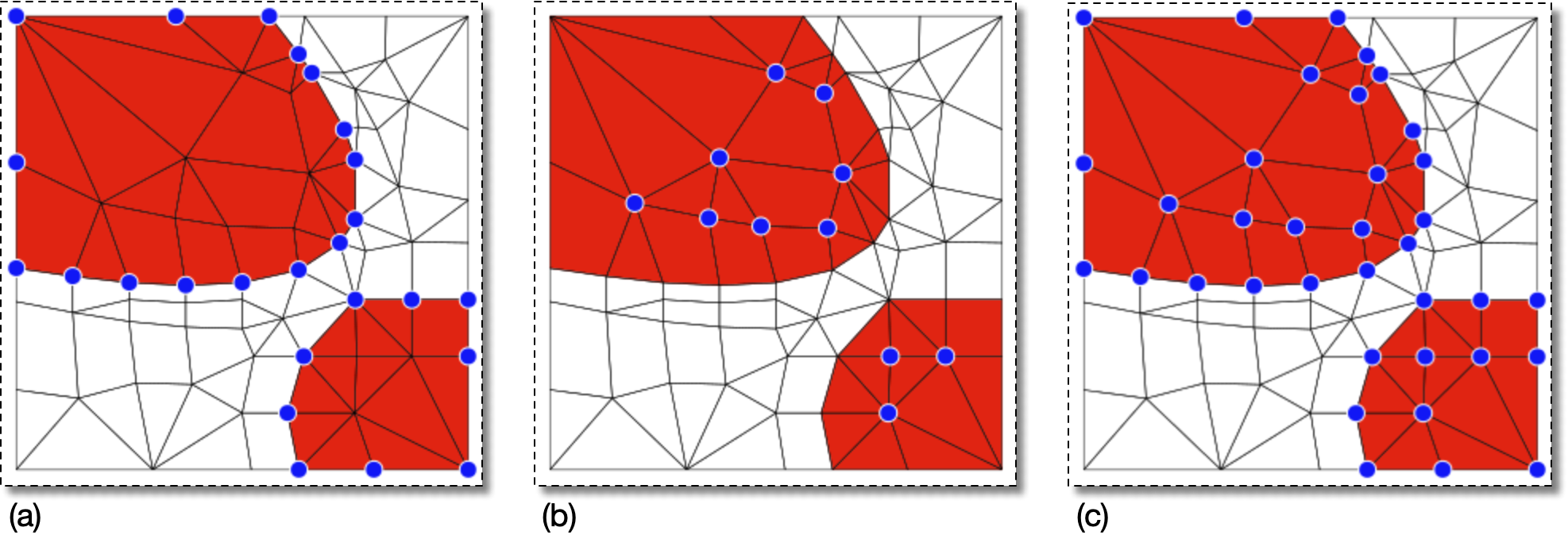
The selected Elements are shown in red.
(a) With boundary=True and
internal=False, only the Nodes (blue dots) on
the perimeter of the set of selected Elements are selected.
(b) With boundary=False and
internal=True, only the Nodes in the interior
of the Element set are selected.
(c) With both parameters True, all nodes that are
part of a selected Element are selected.
|
|
 |
|
| OOF.NodeSelection.Select_Periodic_Partners |  |
OOF.NodeSelection.Select_from_Selected_Segments |