
OOF2: The Manual
| OOF.NodeSelection.Select_Internal_Boundaries | ||
|---|---|---|

|
6.2. Menus |  |
Name
OOF.NodeSelection.Select_Internal_Boundaries — Select all nodes on material or group boundaries.
Synopsis
OOF.NodeSelection.Select_Internal_Boundaries(skeleton, ignorePBC)
Details
- Parent Menu: OOF.NodeSelection
-
Callback: function
modifyin moduleooflib.engine.skeletonselectionmod -
Parameters:
skeleton- Type: The path to an existing
Skeletonobject. ignorePBC- Ignore periodicity?. Type: Boolean: True or False.
Description
Select all the Nodes on the internal boundaries of the Skeleton.
These are the Nodes that are part of Elements that have different
dominant pixel
categories. That is, the dominant pixel types within the
Elements have different assigned Materials or belong to different
pixel
groups.
Note that the resulting Node selection does not include Nodes
that are on the exterior of the Microstructure, except where an interior
boundary reaches the perimeter.
Figure 6.45. Selecting Internal Boundary Nodes
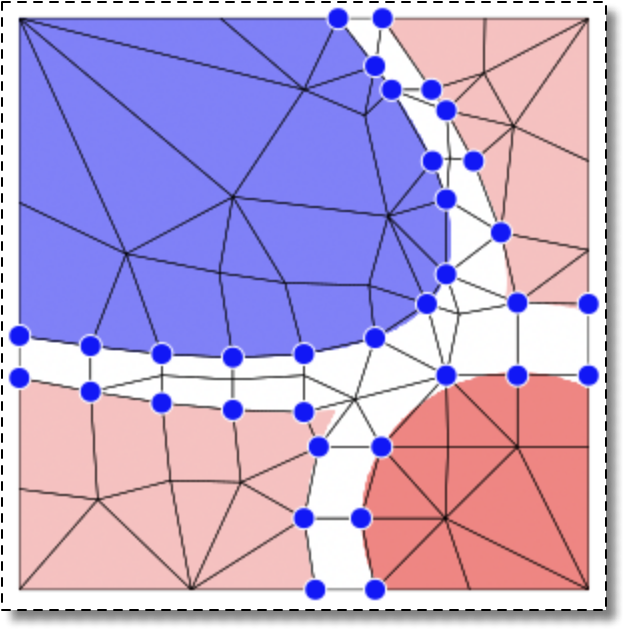
With pixels groups defined by the four colors in the image, the internal boundary nodes are the shown by the blue dots.
|
|
 |
|
| OOF.NodeSelection.Select_Group |  |
OOF.NodeSelection.Select_Named_Boundary |