

OOF2: The Manual
| 3.7. Interfaces | ||
|---|---|---|

|
Chapter 3. Task Pages |  |
The Interfaces Page allows a user to define interfaces on the Microstructure.
The layout of the page is similar to the Skeleton Boundaries Page.
Interfaces are similar to skeleton or mesh boundaries in many respects.
When a mesh is created, an element is defined for each edge belonging
to an interface. Each edge element, or edgement, can contribute to the stiffness matrix if
a material with interface properties such as surface tension is assigned to
the interface. Certain boundary conditions can also be assigned directly to interfaces.
One can also go to the Skeleton Boundaries page and create a new skeleton boundary
based on an interface definition. In contrast to normal skeleton boundaries,
interfaces (and skeleton boundaries based on these interfaces) may correspond to
a disconnected set of edges in the Mesh.
Figure 3.14 illustrates
the Interfaces Page. The Microstructure Chooser at the top
selects the Microstructure whose interface definitions are to be edited. The Interface List Pane
on the left lists all of the interfaces defined in the current
microstructure, and provides buttons for editing them. The Interface details
pane on the right shows information about the interface
selected in the list.
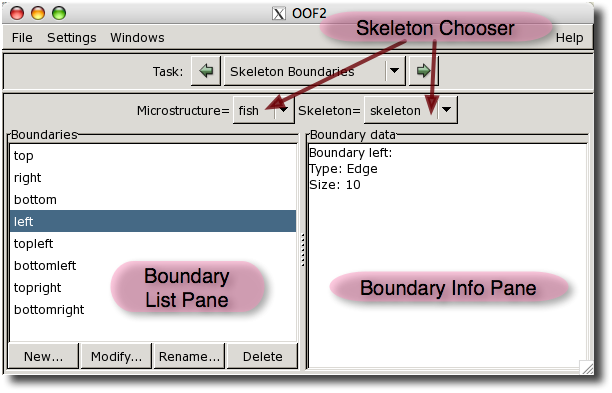
Clicking on the name of an interface in the Interfaces pane on the left column of the page selects that interface and displays information about it in the Interface details pane on the right column.
The five buttons below the list manipulate interfaces:
-
The button defines a new interface given a pixel group, a material, pairs of pixel groups, or pairs of materials. The name of the interface will always be unique from any name in the list of skeleton boundaries in the same
Microstructure. The addition of a new interface causes theMeshto be rebuilt. -
The button deletes the currently selected interface from the
Microstructure. The removal of an interface causes theMeshto be rebuilt. -
The button assigns an interface material to the interface. When a
Meshgets created for theMicrostructure, the material becomes associated with the edgeElementsthat belong to the interface. -
The button removes or unassigns any interface material from the interface.
|
|
 |
|
| 3.6. Materials |  |
3.8. Skeleton |